Newly added column in existing form not showing when in "Edit" mode but can be seen in "View" mode - InfoPath Dev
in

InfoPath Dev

Newly added column in existing form not showing when in "Edit" mode but can be seen in "View" mode

Last post 07-28-2016 07:51 AM by Hilary Stoupa. 5 replies.
Page 1 of 1 (6 items)
Sort Posts: Previous Next
  • 07-26-2016 07:29 PM

    • Alice Teh
    • Not Ranked
      Female
    • Joined on 07-26-2016
    • Singapore
    • Posts 3

    Newly added column in existing form not showing when in "Edit" mode but can be seen in "View" mode

    Hi all,

    I hope someone would be able to help me demystify this. I recently added a new column to a SharePoint form using InfoPath. The column can be seen in "View" mode but when I click on "Edit Item" the column is not visible. Can anyone help me understand what is going on? Thanks!

    Warm regards,
    Alice Teh
  • 07-27-2016 08:12 AM In reply to

    Re: Newly added column in existing form not showing when in "Edit" mode but can be seen in "View" mode

    Hi - can you try attaching your screenshots under the Options tab in a reply? They don't show. :) You may need to add the field in the edit view if this is a SharePoint list form that was customized in InfoPath.
    Hilary Stoupa

  • 07-27-2016 09:19 AM In reply to

    • Alice Teh
    • Not Ranked
      Female
    • Joined on 07-26-2016
    • Singapore
    • Posts 3

    Re: Newly added column in existing form not showing when in "Edit" mode but can be seen in "View" mode

     Hi Hilary,


    Thank you for your reply! :) I'm using another laptop at this moment so I can't attach the screenshots now. It is indeed a SharePoint list form that was customized in InfoPath. How do I add the affected field in the edit view?

    Warm regards,
    Alice Teh
  • 07-27-2016 03:48 PM In reply to

    Re: Newly added column in existing form not showing when in "Edit" mode but can be seen in "View" mode

    You'll need to edit the form in InfoPath (you should be able to open it from the library in InfoPath) and then you can see all the fields in the task pane & just drag the field onto the form. :)
    Hilary Stoupa

  • 07-27-2016 06:28 PM In reply to

    • Alice Teh
    • Not Ranked
      Female
    • Joined on 07-26-2016
    • Singapore
    • Posts 3

    Re: Newly added column in existing form not showing when in "Edit" mode but can be seen in "View" mode

     Hi Hilary,


    I've already done that in InfoPath :) and the new column/field is showing in the SharePoint form, but the problem is that the change seems to be only visible when the entry is viewed but when I click to edit the form (in SP), the new column is not visible. I've attempted to attach the screenshots here so hopefully this time it's showing in this post. Thanks again for your awesome help!
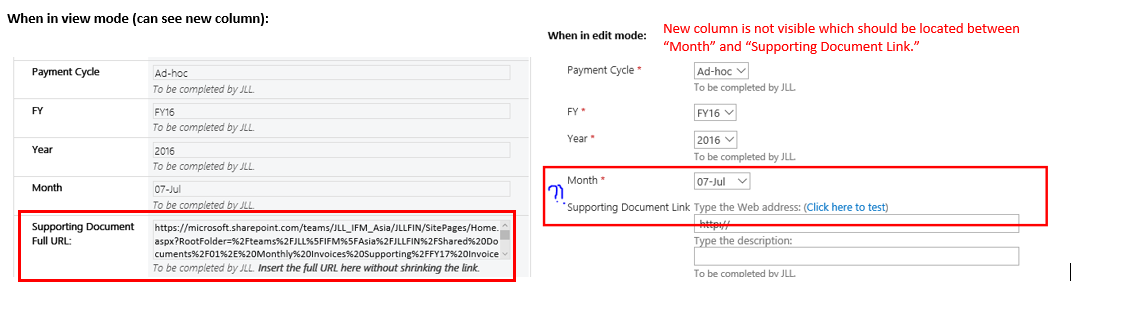

    Warm regards,
    Alice Teh
  • 07-28-2016 07:51 AM In reply to

    Re: Newly added column in existing form not showing when in "Edit" mode but can be seen in "View" mode

    So - I'm going to be a pain and ask for your form, please. :) Can you attach a copy to a reply?
    Hilary Stoupa

Page 1 of 1 (6 items)
Copyright © 2003-2019 Qdabra Software. All rights reserved.
View our Terms of Use.