Repeating table and the calculated value - InfoPath Dev
in

InfoPath Dev

Repeating table and the calculated value

Last post 02-04-2016 10:02 AM by v_dha. 8 replies.
Page 1 of 1 (9 items)
Sort Posts: Previous Next
  • 02-03-2016 12:00 PM

    • v_dha
    • Not Ranked
    • Joined on 08-31-2015
    • Posts 15

    Repeating table and the calculated value

     Hello Experts

    In a Infopath form I am using a repeating table which has the people picker inside to enter the list of employees in to the form. enter image description here

    I need to promote the list of employees entered in to the Entrants of form, so that when the form is filled out email is sent to them.

    When I directly promote the people picker inside the repeating table it shows like

    enter image description here

    I am assuming only the first name will be promoted. How can I promote all the people entered in the form. I am a newbie and struggling with this. Any help is greatly appreciated.

    Thanks

    Filed under:
  • 02-04-2016 07:41 AM In reply to

    Re: Repeating table and the calculated value

    When you promote a repeating field, you have options - you can select merge.
    Hilary Stoupa

  • 02-04-2016 07:43 AM In reply to

    • v_dha
    • Not Ranked
    • Joined on 08-31-2015
    • Posts 15

    Re: Repeating table and the calculated value

    Thanks Hilary. How about the calculated field.How can I get all the names from the repeating table, in to print view page

  • 02-04-2016 07:47 AM In reply to

    Re: Repeating table and the calculated value

    Use a double eval: https://blogs.msdn.microsoft.com/infopath/2006/04/05/email-submit-to-line-loops-in-formulas/
    Hilary Stoupa

  • 02-04-2016 08:04 AM In reply to

    • v_dha
    • Not Ranked
    • Joined on 08-31-2015
    • Posts 15

    Re: Repeating table and the calculated value

     Hilary,

     I tried

    eval(eval(Person,'concat(DisplayName, ",")'), “..")

     But I am getting error 

    Unexpected character.
    eval(eval(../my:PermitEntrantList/my:PermitEntrants/my:PermitEntrant/pc:Person,'concat(../my:PermitEntrantList/my:PermitEntrants/my:PermitEntrant/pc:Person/pc:DisplayName, ",")'), -->“<--..")

  • 02-04-2016 08:43 AM In reply to

    Re: Repeating table and the calculated value

    See where the two arrows are pointing to the "smart" quote? replace it with a normal double quote. You want ".."
    Hilary Stoupa

  • 02-04-2016 09:10 AM In reply to

    • v_dha
    • Not Ranked
    • Joined on 08-31-2015
    • Posts 15

    Re: Repeating table and the calculated value

     Hilary,

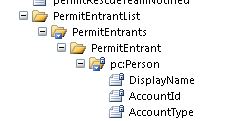
    Thats awesome. I couldn't find the difference in quote. But still experiencing problem, below is the Repeating table field with the People picker


    So if i use now I am using the formula as

    eval(eval(Person, 'concat(my:DisplayName, ",")'), "..")

    The error I am getting is

     "../my:PermitEntrantList/my:PermitEntrants/my:PermitEntrant/pc:Person/my:DisplayName" does not point to a valid location path of a field or group.

     Your help is  very greatly appreciated.

  • 02-04-2016 09:16 AM In reply to

    Re: Repeating table and the calculated value

    I think the namespace prefix for display name is pc. Use pc:DisplayName instead of my:DisplayName.
    Hilary Stoupa

  • 02-04-2016 10:02 AM In reply to

    • v_dha
    • Not Ranked
    • Joined on 08-31-2015
    • Posts 15

    Re: Repeating table and the calculated value

     Awesome. Thanks Hilary.

Page 1 of 1 (9 items)
Copyright © 2003-2019 Qdabra Software. All rights reserved.
View our Terms of Use.