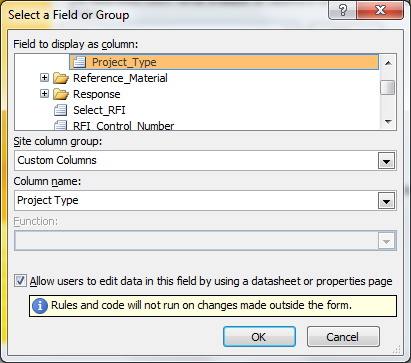
I'm having trouble making admin-approved browser form use a new site column I created for it in "Custom Columns" group of site columns. Instead of using it, the form creates a duplicate column in "Microsoft InfoPath" group (with internal name derived from a guid) after I publish it.
Here is what I did as a whole. I created a site column named "Project Type". Then I added it to the site content type used in the form library, which is listed under "Microsoft InfoPath" group. I selected "Yes" for updating inherited content types, which added the column to the form library (list) content type. Then, I published the form by promoting the field and selecting "Custom Columns" for Site column group, and selecting the site column in Column name, like in attached picture. I checked "Allow users to edit data in this field..." option too.
Does anyone know what I'm doing wrong or how to actually make the form use custom site columns?