Dropdown with Headers - OptGroup Function? - InfoPath Dev Sign in | Join | Help in General InfoPath (Entire Site) InfoPath Dev InfoPath Dev is dedicated to bringing you the information and tools you need to be successful in your Microsoft Office InfoPath development projects. Home Blogs Forums Photos Downloads InfoPath Dev » InfoPath » General » Dropdown with Headers - OptGroup Function? Dropdown with Headers - OptGroup Function? Last post 11-24-2015 10:51 AM by Hilary Stoupa. 18 replies. Page 1 of 2 (19 items) 1 2 Next > Sort Posts: Oldest to newest Newest to oldest Previous Next 11-17-2015 04:14 PM sovietbiker Joined on 06-04-2015 Posts 10 Dropdown with Headers - OptGroup Function? Reply Contact Hi there. Is it possible to do a drop down list that has headers? Can I use what seems to be an OptGroup Function? Example: Fruit - Apple Orange Banana Vegetable - Broccoli Eggplant Protein - Steak Chicken I don't want to be able to select Fruit, Vegetable, Protein. Just those that are under it. PS. Sorry I don't know how to do formatting on this thing. Thanks! 11-17-2015 07:36 PM In reply to sovietbiker Joined on 06-04-2015 Posts 10 Re: Dropdown with Headers Mark as Not AnswerMark as Answer... Reply Contact The following link is an example of what I am looking to do in InfoPath. I am looking to do an optgroup function. http://www.w3schools.com/tags/tryit.asp?filename=tryhtml_optgroup 11-18-2015 07:35 AM In reply to Hilary Stoupa Joined on 06-20-2008 Posts 13,297 Re: Dropdown with Headers Mark as Not AnswerMark as Answer... Reply Contact Interesting. InfoPath doesn't do this out of the box. I don't know if you would be able to customize the view XSL to do this, but it could be worth a try - you can save your form as source files (from the Publish menu) and then modify the XSL. Right click manifest.xsf in the source files and select Design to open back up in design mode. Hilary Stoupa 11-18-2015 07:40 AM In reply to Hilary Stoupa Joined on 06-20-2008 Posts 13,297 Re: Dropdown with Headers Form1.xsn Mark as Not AnswerMark as Answer... Reply Contact I was curious so I tried it. See attached (save the file locally, right click and select design to open in design mode, then preview). Hilary Stoupa 11-18-2015 07:46 AM In reply to Hilary Stoupa Joined on 06-20-2008 Posts 13,297 Re: Dropdown with Headers scrn.png Mark as Not AnswerMark as Answer... Reply Contact One more thing - I was still curious, so I tested in the browser. I'm attaching a screenshot - in IE, Chrome & MS Edge browsers, the optgroup did not display correctly. But it worked in preview & filler, so it depends how you'll be using the form. Hilary Stoupa 11-18-2015 03:31 PM In reply to sovietbiker Joined on 06-04-2015 Posts 10 Re: Dropdown with Headers Mark as Not AnswerMark as Answer... Reply Contact Wow! Very Cool! I wonder how you would do this if you're populating the drop down from a SharePoint list? Thanks for the help! jason 11-18-2015 03:34 PM In reply to Hilary Stoupa Joined on 06-20-2008 Posts 13,297 Re: Dropdown with Headers Mark as Not AnswerMark as Answer... Reply Contact How would you know what options from the SharePoint list had what option group? Would it be another column in the list? You'll be using this form in InfoPath filler? Hilary Stoupa 11-18-2015 03:47 PM In reply to sovietbiker Joined on 06-04-2015 Posts 10 Re: Dropdown with Headers table.PNG Mark as Not AnswerMark as Answer... Reply Contact Yes, I would make a SharePoint list with a header column and subheader column. I believe could go back to the form to only use the infopath filler as we have an enterprise microsoft license throughout the company. 11-18-2015 04:34 PM In reply to Hilary Stoupa Joined on 06-20-2008 Posts 13,297 Re: Dropdown with Headers scrn.png Mark as Not AnswerMark as Answer... Reply Contact Okay - here's a screenshot of my form and list. I got this to work in Filler. My "header" column is named "Target Library". My value column is title. I'll post again w/ my sample (which, of course, won't preview for you because you don't have access to my SharePoint site, but you can look at the secondary data source schema and at my XSLT). Hilary Stoupa 11-18-2015 04:35 PM In reply to Hilary Stoupa Joined on 06-20-2008 Posts 13,297 Re: Dropdown with Headers Form3.xsn Mark as Not AnswerMark as Answer... Reply Contact Here is my sample form. Hilary Stoupa 11-18-2015 04:39 PM In reply to Hilary Stoupa Joined on 06-20-2008 Posts 13,297 Re: Dropdown with Headers Mark as Not AnswerMark as Answer... Reply Contact P.S. > Thanks for the fun challenge! :) Hilary Stoupa 11-18-2015 04:45 PM In reply to sovietbiker Joined on 06-04-2015 Posts 10 Re: Dropdown with Headers Mark as Not AnswerMark as Answer... Reply Contact You are amazing!!!!! 11-23-2015 04:41 PM In reply to sovietbiker Joined on 06-04-2015 Posts 10 Re: Dropdown with Headers codePM.png Mark as Not AnswerMark as Answer... Reply Contact It doesn't seem to want to group the drop downs. It adds a header over each selection instead of grouping them and adding a header. Following the same code. 11-23-2015 04:56 PM In reply to Hilary Stoupa Joined on 06-20-2008 Posts 13,297 Re: Dropdown with Headers Mark as Not AnswerMark as Answer... Reply Contact Can I take a peek at your form? attach it under the Options tab... it may be tomorrow before I have a chance to look tho. Hilary Stoupa 11-23-2015 04:58 PM In reply to Hilary Stoupa Joined on 06-20-2008 Posts 13,297 Re: Dropdown with Headers Mark as Not AnswerMark as Answer... Reply Contact Oh! I see the issue, I think. You have a casing issue. You sometimes have it cased "iuji" and other times "Iuji". Which is it in the data source? Hilary Stoupa Page 1 of 2 (19 items) 1 2 Next > Copyright © 2003-2019 Qdabra Software. All rights reserved.View our Terms of Use.
I was curious so I tried it. See attached (save the file locally, right click and select design to open in design mode, then preview).
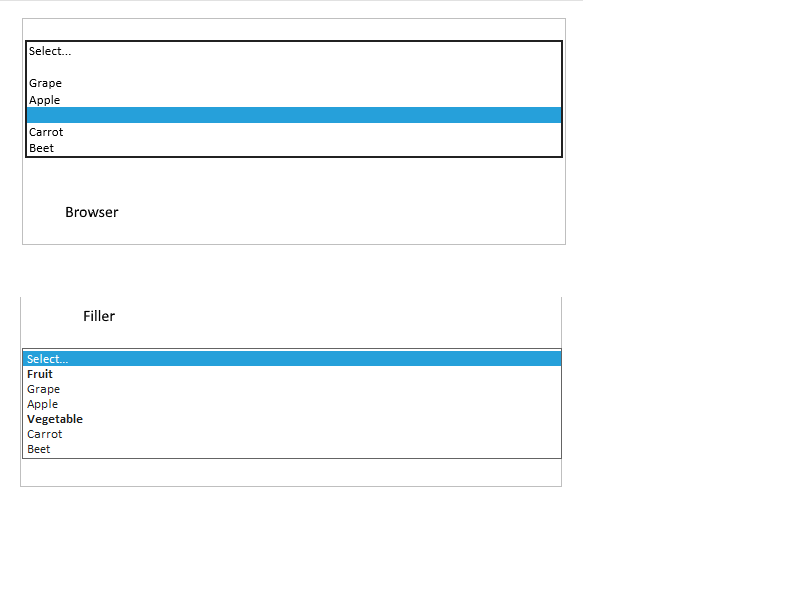
One more thing - I was still curious, so I tested in the browser. I'm attaching a screenshot - in IE, Chrome & MS Edge browsers, the optgroup did not display correctly. But it worked in preview & filler, so it depends how you'll be using the form.
Okay - here's a screenshot of my form and list. I got this to work in Filler. My "header" column is named "Target Library". My value column is title. I'll post again w/ my sample (which, of course, won't preview for you because you don't have access to my SharePoint site, but you can look at the secondary data source schema and at my XSLT).
Here is my sample form.