Attachment url from Secondary Source - Possible to display an alias? - InfoPath Dev
in

InfoPath Dev

Attachment url from Secondary Source - Possible to display an alias?

Last post 07-09-2018 11:16 PM by Swathi Rao. 12 replies.
Page 1 of 1 (13 items)
Sort Posts: Previous Next
  • 11-16-2015 11:43 AM

    Attachment url from Secondary Source - Possible to display an alias?

    Hi, I have a browser enabled form that needs to display hyperlinks to attachments in a SharePoint list. There will potentially be more than one attachment. I have a repeating table & hyperlink bound to the attachmentURL field (in Attachments folder from the secondary souce).  Currently, the entire path of each attachment displays (and is cut off due to size limitations of the form). See screenshot attached. Is there any way to display the hyperlinks as aliases (like with the file name but not entire path) or something else that doesn't take up so much real estate (and look this ugly) on the form?

     I am using InfoPath/SharePoint 2010, qRules 6.1. 


  • 11-16-2015 12:03 PM In reply to

    Re: Attachment url from Secondary Source - Possible to display an alias?

    I have be able to figure out a how to get the path shortened to just the pieces that change (list item id / file name). It's still not pretty, but a step closer. Anyone have any other ideas?

     Attaching another screenshot.


  • 11-16-2015 05:09 PM In reply to

    Re: Attachment url from Secondary Source - Possible to display an alias?

    This is just a hyperlink in an InfoPath form? Go to Insert > Hyperlink and you can select one field in the data source for the link and another for the display.
    Hilary Stoupa

  • 11-17-2015 05:48 AM In reply to

    Re: Attachment url from Secondary Source - Possible to display an alias?

     I did that, and have "substring-after(., "Attachments")" as the data source for the display (the full path is http://enet/New Product Development/Lists/Lab Test Request Summary/Attachments/List Item ID/File Name)  so Attachments is the last consistent thing I can "hard code". Is there a way to also get rid of the listitem id, and only have the file name?


    thanks! 

  • 11-17-2015 07:35 AM In reply to

    Re: Attachment url from Secondary Source - Possible to display an alias?

    Any chance I can see your form? Under the Options tab you can attach a file.
    Hilary Stoupa

  • 11-17-2015 07:58 AM In reply to

    Re: Attachment url from Secondary Source - Possible to display an alias?

     Sure, here you go. Thanks!

  • 11-17-2015 09:29 AM In reply to

    Re: Attachment url from Secondary Source - Possible to display an alias?

     Oh! now I see the issue. I hadn't understood that these links are from attachments to a list item (so we have multiple URLs per item). You could try: substring-after(substring-after(., "Attachments/") , "/")

    Then your substring-after returns ListID/FileName.ext and the outer substring-after gets everything after the "/". 

    Hilary Stoupa

  • 11-17-2015 01:25 PM In reply to

    Re: Attachment url from Secondary Source - Possible to display an alias?

    This worked perfectly! Thanks Hilary! 

  • 11-19-2015 07:31 AM In reply to

    Re: Attachment url from Secondary Source - Possible to display an alias?

    When the form was published to the browser, the "display value" of the hyperlink didn't show, there was white space that was the appropriate size (it grew according to the number of attachments), but the display was blank. I went back and just dropped it in without a display (so the full url showed) and it was visible. Do browser forms not do will with hyperlinks when there is a display value?

    The other side of it, the full url did not have the %20's in the path for the spaces, so even the non-display links didn't work. I know you can do a qrules command:concat("Encode /text=", attachmentURL) then show the results, to get those in there (Hilary helped me on a previous post on a single link a while back), but I couldn't figure out how to do it with the link being repeated from the secondary source. Would love to know how if you have the time :)

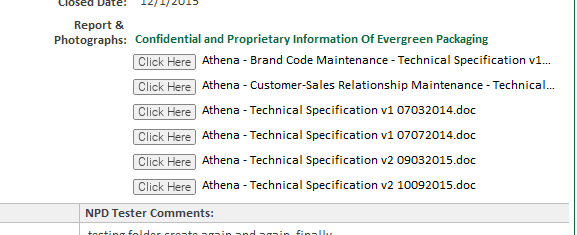
    However, I found a work around... I made a button looking image and put it in with binding to the hyperlink. So, they can click the button to open the attachment. I put the substring formula that we tried on the display for the link, into a calculated value box to show the filename....see screenshot. It all works fine in the browser.


  • 01-08-2016 11:54 AM In reply to

    Re: Attachment url from Secondary Source - Possible to display an alias?

    Thank you GwenW!

    I was banging my head over the lack of URLEncode on the secondary list attachments hyperlinks (i.e. spaces vs '%20'). Your finding that binding an image hyperlink property gives a properly encoded URL gave me a push in the right direction.

    InfoPath is so annoying!!! Bind one type of control and you get one result, bind another type and something else happens!

    Anyway, I got exactly what I was after and made it look exactly like the attachment hyperlinks you would get from the main list form connection:

    1. Create a standard label (i.e. just type some text in an area of form outside of a repeating section)
    2. Select the text, right click and edit hyperlink (anything will do, just to give it a hyperlink)
    3. Copy the label with the hyperlink and paste it into the repeating section (note, you can't just create the label straight in the repeating section and add a hyperlink directly to it - this is InfoPath after all...)
    4. Right click, edit hyperlink again
    5. Set the link data source to the . binding for the attachment of the secondary data source of the repeating section
    6. Set the display data source to Hilary's substring-after(substring-after(., "Attachments/"), "/")
    7. Voila - proper working text-based hyperlinks to the attachments of the secondary list!

    Thank you so much Gwen and Hilary. I hope this update comes in useful to other poor InfoPath victims.

    Ed

  • 07-03-2018 03:11 AM In reply to

    Re: Attachment url from Secondary Source - Possible to display an alias?

    Hi, I'm also facing the same issue on the secondary list attachment. But I'm stuck with the 5th step mentioned above. Please advise.
  • 07-09-2018 08:29 AM In reply to

    Re: Attachment url from Secondary Source - Possible to display an alias?

    Can you tell us what the issue is that you are having? You can attach a screenshot under the options tab in a reply if that helps.
    Hilary Stoupa

  • 07-09-2018 11:16 PM In reply to

    Re: Attachment url from Secondary Source - Possible to display an alias?

    Hi Hilary, I have “Attachments” field in the browser enabled InfoPath form (Main form). But when I attach more than one files (File name and List name have spaces), the link in the second form (Secondary source) displays as hyperlink (which doesn't contain %20 for spaces), and doesn't open when clicked. I tried the solutions mentioned in this forum. 1. Created a button looking image in the repeating section and put it with binding to the hyperlink (when clicked it opens the attachment). But when I attach more than one file the link shows as one single link instead of two and won't open. 2. Created a calculated value box in more repeating section beside the button image and put the substring-after(substring-after(.,"Attachments/"),"/") formula. Then I’m unable to publish the form. Please guide me if I'm wrong in any of these steps or please let me know if there are any other solutions.
Page 1 of 1 (13 items)
Copyright © 2003-2019 Qdabra Software. All rights reserved.
View our Terms of Use.