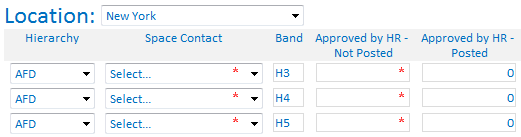
Hello,
I have a repeating table where I want to calculate a sum, based on a few criteria. In the image I have uploaded, the user selects the Location, and then populates a financial Hierarchy and Band (job level). Based on those criteria, I have a formula as the default value that queries a SharePoint list of HR data, matches the variables the user has populated in each line of the repeating table to the data and outputs a sum. I have this working but as I add rows descending, I find that the formula outputs the same sum regardless of the difference in variables on each row of the repeating table. I understand I need to somehow incorporate CURRENT into my formula but I can not!
The formula is currently populated as:
sum(xdXDocument:GetDOM("Staffing Report")/dfs:myFields/dfs:dataFields/d:SharePointListItem_RW/d:Opens[../d:Band_x0020_ = xdXDocument:get-DOM()/my:myFields/my:Group/my:RepeatingFields/my:Band and ../d:Work_x0020_City = xdXDocument:get-DOM()/my:myFields/my:LocationDropdown and ../d:_x0033__x002d_Dot_x0020_Hierarch = xdXDocument:get-DOM()/my:myFields/my:Group/my:RepeatingFields/my:Hierarchy])
Where can I incorporate 'current()/' so that the sum is calculated properly for each row?
Thank you!