Rule issue (ID field wont populate where I'm mapping to) - InfoPath Dev
in

InfoPath Dev

Rule issue (ID field wont populate where I'm mapping to)

Last post 06-26-2015 03:30 PM by spassler. 4 replies.
Page 1 of 1 (5 items)
Sort Posts: Previous Next
  • 06-26-2015 09:57 AM

    Rule issue (ID field wont populate where I'm mapping to)

    Was wondering if i could get another set of eyes to maybe see what i cant figure out. Trying to get my REQNumber field to populate with the ID number once it query s the data for the form library but I'm coming up with an empty field... Attached is my form.
  • 06-26-2015 02:26 PM In reply to

    Re: Rule issue (ID field wont populate where I'm mapping to)

     Drag the entire data source for the form library query onto the form so you can see it (data and query fields). Disable the last three rules on your submit button, so the only rules that run are the ones that submit the form and query for the form. Does your query return any results?

    Hilary Stoupa

  • 06-26-2015 02:36 PM In reply to

    Re: Rule issue (ID field wont populate where I'm mapping to)

    When I do that no fields show up?? see screenshot. The Query fields show up when i drag them... but not the data fields... but query returns zero results.
  • 06-26-2015 03:20 PM In reply to

    Re: Rule issue (ID field wont populate where I'm mapping to)

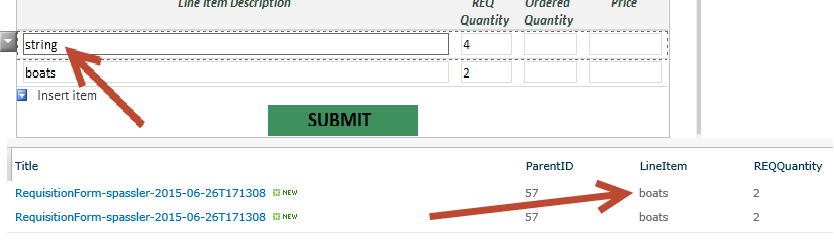
    Hilary, I figured it out... Oddly enough if i moved the Query above the form name rule it populates everythign fine and still submits 1 form so were all good there! Maybe you can give some insight on why when i submit the form then if i go back in and change quantity from 1 to 4 on line one (strings) when i submit it again it changes it to the last field? see screenshot...
  • 06-26-2015 03:30 PM In reply to

    Re: Rule issue (ID field wont populate where I'm mapping to)

    Doh, scratch that just noticed the it only pulled the ID of the form that was at the top of the list. so that didn't work... :( will continue to tinker
Page 1 of 1 (5 items)
Copyright © 2003-2019 Qdabra Software. All rights reserved.
View our Terms of Use.