Retrieving Multiple Values from SP Lookup - InfoPath Dev
in

InfoPath Dev

Retrieving Multiple Values from SP Lookup

Last post 06-09-2015 08:42 AM by klink. 17 replies.
Page 1 of 2 (18 items) 1 2 Next >
Sort Posts: Previous Next
  • 06-04-2015 05:41 AM

    • klink
    • Top 100 Contributor
    • Joined on 09-15-2014
    • Posts 99

    Retrieving Multiple Values from SP Lookup

    I glommed onto an old post, but no one answered so I thought I would write a new one instead!  =)  The original post was http://www.infopathdev.com/forums/p/23208/102695.aspx#102695.  It was exactly what I was looking for! =) But, I am unclear of what to do when querying for the data and filling the multiselect field. ='(

    What I have:

    InfoPath 2010
    qRules 7.1

    SP List with lookup for ICP Numbers. Secondary source has:

    ICP Num
        :Value

    I created a multi-selection list box in my form.

    ObjICPNums
        ObjICPNum

    Currently, after query, I am setting ObjICPNum to :Value (which, of course, is wrong). It does check the correct first item, but only one item.

    I obviously could use a little help...

    Thanks in advance!!!!

  • 06-04-2015 07:31 AM In reply to

    Re: Retrieving Multiple Values from SP Lookup

     You could use copy table to copy all instances of value to ObjICPNum - perhaps try that?

    Hilary Stoupa

  • 06-04-2015 12:25 PM In reply to

    • klink
    • Top 100 Contributor
    • Joined on 09-15-2014
    • Posts 99

    Re: Retrieving Multiple Values from SP Lookup

    Is there by any chance an example somewhere I could look at?  I have never used copytable...  =(

    THANKS!

  • 06-04-2015 12:32 PM In reply to

    Re: Retrieving Multiple Values from SP Lookup

     Well, you could look at the sample form that installs w/ qRules? It is in the forms folder - the default path is:

     C:\Program Files (x86)\Qdabra Software\Qdabra Rules Library\Forms\Installable Forms\qRulesForm.xsn

    or

    C:\Program Files\Qdabra Software\Qdabra Rules Library\Forms\Installable Forms\qRulesForm.xsn 

    Hilary Stoupa

  • 06-04-2015 02:04 PM In reply to

    • klink
    • Top 100 Contributor
    • Joined on 09-15-2014
    • Posts 99

    Re: Retrieving Multiple Values from SP Lookup

    Well, I'm pretty embarrassed.  I never looked at that form before!  Pretty impressive!  =)  I THINK I get it, but it is not finding the source table.  I'm presuming because it is from a secondary data source and I am not identifying it correctly.  =/  I'll see if I can find an answer tomorrow, but if you happen to know what I am missing, let me know!

    Here's what I have:

    concat("CopyTable /tablesrc=/dfs:myFields/dfs:dataFields/d:SharePointListItem_RW /rowsrc=d:ICPNum /tabledest=/my:myFields/my:Objectives/my:ObjectiveDetail /rowdest=my:ObjICPNums /empty=", Empty)

    THANKS!

  • 06-04-2015 02:11 PM In reply to

    Re: Retrieving Multiple Values from SP Lookup

     You can check the command overview for syntax when one item is in a secondary data source. The parameter is dsnamesrc if it is the source table.

    Hilary Stoupa

  • 06-05-2015 07:36 AM In reply to

    • klink
    • Top 100 Contributor
    • Joined on 09-15-2014
    • Posts 99

    Re: Retrieving Multiple Values from SP Lookup

    Grrr...I'm getting this error:

    The table row of the source and destination must contain the same number of elements and attributes. The table row of the source and destination must contain the same number of elements and attributes. Source element count: 2. Destination element count: 1. Source element name list: Value, Value. Destination element name list: my:ObjICPNum.

    The multi-selection list box is from a SharePoint list.  Not sure if that's a factor.

    If this doesn't work, is there a way to concatenate values from datasource into a field and then somehow loop through that field and populate the checkboxes?  (Note:  Grasping here!)

  • 06-05-2015 08:25 AM In reply to

    Re: Retrieving Multiple Values from SP Lookup

     You can just use insert and a rule on the repeating main data source row to set the value. See attached sample. I don't know if you are using a browser forms or not, but you may need to test this in the browser to verify there aren't any problems there. The insert rule is on the QdabraRules finishedLoading node. :)

    Oh - and the sample has a trial of qRules injected - the trial expires 9/15/2015 

    Hilary Stoupa

  • 06-05-2015 12:39 PM In reply to

    • klink
    • Top 100 Contributor
    • Joined on 09-15-2014
    • Posts 99

    Re: Retrieving Multiple Values from SP Lookup

    Hmmm.  This isn't quite what I had in mind.  I still need all of the selections visible, but want to check the ones that are coming in from the SharePoint list.  See attached...


  • 06-05-2015 12:45 PM In reply to

    Re: Retrieving Multiple Values from SP Lookup

     Sorry, I don't understand. What does "need all of the selections visible" mean? What provides the data source for your multiselect?

    Hilary Stoupa

  • 06-05-2015 12:46 PM In reply to

    Re: Retrieving Multiple Values from SP Lookup

    Sorry, I get it now - but you'll only have in "values" from SharePoint the ones that have been selected, right?

    Hilary Stoupa

  • 06-05-2015 12:52 PM In reply to

    • klink
    • Top 100 Contributor
    • Joined on 09-15-2014
    • Posts 99

    Re: Retrieving Multiple Values from SP Lookup

    That is correct!
  • 06-05-2015 02:52 PM In reply to

    Re: Retrieving Multiple Values from SP Lookup

     I apologize, I still don't understand what you are asking.

    The technique I showed in the sample could be used to copy your "Value" nodes from your secondary data source into the repeating field in your main data source. 

    What is your multi-select using for its options? I'm assuming it has the same options as your SharePoint list? 

    Hilary Stoupa

  • 06-09-2015 06:00 AM In reply to

    • klink
    • Top 100 Contributor
    • Joined on 09-15-2014
    • Posts 99

    Re: Retrieving Multiple Values from SP Lookup

    Sorry, I'll try to explain more better!  =)

    This form will be used to add and/or change an Objective (which includes the ICP#, the multi-choice field).  The secondary data source for both the Objective and the ICP# are SharePoint lists. 

    From the technique you showed in your example, it looks like when I copy the "Value" nodes in from the secondary data source of the "Objective" , the form will only show the ICP#s that the user picked when they added.  But I need to also show the ones they didn't pick.

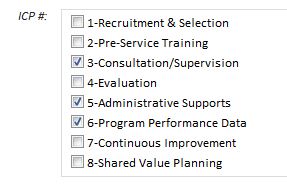
    See example.  The user first picked #3, 5 and 6 and saved (let's call what they saved Objective 1).  If they come back into the form and pick Objective 1 to make changes.  I want the ones they checked to still be checked, but also the ones they didn't check to still be there in case they want to check another one.  Clear as mud??

  • 06-09-2015 07:37 AM In reply to

    Re: Retrieving Multiple Values from SP Lookup

     The ones that have not been checked should show based on your multi select being set to use the same list of options as your SharePoint list. What is your multi select using for options? Another SharePoint list? Are they hard coded?

    Hilary Stoupa

Page 1 of 2 (18 items) 1 2 Next >
Copyright © 2003-2019 Qdabra Software. All rights reserved.
View our Terms of Use.