View some of Formualire following the user choice - InfoPath Dev
in

InfoPath Dev

View some of Formualire following the user choice

Last post 04-27-2015 01:55 AM by Mel Clemente. 1 replies.
Page 1 of 1 (2 items)
Sort Posts: Previous Next
  • 04-20-2015 04:25 AM

    View some of Formualire following the user choice

    Hello all !

    I'm new with infopath and i have some trouble to do my work.

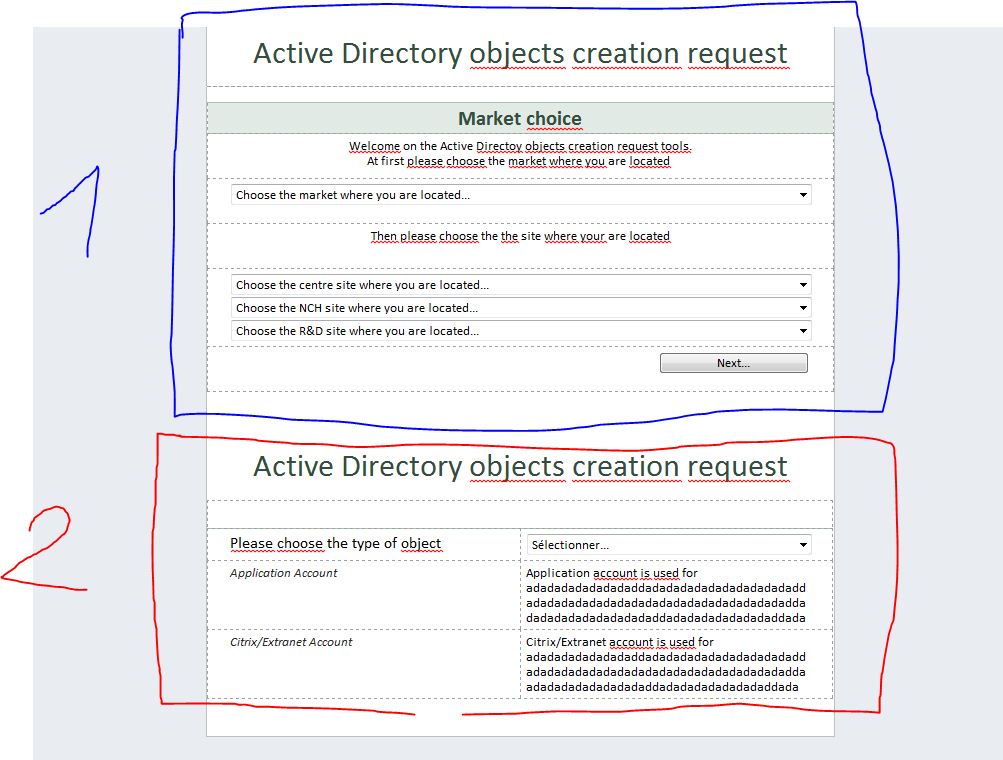
    There is my form in attachments.

    I would like to view the part "2" only after user choice in part "1" and after click on the next button..

    Please could you help me ?

    Thank you


  • 04-27-2015 01:55 AM In reply to

    Re: View some of Formualire following the user choice

    Hi,

    You can achieve this either by using sections that has formatting to hide/show based on certain conditions, or by using views. I think that in your case, it will be easier for you to use views. Please follow these steps:

    1. Create a new view (Page Design > New View)
    2. Add your Part 2 contents in this view. Delete them from the first view.
    3. Add a conditional formatting to your Part 1 Next button so that it is disabled until all the Part 1 fields have been filled out. (Home > Manage Rules > New > Formatting. Example condition: If dropdown1 is blank or dropdown2 is blank, then disable this control).
    4. Add a rule in your Next button to switch to the second view on click (Rule taskpane > New > Action > Add > Switch views.

    Hope that helps!

    Mel Clemente
    Qdabra® Software/ InfoPathDev.com
    The InfoPath Experts – Streamline data gathering to turn process into knowledge.™

Page 1 of 1 (2 items)
Copyright © 2003-2019 Qdabra Software. All rights reserved.
View our Terms of Use.