How can i open migrated Info Path form in Web Browser. - InfoPath Dev
in

InfoPath Dev

How can i open migrated Info Path form in Web Browser.

Last post 03-13-2015 08:25 AM by Bre Huston. 1 replies.
Page 1 of 1 (2 items)
Sort Posts: Previous Next
  • 02-27-2015 03:38 AM

    How can i open migrated Info Path form in Web Browser.

    Hi,
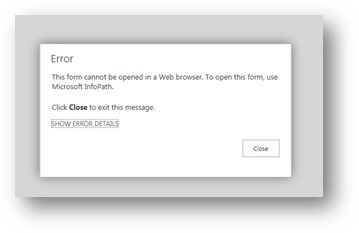
    I have a query, I have migrated Info Path form from SharePoint 2007 to SharePoint online (Office 365) site. But when I open Info Path form in Web Browsers its getting error.
     I already click on Check box of Allow users to browser-enable form templates and Render form templates that are browser-enabled by users in SharePoint admin center of Office 365.
    Can anyone please suggested me, how can i open migrated Info Path form in Web Browser.
    Click Here for More Detail Click Here

    Thanks
    Akash Anand
  • 03-13-2015 08:25 AM In reply to

    Re: How can i open migrated Info Path form in Web Browser.

    Hello Akash,

    Did you re-publish the form to the site? I would suggest opening the form in the designer, and running design checker to check for errors in the form. Also you will want to upgrade your form template to 2010 or 2013 and republish to your location. If you have existing xml that you move over, you will need to relink them to the template using the relink view in SharePoint.

    Hope that helps!
    Bre

Page 1 of 1 (2 items)
Copyright © 2003-2019 Qdabra Software. All rights reserved.
View our Terms of Use.