Dropdown Selection Rule - InfoPath Dev
in

InfoPath Dev

Dropdown Selection Rule

Last post 01-05-2015 01:16 PM by CDNgo. 9 replies.
Page 1 of 1 (10 items)
Sort Posts: Previous Next
  • 01-05-2015 11:25 AM

    • CDNgo
    • Not Ranked
    • Joined on 01-05-2015
    • Posts 10

    Dropdown Selection Rule

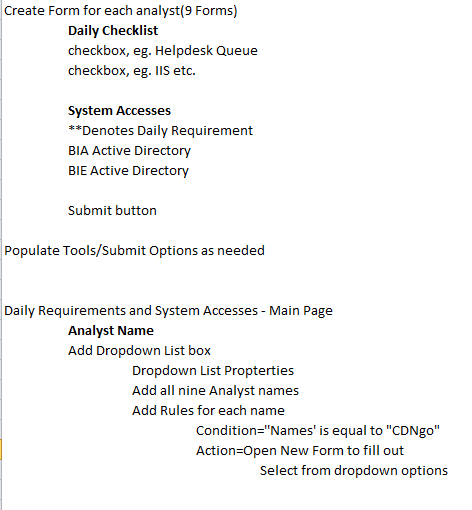
    Hello. I'm an InfoPath newbie, of course, and I'd like to know how to link a dropdown selection to a new form that is submittable. I was able to create and test, as such, on my InfoPath 2007 at home. But unable to do so in InfoPath 2010 at my workplace. Below, are the notes I made for myself. Again, I was successful doing this in 2007, but not in 2010. Create Form for each analyst(9 Forms) Daily Checklist checkbox, eg. Helpdesk Queue checkbox, eg. IIS etc. System Accesses **Denotes Daily Requirement BIA Active Directory BIE Active Directory Submit button Populate Tools/Submit Options as needed Daily Requirements and System Accesses - Main Page Analyst Name Add Dropdown List box Dropdown List Propterties Add all nine Analyst names Add Rules for each name Condition=''Names' is equal to "CDNgo" Action=Open New Form to fill out Select from dropdown options Essentially, I have user names in the dropdown list. When they select their name, I'd like for it to then default to their defined 'checklist' page. Once this is created, I'll publish to my team's page on Sharepoint. Thank you very much! CDN
  • 01-05-2015 11:28 AM In reply to

    • CDNgo
    • Not Ranked
    • Joined on 01-05-2015
    • Posts 10

    Re: Dropdown Selection Rule

    Because the steps I posted did not remain formatted for easy reading, I attached them as a .png Sorry about that.
  • 01-05-2015 11:40 AM In reply to

    Re: Dropdown Selection Rule

    Hi - I guess to start with, it would be helpful to have more info about what is not working in IP 2010 that was working for you in IP 2007. Can you give a little detail on that? I don't understand why you are unable to replicate your original design in IP 2010. :)

    Hilary Stoupa

  • 01-05-2015 11:51 AM In reply to

    • CDNgo
    • Not Ranked
    • Joined on 01-05-2015
    • Posts 10

    Re: Dropdown Selection Rule

    Good point. The issue seems to be in Rules. Condition: Names is equal to "Joe Example" Rule Type Action: Run these actions: upon selecting Add, 'go to another Form' is not an option. Whereas, it was in InfoPath 2007 Upon noting 'Go to another Form,' I would then note the Form's file location. When previewing the main form, I selected a name from the dropdown list, then the applicable form would open. I populated accordingly, then hit the Submit button. In my test, I received the email within seconds.
  • 01-05-2015 11:58 AM In reply to

    Re: Dropdown Selection Rule

    Okay - sounds like your 2010 template attempt was with a browser form. You can change the compatibility to Filler under the Form Options - or were you wanting to use browser forms?

    Hilary Stoupa

  • 01-05-2015 12:04 PM In reply to

    • CDNgo
    • Not Ranked
    • Joined on 01-05-2015
    • Posts 10

    Re: Dropdown Selection Rule

    Let me give the compatibility change a try. In answer to your question, I don't have a definitive answer. Though, it will inevitably be used in our team's browser.
  • 01-05-2015 12:20 PM In reply to

    • CDNgo
    • Not Ranked
    • Joined on 01-05-2015
    • Posts 10

    Re: Dropdown Selection Rule

    Changing Advanced Form Options/Compatibility to InfoPath Filler Form worked! I now see 'open a new Form to fill out' as an Action option. Wow. I'm seeing the versatility in using Sharepoint and InfoPath, but there so many breadcrumbs to follow. Thank you so much for your help! Craig
  • 01-05-2015 12:50 PM In reply to

    • CDNgo
    • Not Ranked
    • Joined on 01-05-2015
    • Posts 10

    Re: Dropdown Selection Rule

    Now I need to remember how I was able to avoid getting the Some Rules Were Not Applied error.
  • 01-05-2015 12:56 PM In reply to

    Re: Dropdown Selection Rule

    Usually there is a Show Details button that can be helpful... if you have your 2007 forms, you can still use those with InfoPath 2010, by the way.

    Hilary Stoupa

  • 01-05-2015 01:16 PM In reply to

    • CDNgo
    • Not Ranked
    • Joined on 01-05-2015
    • Posts 10

    Re: Dropdown Selection Rule

    to run the 'Open New Form...' action, two file locations are offered as options under Form Template ID or Location. Oddly enough, Form Template ID was not working but Location did work. It seems, you have to actually copy the entire File Location as it appears under the File menu. then paste it under the aforementioned Form Template ID or Location space. Success!!
Page 1 of 1 (10 items)
Copyright © 2003-2019 Qdabra Software. All rights reserved.
View our Terms of Use.