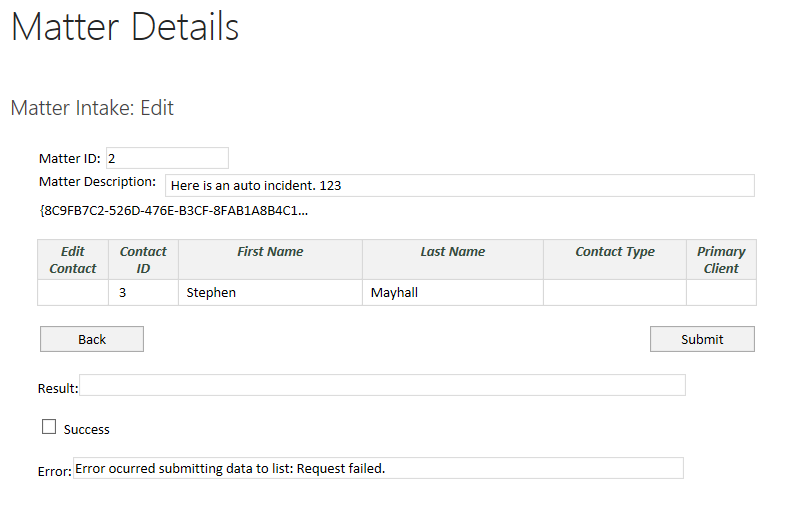
Hilary, Thank you for responding. I made the change to my form that you
suggested. However, I receive a
different error now. I have attached a
screenshot of the previous error as well.
The new error is a bit lengthy:
Failed to submit to
SharePoint. URL = 'http://cb-sp-serv/matterintake/_vti_bin/lists.asmx'.
Exception:
Microsoft.Office.InfoPath.Server.SolutionLifetime.DataAdapterException: The
remote server returned an error: (401) Unauthorized. ---> System.Net.WebException:
The remote server returned an error: (401) Unauthorized. at
System.Net.HttpWebRequest.GetResponse()
at Microsoft.Office.InfoPath.Server.SolutionLifetime.WebServiceHelper.GetResponseHelper(WebRequest
request, DataAdapterCredentials credentials, Stopwatch timer,
ExecWebRequestExceptionState state, String adapterName, Boolean isQuery) at
Microsoft.Office.InfoPath.Server.SolutionLifetime.WebServiceHelper.ExecWebRequestSync(XPathNavigator
inputSubDOM, Boolean[] inputUseDataset, XPathNavigator resultsSubDOM, Boolean
resultUseDataset, XPathNavigator errorsSubDOM, Uri serviceUrl, Uri soapAction,
Int64 timeOutMillisec, DataAdapter adapter, Document document,
DataAdapterCredentials credentials, Boolean useDcl, Boolean useProxy, Boolean
useSelf) --- End of inner exception
stack trace --- at
Microsoft.Office.InfoPath.Server.SolutionLifetime.WebServiceHelper.HandleExecWebRequestException(Document
document, Exception exception, ExecWebRequestExceptionState state, Byte[]
exceptionResponse, Ids errorId) at
Microsoft.Office.InfoPath.Server.SolutionLifetime.WebServiceHelper.ExecWebRequestSync(XPathNavigator
inputSubDOM, Boolean[] inputUseDataset, XPathNavigator resultsSubDOM, Boolean
resultUseDataset, XPathNavigator errorsSubDOM, Uri serviceUrl, Uri soapAction,
Int64 timeOutMillisec, DataAdapter adapter, Document document,
DataAdapterCredentials credentials, Boolean useDcl, Boolean useProxy, Boolean
useSelf) at
Microsoft.Office.InfoPath.Server.SolutionLifetime.DataAdapterWebServiceSubmit.Execute(Document
document, Uri soapAction, Uri serviceUrl, XPathNavigator querySubDOM,
XPathNavigator resultsSubDOM, XPathNavigator errorsSubDOM, Int64 timeout,
DataAdapterCredentials credentials, Boolean useDcl, Boolean useProxy, Boolean
useSelf) at Microsoft.Office.InfoPath.Server.DocumentLifetime.DataAdapterWebServiceSubmit.ExecuteInternal(XPathNavigator
queryFields, XPathNavigator resultFields, XPathNavigator errors) at
Microsoft.Office.InfoPath.Server.DocumentLifetime.OMExceptionManager.ExecuteOMCallWithExceptions(OMCall
d, ExceptionFilter exceptionFilter) LogId: 5567 Details:
System.Net.WebException: The remote server returned an error: (401)
Unauthorized. at
System.Net.HttpWebRequest.GetResponse()
at Microsoft.Office.InfoPath.Server.SolutionLifetime.WebServiceHelper.GetResponseHelper(WebRequest
request, DataAdapterCredentials credentials, Stopwatch timer,
ExecWebRequestExceptionState state, String adapterName, Boolean isQuery) at Microsoft.Office.InfoPath.Server.SolutionLifetime.WebServiceHelper.ExecWebRequestSync(XPathNavigator
inputSubDOM, Boolean[] inputUseDataset, XPathNavigator resultsSubDOM, Boolean
resultUseDataset, XPathNavigator errorsSubDOM, Uri serviceUrl, Uri soapAction,
Int64 timeOutMillisec, DataAdapter adapter, Document document,
DataAdapterCredentials credentials, Boolean useDcl, Boolean useProxy, Boolean
useSelf). Full error node text: No error node text available.