I have an IP2010 form with a Repeating table for each month, starting with October. Each table is filtered with a Rule so that only data for that month is displayed in each repeating table. That works fine.
In the repeating table's footer, I am trying to add up the Total Fees amount. I keep getting zero as a Running Total. It only produces a non-zero value when I remove the filter from the Sum function below, but then it adds up the Total Fees for all 12 months. I've tried both a Text Box and a Calculated Value control. This is the formula I have now that I am trying to get to work:
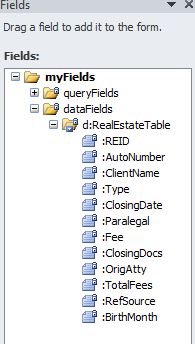
sum(@TotalFees[@BirthMonth = 10]) where @Birthmonth is a computed column in SQL that is determined off of the ClosingDate field. See attached screenshot for the Schema
Based on the examples and sample forms I have seen on InfoPathDev and elsewhere on the web, this should work, but it's not. What am I doing wrong?
Joe