Check Box - Click Recognition - InfoPath Dev
in

InfoPath Dev

Check Box - Click Recognition

Last post 05-08-2014 03:19 AM by jun_barbosa. 2 replies.
Page 1 of 1 (3 items)
Sort Posts: Previous Next
  • 05-06-2014 07:09 AM

    Check Box - Click Recognition

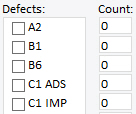
    Hi there, I have a Multiple-Selection List Box (see attachement). Next to that, each check box has it's own number field with a "0" as default. What I'm trying to impelement is: If you check a box, put a "1" in the text box next to it -> No problem, that's just one rule. However, when I uncheck the box, I need a "0" to appear in the text box next to it -> can't figure it out. Does anyone have a tip? Thanks, Kevin
    Windows 7
    Microsoft Office 2010
  • 05-08-2014 03:19 AM In reply to

     Hi Kevin,

    You can use conditional formatting to set the default values. Check the attached xsn.

    Have a good day! 


  • 05-08-2014 03:19 AM In reply to

    Re: Check Box - Click Recognition

     Hi Kevin,

    You can use conditional formatting for the default values. Check the attached xsn.

    Have a good day! 


Page 1 of 1 (3 items)
Copyright © 2003-2019 Qdabra Software. All rights reserved.
View our Terms of Use.