XSL Transform (Patrick) - InfoPath Dev
in

InfoPath Dev

XSL Transform (Patrick)

Last post 02-12-2014 12:22 PM by TomRenfro. 6 replies.
Page 1 of 1 (7 items)
Sort Posts: Previous Next
  • 02-12-2014 12:21 PM

    • TomRenfro
    • Top 75 Contributor
      Male
    • Joined on 09-29-2011
    • Oklahoma City, OK
    • Posts 134

    XSL Transform (Patrick)

     Ok, let's see if I can get some meaningful data to you this way.

    Well, it seems my xsn forms are too big, even zipped.

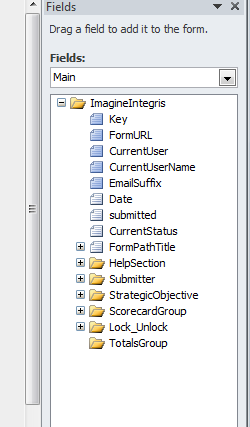
    Here’s where I’m struggling, it’s with the XSL transform.  I’m thinking it should be pretty straightforward, but I know I’m missing something.  Here are screenshots of the main data sources.  The difference is an added node at the bottom.

    The first image is the original, the second is the new data source.


    Here's what the XSN looks like, and I know I'm missing something, I just don't know what.

    <?xml version="1.0" encoding="utf-8" ?>
    <xsl:stylesheet xmlns:xsl="http://www.w3.org/1999/XSL/Transform" version="1.0"
        xmlns:oldMy="http://schemas.microsoft.com/office/infopath/2003/myXSD/2010-04-24T08:00:49"
        xmlns:my="http://schemas.microsoft.com/office/infopath/2003/myXSD/2010-04-24T08:10:08">
     <xsl:template match="oldMy:ImagineIntegris">
      <my:ImagineIntegrisV101>
       <xsl:apply-templates select="@*" />
       <xsl:apply-templates select="oldMy:Key | oldMy:FormURL | oldMy:CurrentUser | oldMy:CurrentUserName | oldMy:EmailSuffix | oldMy:Date | oldMy:submitted | oldMyCurrentStatus | oldMy:FormPathTitle" />
       <xsl:apply-templates select="oldMy:HelpSection" />
       <xsl:apply-templates select="oldMy:Submitter" />
       <xsl:apply-templates select="oldMy:StrategicObjective" />
       <xsl:apply-templates select="oldMy:ScorecardGroup" />
       <xsl:apply-templates select="oldMy:Lock_Unlock" />
       <xsl:apply-templates select="TotalsGroup" />
       <my:FollowUp>
        <my:ActionPlan />
        <my:FollowUpComments>
         <my:FollowUpUser />
         <my:FollowUpDate />
         <my:FollowUpNotes />
        </my:FollowUpComments>
       </my:FollowUp>
      </my:ImagineIntegrisV101>
     </xsl:template>
    </xsl:stylesheet>


    I'll post the other file image in a reply, since it appears this interface allows one at a time.


  • 02-12-2014 12:22 PM In reply to

    • TomRenfro
    • Top 75 Contributor
      Male
    • Joined on 09-29-2011
    • Oklahoma City, OK
    • Posts 134

     Here's ImagineIntegrisV101 data source:


  • 02-12-2014 12:24 PM In reply to

    • TomRenfro
    • Top 75 Contributor
      Male
    • Joined on 09-29-2011
    • Oklahoma City, OK
    • Posts 134

     Here's the other image.


  • 02-12-2014 01:25 PM In reply to

    • TomRenfro
    • Top 75 Contributor
      Male
    • Joined on 09-29-2011
    • Oklahoma City, OK
    • Posts 134

    Re: XSL Transform (Patrick)

     Patrick,

     I've manually repaired the XML headers of the corrupted forms in DBXL with data that allows the form to open with the correct content type and preserving the data formatting.  I did this by using the DBXL Migration tool, exporting the broken forms out to a file share, modifying the existing XML's and renaming with the correct name for our purposes. Here's what I stripped out of the exported XML:

    <?mso-infoPathSolution name="urn:schemas-microsoft-com:office:infopath:ImagineIntegrisV101:-myXSD-2013-02-04T19-12-58" solutionVersion="1.0.1.18" productVersion="14.0.0.0" PIVersion="1.0.0.0" href="https://forms.corp.integris-health.com/QdabraWebService/Forms/ID/782/template.xsn"?>

    and replaced with:

    <?xml version="1.0" encoding="utf-8"?>

    The QdabraDBXL node had a doctype="", so I typed in "ImagineIntegrisV101", the new content type, and added this after that node:

    <?mso-infoPathSolution name="urn:schemas-microsoft-com:office:infopath:ImagineIntegrisV101:-myXSD-2013-02-04T19-12-58" solutionVersion="1.0.1.23" productVersion="14.0.0.0" PIVersion="1.0.0.0"  href="https://forms.corp.integris-health.com/eForms/ContentForms/ImagineIntegrisV101.xsn" ?>

    This correctly maps to the current content type version and the form opens in InfoPath when I right-click.  I'm now trying to import a document back into DBXL as a proof of concept using the migration tool.

    I'll post my results.

  • 02-12-2014 01:38 PM In reply to

    • TomRenfro
    • Top 75 Contributor
      Male
    • Joined on 09-29-2011
    • Oklahoma City, OK
    • Posts 134

    Re: XSL Transform (Patrick)

     Patrick, my test worked once I corrected the SharePoint path to reference the correct root node that had changed for each respective library.  I imported, reshredded, and the form appeared in the correct library and kicked off the notification workflow.

    Guess I just needed to go back to basics and compare existing, working XML's and the ones that weren't, a trick I picked up from Hilary.

  • 02-12-2014 03:57 PM In reply to

    Re: XSL Transform (Patrick)

    Hey, Tom - I'm a bit confused as to the original question here - is everything here resolved? Or is there something you need a hand with? I'm guessing this is an addendum to the support email you sent on the afternoon of the 11th?

    Hilary Stoupa

  • 02-13-2014 06:33 AM In reply to

    • TomRenfro
    • Top 75 Contributor
      Male
    • Joined on 09-29-2011
    • Oklahoma City, OK
    • Posts 134

    Re: XSL Transform (Patrick)

     Yes, it's resolved.  I had some entries crosslinked with a previous content type and document type in DBXL.  I fixed them in the XML.

Page 1 of 1 (7 items)
Copyright © 2003-2019 Qdabra Software. All rights reserved.
View our Terms of Use.