Hi,
I am newly using infopath, and so far it has been a fun experience.
However, I do have a problem with filtering. FYI, I am using Infopath WebBased 2007, since the sharepoint that I am using to publish my work is 2007.
I do have a drop down called "site", and I want based on the selection for the site, relevant "Site Phone" and other contact information to appear in the following fields.
I got the the cities name from w sharepoint library. To do so, I went on the drop-down properties, and I marked "Get choices from an external data source, which is the sharepoint library. (Therefore, I've got a second connection)
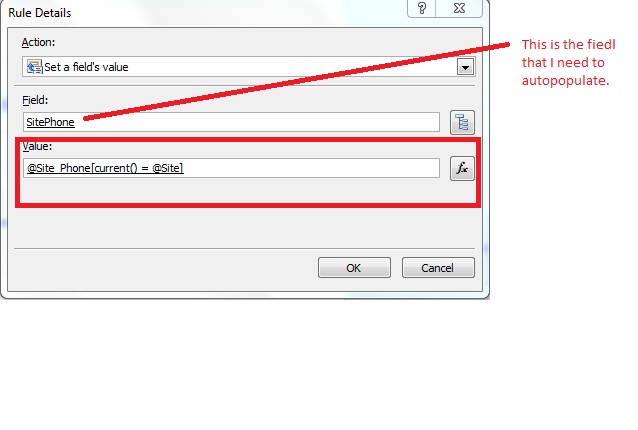
Now, here where the problem is, I've ran action rules on the "site" drop-down to set value of "site phone" based on the selection of the "site".
In the attachment, you can find the formula that I have input in the value field in order to get the intended results.
With this formula, the field is autopopulating, however the data that it pulled are not correct. It basically pulled the first phone number on the list which probably belong to Canada, however, the site that I have chosen is USA.
By the way, I tried to filter from the drop down properties, but the error message that I got is that filtering is not supported in InfoPath 2007 Web Browser Forms. (I don't want to change that since I want the form to be filled witihin the sharepoint browser.
Any help will be greatly appreciated
Thank youuu!