Hi all,
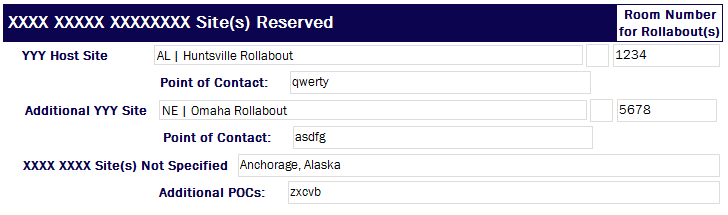
I have a new bug that popped up in one of my forms - upon submission, some of the fields move left or right by about 5 pixels, so that my lovely even layout gets messed up. I have already implemented all the other fixes for the major layout issues that had been popping up (see notes below), and this one just has me stumped. See attached screenshot of submitted version. Note that the left side "Point of Contact" text does not line up properly with the field above it, and that the right side of the POC field does not line up properly with the field above it (even though the cells are the same size and therefore it should line up evenly)
Note:
-
The form is built using InfoPath 2010 as a 2007 Browser form, and loaded onto a Sharepoint 2007 site.
-
Each row is its own table (so that the issue of merged cells messing up the layout was taken care of).
-
Every field is set to a specific pixel width (so that none are 100%).
-
I have implemented the submit view for the date picker fields so that a text version of the date is shown when submitted, to resolve the issue of the date picker field messing up the layout
Any ideas would be greatly appreciated.
Thank you!!