Question: Set a field's value - InfoPath Dev
in

InfoPath Dev

Question: Set a field's value

Last post 10-29-2013 10:10 AM by biohazz65. 5 replies.
Page 1 of 1 (6 items)
Sort Posts: Previous Next
  • 10-29-2013 08:13 AM

    Question: Set a field's value

    I asked the publisher of "Microsoft SharePoint 2010 Creating and Implementing Real-World Projects" for clarification and was basically blown off, so I figured I would come to the experts! I'm not a developer and this is prolly a simple problem but I'm asking anyway:) Here is the syntax from page 92: StudentCurrentlyRegistered=Count(Registration(Secondary) ID, where Registration (UserName)=Main(UserName) Description: Counts the number of registrations where the UserName in the Registration data set is equal to the current user. If the value is grater than zero we know the user is registered for the course. On page 94 there is a screen shot which shows: Set a field's value: StudentCurrentlyRegistered = count(ID[User = User]) This causes an error. I've tried numerous permutations but nothing works. The Main data connection contains CourseID User MaxNumStudents CurrentNumStudents StudentCurrentlyRegistered The Registration (secondary) contains: Title Course ID User ID Hopefully this is enough info for you brainiacs to help get this thing working! Thanks in advance!!
    Robert Davis
    SharePoint MCTS
  • 10-29-2013 08:32 AM In reply to

    Re: Question: Set a field's value

     Mind attaching your template under the Options tab in a reply?

    Hilary Stoupa

  • 10-29-2013 08:43 AM In reply to

    Thank you!
    Robert Davis
    SharePoint MCTS
  • 10-29-2013 09:20 AM In reply to

    Re: Question: Set a field's value

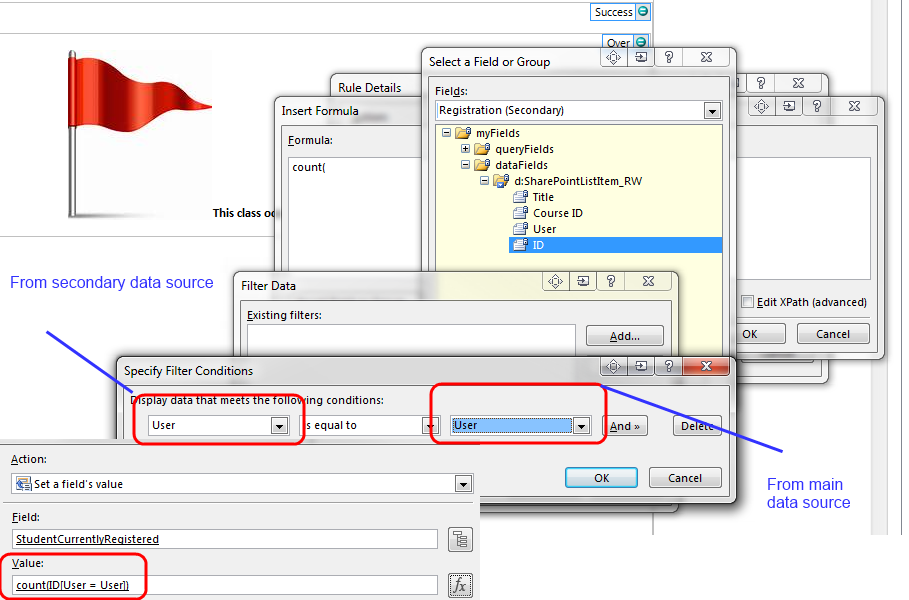
    I'm attaching some screenshots and will add another reply with your template with another action added to your rule on course ID.

    This is what the XPath for the filter looks like - User from the secondary data source is equal to user from the primary data source:

    ../d:User = xdXDocument:get-DOM()/my:myFields/my:User

    I'm not 100% confident that this is correct - I would think that what you want to know is if the user is registered for this particular course - but it looks like you may be querying for just this course's data, so this may be just fine.

    Hilary Stoupa

  • 10-29-2013 09:21 AM In reply to

    Here's your form - save it locally, right click and select design to open in design mode.

    Hilary Stoupa

  • 10-29-2013 10:10 AM In reply to

    Re: Question: Set a field's value

    Wow, that was fast! Thank you, I'm plowing on through the book - I should know shortly if your solution worked. I'll mark it as Answered if it works, if not I'll ping you if that is OK.
    Robert Davis
    SharePoint MCTS
Page 1 of 1 (6 items)
Copyright © 2003-2019 Qdabra Software. All rights reserved.
View our Terms of Use.