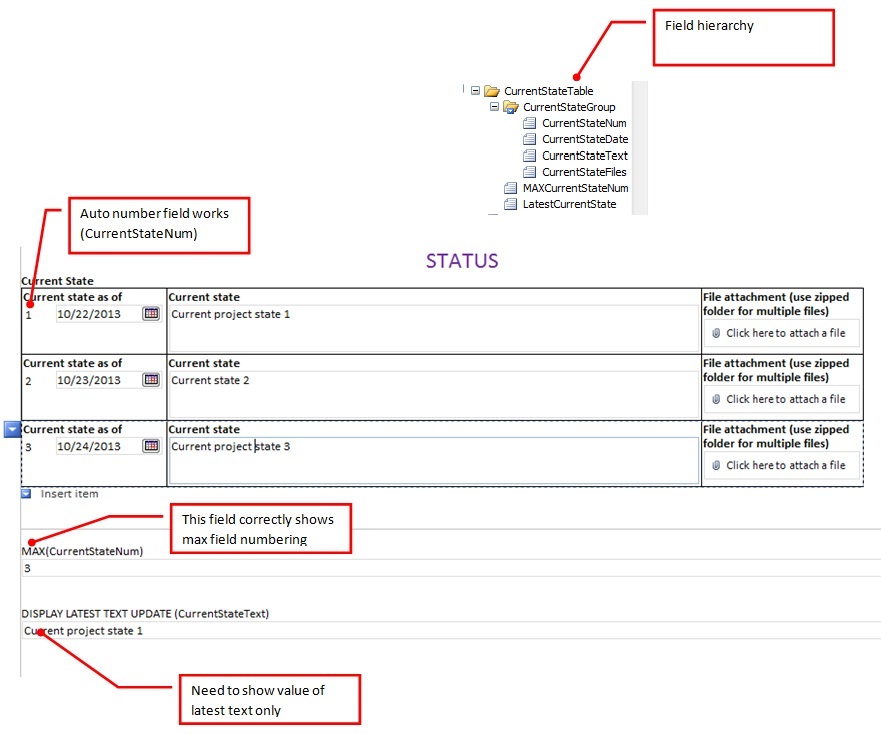
I know this has been addressed before, but for some reason the solutions I have Googled and found here or elsewhere are not working.
PROBLEM:
Infopath 2007 - I am trying to show the last text value fields in a repeating table used for project managers to update status on their projects on my InfoPath form. Each form addresses a separate part of the whole project.My repeating fields are:
CurrentStateNum (auto numbers as items are added)
CurrentStateDate (date of entry)
CurrentStateText (Update notes -- this is what I am trying to extract the latest version of)
CurrentStateFiles (attachment area for any supporting files, photos, et)
SOLUTION THUS FAR:
I tried using CurrentStateText [last()] and that gave me only the first text entry - no good
I found this online and successfully set up an auto numbering: http://social.msdn.microsoft.com/Forums/sharepoint/en-US/44594b14-5034-43fd-b405-f7da5b0e537f/infopath-2010-repeating-table-extract-last-row-data?forum=sharepointcustomizationprevious
Following the example above, I added two fields
- MAXCurrentStateNum with formula = max(CurrentStateNum)
- LatestCurrentState with formula CurrentStateText[CurrentStateNum = MAXCurentStateNum]
This failed with error: "../my:CurrentStateGroup/my:CurrentStateGroup/my:CurrentStateNum" does not point to a valid location path of a field or group
Basically I am trying to say, "Give me the CurrentStateText value in a repeating field where CurrentStateNum is the highest (max) value". This cannot be this convoluted or difficult... any wisdom from the masses as to what's wrong? I attached a screen shot of the form and text fields with annotations.
THANKS in advance for the help!