"InfoPath Dashboard - Displaying Repeating Data in Libraries -- February 28, 2013 Webinar" .XSN? - InfoPath Dev Sign in | Join | Help in General InfoPath (Entire Site) InfoPath Dev InfoPath Dev is dedicated to bringing you the information and tools you need to be successful in your Microsoft Office InfoPath development projects. Home Blogs Forums Photos Downloads InfoPath Dev » InfoPath » General » "InfoPath Dashboard - Displaying Repeating Data in Libraries -- February 28, 2013 Webinar" .XSN? "InfoPath Dashboard - Displaying Repeating Data in Libraries -- February 28, 2013 Webinar" .XSN? Last post 06-26-2015 07:05 AM by spassler. 24 replies. Page 2 of 2 (25 items) < Previous 1 2 Sort Posts: Oldest to newest Newest to oldest Previous Next 06-24-2015 11:19 AM In reply to Hilary Stoupa Joined on 06-20-2008 Posts 13,297 Re: "InfoPath Dashboard - Displaying Repeating Data in Libraries -- February 28, 2013 Webinar" .XSN? Mark as Not AnswerMark as Answer... Reply Contact Referring back to just the library submit and the two copies, did you also change your logic for creating the form name? As long as you have a formula including username and now as part of the form name, the form name will change every time you submit. Use a form field for the form name and set the value only one time instead. Hilary Stoupa 06-24-2015 12:08 PM In reply to spassler Joined on 02-13-2015 Posts 47 Re: "InfoPath Dashboard - Displaying Repeating Data in Libraries -- February 28, 2013 Webinar" .XSN? Mark as Not AnswerMark as Answer... Reply Contact The formName has translate(concat("Requisition Form - ", userName(), " - ", now()), " :", "") as the default value but i also have the same fx in the form name when i created the data connection should i just point that to the formName field? Update after pointing to the formName it only submitted once, but put the formula as the "name" will try to put it back in the connection but take it out of formname as the default value. 06-24-2015 12:31 PM In reply to Hilary Stoupa Joined on 06-20-2008 Posts 13,297 Re: "InfoPath Dashboard - Displaying Repeating Data in Libraries -- February 28, 2013 Webinar" .XSN? Mark as Not AnswerMark as Answer... Reply Contact In the data connection, select the form name field in your form for the form name.Do not use a default value for the form name.Instead, add a form load rule with the condition IF FORM NAME IS BLANK to set the form name.Do you understand why you are currently getting multiple files in the library? Your rule submits the form 2 times, which is fine - but the first time "now()" is one value and the next time it is a whole different value.... leading the form not being able to overwrite as there is nothing in the library with the same name. Hilary Stoupa 06-24-2015 01:07 PM In reply to spassler Joined on 02-13-2015 Posts 47 Re: "InfoPath Dashboard - Displaying Repeating Data in Libraries -- February 28, 2013 Webinar" .XSN? submit button.png Mark as Not AnswerMark as Answer... Reply Contact Thanks for your help an patients Hilary im still learning, and new to SharePoint development and infopath. I changed the name formula and got rid of the username and now and replaced those two items with REQNumber (even though its not pulling the ID as my REQNumber (yet) but now, it is submitting only once! so I'm getting there! Still getting the error: You do not have permissions to access a Web service that provides data required for this form to function correctly. Correlation ID:43c6e8a0-0ebf-4a01-9f97-4471efd735f6 I'm going to try to see why by doing a few searches. ***UPDATE*** Ok, so looking into it more it appears since i have SSL enabled on my site it could be a certificate issue. Im going to attempt to reset the IIS services after i attach the up to date cert in the trusted root authority. (cant do it now since its the production server) but will let you know what happens tonight. 06-24-2015 01:54 PM In reply to Hilary Stoupa Joined on 06-20-2008 Posts 13,297 Re: "InfoPath Dashboard - Displaying Repeating Data in Libraries -- February 28, 2013 Webinar" .XSN? Mark as Not AnswerMark as Answer... Reply Contact Try something like this for your Add List Items test XML file:<Batch OnError="Continue"> <Method ID="1" Cmd="New"> <FieldRef Name="Title" CopyTitle="" /> </Method></Batch>And disable your rules that set Cmd to new or update, disable your rule that sets the field values and then just add a rule to set "copy title" - so you can test.Or, drag the secondary data source for Add List Items onto your form so you can try manually setting values and submitting (add a button with a rule to submit to the lists web service). Then you can experiment to see what works. Hilary Stoupa 06-24-2015 02:13 PM In reply to spassler Joined on 02-13-2015 Posts 47 Re: "InfoPath Dashboard - Displaying Repeating Data in Libraries -- February 28, 2013 Webinar" .XSN? 6-25-2015 7-54-14 AM.jpg Mark as Not AnswerMark as Answer... Reply Contact I don't think it's my XML file, I disabled my rule that sets my field values along with the new and update as you suggested and the form uploads without errors, but still nothing as far as the list is concerned. I forced the CopyTitle to sue the formName field so it would name it the same... So what I did was I set the title field to use the formName for the value, and i submit to the form library with no error (this is without the submit to webservice rule after the copytitle) Once I add that next rule step "submit to webservice" that's when that error comes back, so it's got to me something on the server that's causing the issue, possibly the certificate. ill attempt to reset the IIS in about an hour or so. Took old cert out the trust put new one in and rebooted IIS services, still no luck :( still tinkering i refuse to give up! **UPDATE** - Still working on the issue but found an error in the eventlog. Added my new certs (got new error so... progress i hope hah) Type: DataAdapterException, Exception Message: The remote server returned an error: (500) Internal Server Error. Exception of type 'Microsoft.SharePoint.SoapServer.SoapServerException' was thrown. Cannot access a closed Stream. The remote server returned an error: (500) Internal Server Error.) Ok, So I found this information which is the error message im getting: "Cannot Access A Closed Stream" number 4 would apply to me but it's not empty... do I have to have the { } or no brackets? or does it matter. 3.1.4.31 UpdateListItems SharePoint The UpdateListItems operation is used to make inserts, updates, and deletions to specified list items in a list. The protocol client sends an UpdateListItemsSoapIn request message (section 3.1.4.31.1.1) and the protocol server responds with an UpdateListItemsSoapOut response message (section 3.1.4.31.1.2), as follows: 1.If the specified listName is a valid GUID and corresponds to the identification of a list on the site, use that list. 2.If the specified listName is not a valid GUID or does not correspond to the identification of a list on the site, check if the listName corresponds to the list title of a list on the site and if so, use that list. 3.If listName does not correspond to a list from either of these checks, the protocol server SHOULD return a SOAP fault with error code 0x82000006. This indicates that the list does not exist or might have been deleted by another user. 4.If listName is an empty string, the server SHOULD return the SOAP fault: "Cannot access a closed Stream". 5.Otherwise, the protocol server MUST process the batched operations on the list, and return success or failure conditions per each operation. No really sure why my text is not being formatted like yours... sorry about that.. I figured out the submission to the list issue though. for my XML file I was using when i needed to use (it submits to the list now, but now my data isn't showing up, just items in the list which say (no title) for the title and no other info is carrying over. will tinker with it some more. 06-25-2015 07:30 AM In reply to spassler Joined on 02-13-2015 Posts 47 Re: "InfoPath Dashboard - Displaying Repeating Data in Libraries -- February 28, 2013 Webinar" .XSN? ID Pull.png Mark as Not AnswerMark as Answer... Reply Contact Replying to my own post as im not sure why the format is like that and it makes my and im sure your eyes hurt. I ended up having to re-point the Copyfield values to themselves and now the data copies to the list. The only issue now is that my GET ID and title rules aren't working I will continue to tinker but my rules are attached does anyone see why they aren't pulling the info over? After I submit I query the form library, then try to set the form field (REQNumber) to the Query ID field on the form lib is that not correct? 06-25-2015 07:44 AM In reply to Hilary Stoupa Joined on 06-20-2008 Posts 13,297 Re: "InfoPath Dashboard - Displaying Repeating Data in Libraries -- February 28, 2013 Webinar" .XSN? Mark as Not AnswerMark as Answer... Reply Contact Hi - set it to the ID field in the data fields folder instead. Query fields are how we tell the data connection what we want - data fields are where the returned data is. When in doubt, drag the data connection onto the form, add a button that executes the query, preview the form and experiment. :) Hilary Stoupa 06-25-2015 08:03 AM In reply to spassler Joined on 02-13-2015 Posts 47 Re: "InfoPath Dashboard - Displaying Repeating Data in Libraries -- February 28, 2013 Webinar" .XSN? Mark as Not AnswerMark as Answer... Reply Contact That worked! my title still doesn't carry over, but its not nearly as important as the ID field. Thanks again Hilary for your help and support! really appreciate it. I'm still going to tinker and make some changes but I'm well on my way now!! :D Few issues I'm running into... If i open the form and make a change and hit submit again it repeats the same items in the list again, is there a way to just have it update the items when the form is submitted again so it doesn't duplicate the documents? I ended up getting the title to pull the name so that's working (list items are named the same thing as the form they are associated with. the only other issue I'm having, is that when i submit one form it makes the name "Requisition Form -" as the second part is suppose to be "Requisition Form - REQNumber (which is pulling the ID field) is it not possible to keep it that way? because if I go to submit a new form, the blank one just gets overwritten. If i set a workflow to run when a form is submitted, to delete the form without the full name would that be "too slow" if multiple people were to fill these out at a time? that would take care for the name not showing correctly and having it update that instead of creating a new form... 06-26-2015 07:05 AM In reply to spassler Joined on 02-13-2015 Posts 47 Re: "InfoPath Dashboard - Displaying Repeating Data in Libraries -- February 28, 2013 Webinar" .XSN? Mark as Not AnswerMark as Answer... Reply Contact Hilary, Would you happen to know what would cause a form to submit to the form library but not to the list when there is no error by chance? Figured it out, had a typo in the XML. Page 2 of 2 (25 items) < Previous 1 2 Copyright © 2003-2019 Qdabra Software. All rights reserved.View our Terms of Use.
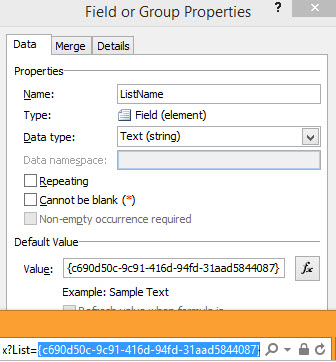
Referring back to just the library submit and the two copies, did you also change your logic for creating the form name? As long as you have a formula including username and now as part of the form name, the form name will change every time you submit. Use a form field for the form name and set the value only one time instead.
In the data connection, select the form name field in your form for the form name.
Do not use a default value for the form name.
Instead, add a form load rule with the condition IF FORM NAME IS BLANK to set the form name.
Do you understand why you are currently getting multiple files in the library? Your rule submits the form 2 times, which is fine - but the first time "now()" is one value and the next time it is a whole different value.... leading the form not being able to overwrite as there is nothing in the library with the same name.
Try something like this for your Add List Items test XML file:
<Batch OnError="Continue"> <Method ID="1" Cmd="New"> <FieldRef Name="Title" CopyTitle="" /> </Method></Batch>
And disable your rules that set Cmd to new or update, disable your rule that sets the field values and then just add a rule to set "copy title" - so you can test.
Or, drag the secondary data source for Add List Items onto your form so you can try manually setting values and submitting (add a button with a rule to submit to the lists web service). Then you can experiment to see what works.
Hi - set it to the ID field in the data fields folder instead. Query fields are how we tell the data connection what we want - data fields are where the returned data is. When in doubt, drag the data connection onto the form, add a button that executes the query, preview the form and experiment. :)