Gaps in between sections - InfoPath Dev
in

InfoPath Dev

Gaps in between sections

Last post 07-08-2013 12:07 PM by jseeker. 2 replies.
Page 1 of 1 (3 items)
Sort Posts: Previous Next
  • 07-06-2013 02:20 PM

    Gaps in between sections

    Hi,

    I have created my InfoPath form in multiple sections. Section B and C are hidden unless Section A is complete. When the conditions in Section A are set in such a way that only Section C should show up hiding Section B, it is creating a white space - a similar space/height occupied by Section B. I even deleted the Section B now from the form I did a preview. Populated values in Secition A, Section C appears but after the usual white space.

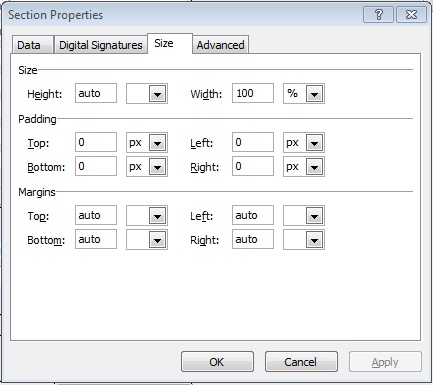
    Any suggestions to get rid of the white space? I have attached the Section A and Section C - table size properties. Please review that and provide me some pointers on where I should look for.

    Thanks

  • 07-06-2013 10:00 PM In reply to

    Re: Gaps in between sections

     Right Click on Row-> properties,  set Row Height To Auto, this will shrink rows with hidden fields and expand them when they are visible. Make sure  you take out all blank spaces and what not too.

    Click the row that the section is in.

  • 07-08-2013 12:07 PM In reply to

    Re: Gaps in between sections

    Thanks Jnava121. I tried what you had mentioned and repeatedly had to set the Size of the section table to auto and that removed the gaps. thanks once again.
Page 1 of 1 (3 items)
Copyright © 2003-2019 Qdabra Software. All rights reserved.
View our Terms of Use.