How to Force a Button to Auto-Populate Another Field when Selected. - InfoPath Dev
in

InfoPath Dev

How to Force a Button to Auto-Populate Another Field when Selected.

Last post 07-08-2013 05:49 AM by Zippy. 2 replies.
Page 1 of 1 (3 items)
Sort Posts: Previous Next
  • 07-05-2013 07:45 AM

    • Zippy
    • Not Ranked
    • Joined on 07-05-2013
    • Posts 6

    How to Force a Button to Auto-Populate Another Field when Selected.

    I’m fairly new to InfoPath 2010 and this may not be the best way to approach this but this is what I would like to do.
    • I’m looking for a rule or some other method so that when a user selects a button it will autofill a separate checkbox field called New Item, or force a similar type of field to equal true.
    Background: I have a created a request for training form that contains basic user contact info with three available view choices. Depending on the type of training required, the user selects one of three view buttons and fills in the remaining fields for the view selected.  I want the ability to later sort through the database by these three views and need a way to auto-populate  some other type of field for each of the three views with true/false when the button is selected.  I could use a checkbox instead of a button but would rather have something more visual like a button.


  • 07-07-2013 11:38 AM In reply to

    Re: How to Force a Button to Auto-Populate Another Field when Selected.

    This should be very simple to do:

    1. Add a new rule to the button. Call it "Set flag"
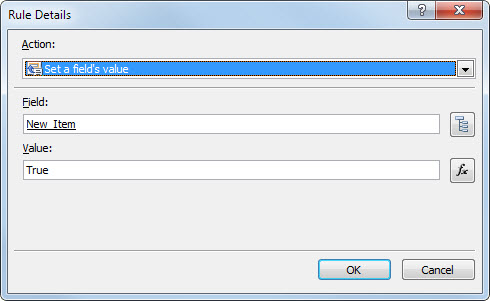
    2. Add a Set a field's value action to the rule
    3. For the Field entry, use the Select a field or group dialog to select the field you want to set
    4. In the Value box, just type true

    That should be it! Let us know if your situation is more involved than this.

    Jimmy Rishe / Software Developer / Microsoft MVP
    Qdabra Software
  • 07-08-2013 05:49 AM In reply to

    • Zippy
    • Not Ranked
    • Joined on 07-05-2013
    • Posts 6

    Re: How to Force a Button to Auto-Populate Another Field when Selected.

    DISREGARD MY COMMENTS BELOW.  I ADDED THE () AFTER THE WORD TRUE AND IT WORKED.  THANKS. 

    Thank you but perhaps I'm doing something wrong as I get a validation error when submitting the form with this rule (attached screen shot).

    The "New Item" is currently set as a checkbox on the form and is the field I want to show True when the button is selected and runs the rule.

Page 1 of 1 (3 items)
Copyright © 2003-2019 Qdabra Software. All rights reserved.
View our Terms of Use.