Formatting rules not working in browser form?? - InfoPath Dev
in

InfoPath Dev

Formatting rules not working in browser form??

Last post 04-30-2013 08:57 AM by luke20. 6 replies.
Page 1 of 1 (7 items)
Sort Posts: Previous Next
  • 04-30-2013 07:49 AM

    Formatting rules not working in browser form??

    I have a form published to sharepoint and employees are already using the form. There have been a few times when people have receieved an email by mistake from the workflow and gone onto the form and used the approve button. I have tried hiding this button ( i have a field that finds out who the current person is) and if the current person is not equal to who the approver should be then the button should be hidden. when i preview the form in filler this button is hidden and the rule is working but when i publish to sharepoint and open a form that has already been submitted the buttons are still showing. I cannot seem to hide these buttons in the browser whatever i try?
  • 04-30-2013 08:11 AM In reply to

    Re: Formatting rules not working in browser form??

    I have had this happen to me and my solution was to add a NEW control, and add the rules/conditions to the new control, and this works for me every time. Who knows, sometimes a control may become rowdy and needs to be replaced.
    Ernesto Machado
    Qdabra® Software/ InfoPathDev.com
    The InfoPath Experts – Streamline data gathering to turn process into knowledge.™


  • 04-30-2013 08:19 AM In reply to

    Re: Formatting rules not working in browser form??

    I've tried this a few times but still had no luck :( even new buttons wont hide
  • 04-30-2013 08:30 AM In reply to

    Re: Formatting rules not working in browser form??

    Have you checked the versioning settings of the form?
    Ernesto Machado
    Qdabra® Software/ InfoPathDev.com
    The InfoPath Experts – Streamline data gathering to turn process into knowledge.™


  • 04-30-2013 08:45 AM In reply to

    Re: Formatting rules not working in browser form??

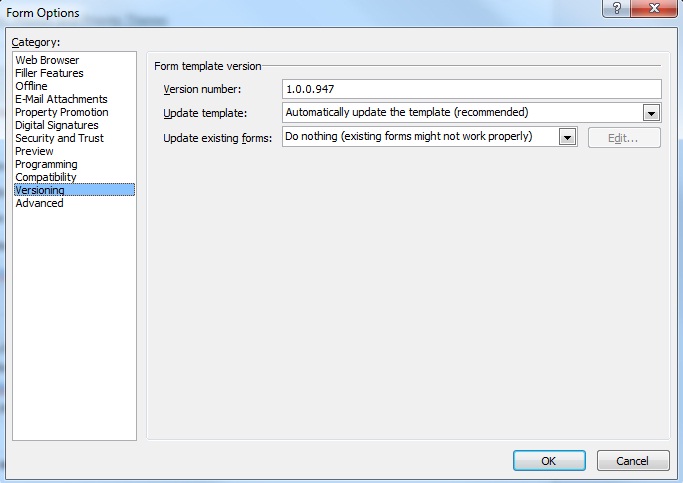
    Have attached a print screen of the versioning settings, do they look correct to you, is this what they should be?

    (not sure if 'update existing forms:" should be do nothing or automatically upgrade existing forms?) will i lose data on already submitted forms if i change anything here?

    Thanks

    Luke

  • 04-30-2013 08:50 AM In reply to

    Re: Formatting rules not working in browser form??

    Do Nothing means that all previously submitted forms are NOT using the latest form template that you've published. And this would explain why the new formatting rules are not showing in those.
    Ernesto Machado
    Qdabra® Software/ InfoPathDev.com
    The InfoPath Experts – Streamline data gathering to turn process into knowledge.™


  • 04-30-2013 08:57 AM In reply to

    Re: Formatting rules not working in browser form??

    Thanks - will have to change this. But am just hoping that i dont lose data in previously submitted forms. Although i think if i make a backup copy of the form template before i change the settings if i do lose data i can just re-publish the older version back to sharepoint to get it all back?

    Thanks again

    Luke

Page 1 of 1 (7 items)
Copyright © 2003-2019 Qdabra Software. All rights reserved.
View our Terms of Use.