qRules 4.3 trying to install mapping tool, error - InfoPath Dev Sign in | Join | Help in Qdabra qRules Qdabra Software Product Support (Entire Site) InfoPath Dev InfoPath Dev is dedicated to bringing you the information and tools you need to be successful in your Microsoft Office InfoPath development projects. Home Blogs Forums Photos Downloads InfoPath Dev » Qdabra Software Product Support » Qdabra qRules » qRules 4.3 trying to install mapping tool, error qRules 4.3 trying to install mapping tool, error Last post 04-15-2013 03:58 PM by Hilary Stoupa. 21 replies. Page 1 of 2 (22 items) 1 2 Next > Sort Posts: Oldest to newest Newest to oldest Previous Next 04-10-2013 01:23 AM novak84 Joined on 04-10-2013 Posts 37 qRules 4.3 trying to install mapping tool, error Reply Contact When trying to install mapping tool on Win7 64 bit i get the following error: "An unexpected error occurred: retrieving the COM class factory for component with CLSID {80757358-5146-11D5-A672-00B0D022E945} failed due to the following error: 80080005 Server execution failed (Exception from HRESULT:0x80080005(CO_E_SERVER_EXEC_FAILURE)} 04-10-2013 05:18 AM In reply to Hilary Stoupa Joined on 06-20-2008 Posts 13,297 Re: qRules 4.3 trying to install mapping tool, error Mark as Not AnswerMark as Answer... Reply Contact Hi - make sure all instances of InfoPath are closed - sometimes this requires killing the process under the task manager (or a restart) - often if I've tried to install a form while IP is open, I get a hung process. Hilary Stoupa 04-10-2013 05:33 AM In reply to novak84 Joined on 04-10-2013 Posts 37 Re: qRules 4.3 trying to install mapping tool, error Mark as Not AnswerMark as Answer... Reply Contact thanks for the reply :-) Pesky infopath was still running as a process when i checked task manager, killed it, installs fine now. Thanks for the help. 04-10-2013 01:05 PM In reply to novak84 Joined on 04-10-2013 Posts 37 Re: qRules 4.3 trying to install mapping tool, error Mark as Not AnswerMark as Answer... Reply Contact Ah, i have rebooted and don't see the mapping tool in the directory. I got a message saying it was installed successfully, i was expecting a form to open............where am i going wrong? I have no shortcut as described in your blog http://www.infopathdev.com/blogs/hilary/archive/2012/05/30/qrules-submittosharepointlist-walkthrough-for-v4-2.aspx 04-10-2013 01:18 PM In reply to ErnestoM Joined on 08-27-2007 Posts 3,320 Re: qRules 4.3 trying to install mapping tool, error Mark as Not AnswerMark as Answer... Reply Contact Once the mapping tool has been installed, you can open it by launching the InfoPath 2010 Filler and finding the tool under Installed Forms.Can you try this? Ernesto MachadoQdabra® Software/ InfoPathDev.comThe InfoPath Experts – Streamline data gathering to turn process into knowledge.™ 04-10-2013 01:25 PM In reply to novak84 Joined on 04-10-2013 Posts 37 Re: qRules 4.3 trying to install mapping tool, error Mark as Not AnswerMark as Answer... Reply Contact infopath cannot open form "Form template: file:///C:\Program%20Files%20(x86)\Qdabra%20Software\Qdabra%20Rules%20Library%20(Trial%20Version)\Forms\Qdabra%20InfoPath%20to%20SharePoint%20List%20Tool.xsn The form template cannot be opened, because the system administrator has disabled opening form templates that require full trust." Also i looked at page 74 of the user guide and tried running install.js from a admin cmd prompt, i got the following error: C:\Program Files (x86)\Qdabra Software\Qdabra Rules Library (Trial Version)\Form s>install.js 'install.js' is not recognized as an internal or external command, operable program or batch file. 04-10-2013 01:37 PM In reply to ErnestoM Joined on 08-27-2007 Posts 3,320 Re: qRules 4.3 trying to install mapping tool, error Mark as Not AnswerMark as Answer... Reply Contact Are you able to open other full trust / installed templates or do you get the same error on them?It almost seems like there's a limitation on your environment: "The form template cannot be opened, because the system administrator has disabled opening form templates that require full trust." The latest qRules trial available on Qdabra.com contains different steps for installing the tool. It might be worth obtaining that latest build and trying the updated steps. Would you be able to try that? Ernesto MachadoQdabra® Software/ InfoPathDev.comThe InfoPath Experts – Streamline data gathering to turn process into knowledge.™ 04-10-2013 01:44 PM In reply to novak84 Joined on 04-10-2013 Posts 37 Re: qRules 4.3 trying to install mapping tool, error Mark as Not AnswerMark as Answer... Reply Contact i downloaded the trial yesterday........................ i haven't changed anything on my laptop where i develop my infopath forms, it is a personal laptop and doesn't have any company policies etc 04-10-2013 01:53 PM In reply to ErnestoM Joined on 08-27-2007 Posts 3,320 Re: qRules 4.3 trying to install mapping tool, error Mark as Not AnswerMark as Answer... Reply Contact Hi,I'm sorry that the user guide still mentions the install.js.Can you try to follow the steps in the document called "qRules Full Trust Form Installation Guide"? This should be available inC:\Program Files (x86)\Qdabra Software\Qdabra Rules Library\FormsThanks. Ernesto MachadoQdabra® Software/ InfoPathDev.comThe InfoPath Experts – Streamline data gathering to turn process into knowledge.™ 04-10-2013 11:02 PM In reply to novak84 Joined on 04-10-2013 Posts 37 Re: qRules 4.3 trying to install mapping tool, error Mark as Not AnswerMark as Answer... Reply Contact That is exactly what i have done. The initial post was about this, Hillary pointed out i needed to kill the infopath process, since then, it has installed (well, no errors) but i am not seeing the shortcut to the mapping tool and i can't run it via infopath filler, at the very least i would expect to see the files installed in the directory after the install? 04-11-2013 01:19 AM In reply to novak84 Joined on 04-10-2013 Posts 37 Re: qRules 4.3 trying to install mapping tool, error Mark as Not AnswerMark as Answer... Reply Contact ok after more trouble shooting. I have installed on a Win 2008 Server and although i didn't get the shortcuts to the mapping tool i could open infopath filler and use the installed form. Ok back to my personal machine, it is Win 7 64 bit and i am the admin. Why do you think i am getting the issues listed on this thread? 04-11-2013 06:53 AM In reply to ErnestoM Joined on 08-27-2007 Posts 3,320 Re: qRules 4.3 trying to install mapping tool, error Mark as Not AnswerMark as Answer... Reply Contact Hi-When a full trust form is installed, there's no visual indicator (such as a shortcut) to tell us it was installed, EXCEPT that the form shows up in the InfoPath 2010 Filler, under Installed Forms.I'm glad the form opened on the 2nd machine you've tried. It seems there's a machine issue on your personal PC, although I'm not sure what that could be. It might take some live troubleshooting to figure this one out.Perhaps you could use the Tool on the 2nd machine for now. If you decide qRules is right for you, we can set up a support call later on to troubleshoot the issue on your PC and get that resolved.Thanks. Ernesto MachadoQdabra® Software/ InfoPathDev.comThe InfoPath Experts – Streamline data gathering to turn process into knowledge.™ 04-11-2013 07:14 AM In reply to novak84 Joined on 04-10-2013 Posts 37 Re: qRules 4.3 trying to install mapping tool, error Mark as Not AnswerMark as Answer... Reply Contact i am expecting to see the shortcut as per Hillary's blog, is this not the case now? Seems confusion with documents and what a user should see. It is nowhere near ideal using this on a server. I would like to know how to fix it on a Win 7 64 bit machine. 04-11-2013 07:28 AM In reply to ErnestoM Joined on 08-27-2007 Posts 3,320 Re: qRules 4.3 trying to install mapping tool, error 260.jpg Mark as Not AnswerMark as Answer... Reply Contact I am sorry that the tool is not working on your specific machine configuration, and it's definitely something that can be investigated and resolved, but I'm afraid that over the community forum it's a little difficult to know exactly what's going on in your machine. We have tested installing this tool in various machine configurations and have many customers using this tool. Since it works on one machine and fails in another, this means we've narrowed this down to a config issue on the specific machine. Here's an example of another InfoPath user (non qRules) running into the same issue you're describing:http://answers.microsoft.com/en-us/office/forum/office_2010-infopath/the-form-template-cannot-be-opened/fbe89b35-ec3d-448c-a129-f23cef984a23?msgId=3418dfc2-4554-4508-b1f9-c3961dc8e69e novak84:i am expecting to see the shortcut as per Hillary's blogI'm sorry, I'm not sure what shorcut you're referring to. Are you talking about opening the tool directly from the folder? (screenshot attached) If so, we expect that should work. I would also expect the tool to open from the Installed Tools menu in InfoPath Filler 2010 (same steps you have followed on your 2nd machine).If you'd like one on one assistance to debug the issue, we can open a support ticket and schedule a support call. If you'd like to pursue this option, please contact us via support at qdabra dot com.Thank you. Ernesto MachadoQdabra® Software/ InfoPathDev.comThe InfoPath Experts – Streamline data gathering to turn process into knowledge.™ 04-11-2013 07:55 AM In reply to novak84 Joined on 04-10-2013 Posts 37 Re: qRules 4.3 trying to install mapping tool, error Mark as Not AnswerMark as Answer... Reply Contact look at this blog by hillary: http://www.infopathdev.com/blogs/hilary/archive/2012/05/30/qrules-submittosharepointlist-walkthrough-for-v4-2.aspx Look at the section "Mapping". Look at the first screen shot, there is clearly shortcuts to the mapping tool. Also there is confusion as the install/user guide isn't giving a clear message.....it mentions use the install.js if you have issues, yet you tell me that shouldn't be there. I would like some clear instructions. I will try this on another win 7 machine tomorrow. Page 1 of 2 (22 items) 1 2 Next > Copyright © 2003-2019 Qdabra Software. All rights reserved.View our Terms of Use.
Hi - make sure all instances of InfoPath are closed - sometimes this requires killing the process under the task manager (or a restart) - often if I've tried to install a form while IP is open, I get a hung process.
Once the mapping tool has been installed, you can open it by launching the InfoPath 2010 Filler and finding the tool under Installed Forms.
Can you try this?
Are you able to open other full trust / installed templates or do you get the same error on them?
It almost seems like there's a limitation on your environment: "The form template cannot be opened, because the system administrator has disabled opening form templates that require full trust."
The latest qRules trial available on Qdabra.com contains different steps for installing the tool. It might be worth obtaining that latest build and trying the updated steps. Would you be able to try that?
Hi,
I'm sorry that the user guide still mentions the install.js.
Can you try to follow the steps in the document called "qRules Full Trust Form Installation Guide"? This should be available in
C:\Program Files (x86)\Qdabra Software\Qdabra Rules Library\Forms
Thanks.
Hi-
When a full trust form is installed, there's no visual indicator (such as a shortcut) to tell us it was installed, EXCEPT that the form shows up in the InfoPath 2010 Filler, under Installed Forms.
I'm glad the form opened on the 2nd machine you've tried. It seems there's a machine issue on your personal PC, although I'm not sure what that could be. It might take some live troubleshooting to figure this one out.
Perhaps you could use the Tool on the 2nd machine for now. If you decide qRules is right for you, we can set up a support call later on to troubleshoot the issue on your PC and get that resolved.
I am sorry that the tool is not working on your specific machine configuration, and it's definitely something that can be investigated and resolved, but I'm afraid that over the community forum it's a little difficult to know exactly what's going on in your machine. We have tested installing this tool in various machine configurations and have many customers using this tool. Since it works on one machine and fails in another, this means we've narrowed this down to a config issue on the specific machine.
Here's an example of another InfoPath user (non qRules) running into the same issue you're describing:
http://answers.microsoft.com/en-us/office/forum/office_2010-infopath/the-form-template-cannot-be-opened/fbe89b35-ec3d-448c-a129-f23cef984a23?msgId=3418dfc2-4554-4508-b1f9-c3961dc8e69e
novak84:i am expecting to see the shortcut as per Hillary's blog
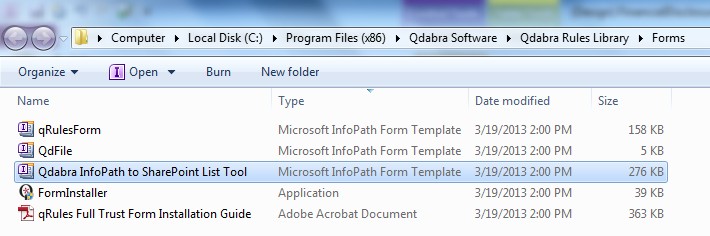
I'm sorry, I'm not sure what shorcut you're referring to. Are you talking about opening the tool directly from the folder? (screenshot attached) If so, we expect that should work. I would also expect the tool to open from the Installed Tools menu in InfoPath Filler 2010 (same steps you have followed on your 2nd machine).
If you'd like one on one assistance to debug the issue, we can open a support ticket and schedule a support call. If you'd like to pursue this option, please contact us via support at qdabra dot com.
Thank you.