Hi,
I have done similar edits and lookups in Infopath, for calculating default due dates based on different priority categories (which are defined in another list, accessed via secondary data connection).
From the description above I am not sure which is your main connection & what exactly are you trying to save, however:
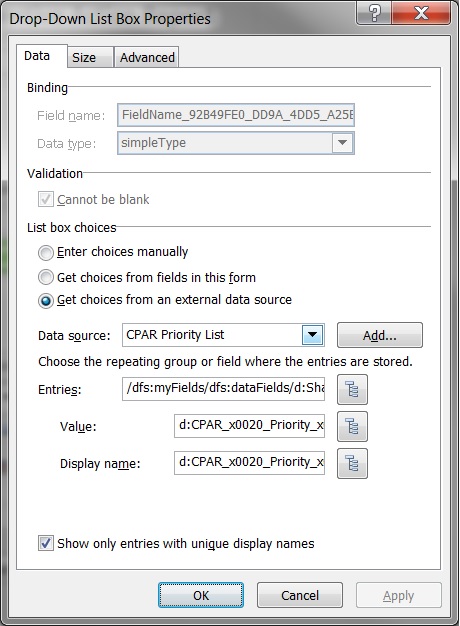
1) if you try to save the actual name shown in the drop down list control (the priority class name itself) you should have value and display name point to the same field (shown in the picture).
- now you can put a rule on the drop down list box, which will activate with any change and run the actions you specify for the rule, maybe setting the rest of the fields in the main connection using whatever calculation you need to do on the fields from the Jobs List or just save the value from secondary connection to the desired field in main connection.
- to select the proper field from the secondary connection you should use "a filter" when setting the field's value in the main connection.
Example:
xdDate:AddDays(../d:StartDate, round(xdXDocument:GetDOM("CPAR Priority List")/dfs:myFields/dfs:dataFields/d:SharePointListItem_RW/d:CPAR_x0020_Part2_x0020_Expiratio[../d:CPAR_x0020_Priority_x0020_Class = xdXDocument:get-DOM()/dfs:myFields/dfs:dataFields/d:SharePointListItem_RW/d:FieldName_92B49FE0_DD9A_4DD5_A25E_40E4FC4DE427_]))
Note: The long field names come from the Task List forms, I declared a number of custom fields which should only appear as part of the Approval process, but not anywhere in the formal documents or views.
2) If you are trying to save only a single value, tied to the Job code selected, to the main connection then you just need to specify in the "value" property of the list box, which field exactly you want to save.
The rest is about the same as the first case. You still will be able to use action rules to set any neccesary fields from the secondary connection by using filters on each one, matching the filter with the "Value" field from the Drop down List box properties.
Hope that helps.