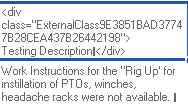
I created a new form based on an existing SharePoint list. Of course when I started building the form I had all the list columns from the list available to use, with data. The existing columns displayed on the form, all I had to do was arrange them in sections like I needed. I saved and p[published the form to the list. Everything appeared to work good until I tried to view a new test item I just added in the datasheet view. The text in one of the fields appears with HTML wrapped around it. The items that are already in the list appear as normal text.
Can someone help me with this? I have added a screenshot so you can see what I am talking about.
I
On another note, I didn't use all the columns from the existing list in the Infopath form. The columns still have information that is needed for reviewing. How can I display those columns like I would without an Infopath form?