My "Or" Rule does not work, but changing it to an "And" rule makes it work - InfoPath Dev
in

InfoPath Dev

My "Or" Rule does not work, but changing it to an "And" rule makes it work

Last post 11-14-2012 06:56 AM by Hilary Stoupa. 2 replies.
Page 1 of 1 (3 items)
Sort Posts: Previous Next
  • 11-09-2012 11:58 AM

    • tborja
    • Not Ranked
    • Joined on 11-09-2012
    • Posts 2

    My "Or" Rule does not work, but changing it to an "And" rule makes it work

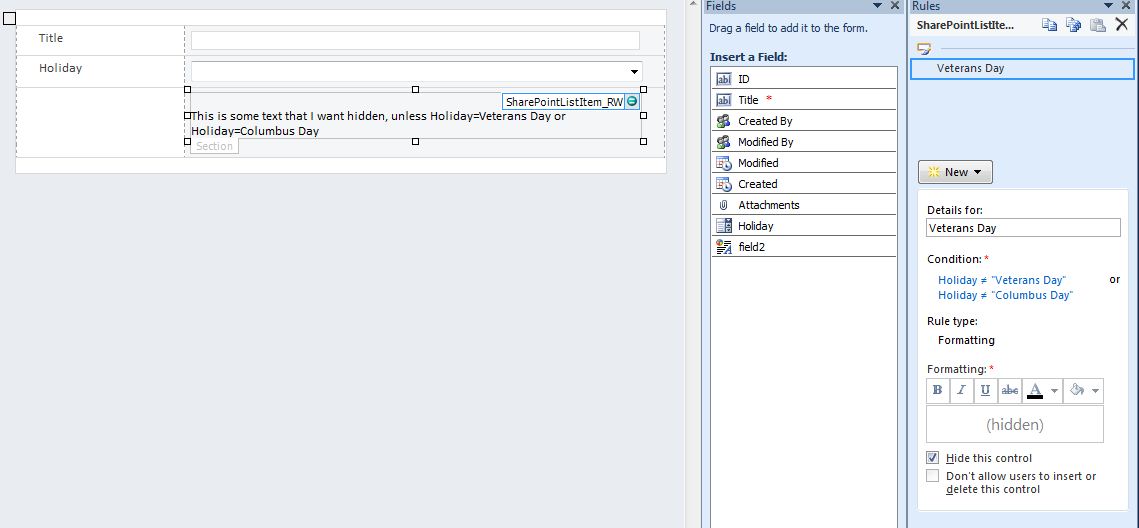
    I have a drop down menu that contains a list of holidays (only one selection can be made). I also have a section container with some instructional text. I have created a rule so that this instructional text is hidden unless my drop down menu selection is Columbus Day or Veterans Day. When I create the rule as an "Or" rule it does not work. But when I make it an "And" rule it does work. This doesn't make sense because the drop down field does not allow for two selections to be made. Does anyone know why the "Or" rule is not working?

    I have included a screenshot of my rule.

  • 11-14-2012 03:57 AM In reply to

    Re: My "Or" Rule does not work, but changing it to an "And" rule makes it work

    That's correct. It should be the AND rule that you use. I know it can be confusing like this but if you think of it like "instructional text is not equal to Columbus Day and its not equal to Veterans Day so hide this control" it can make a bit more sense

  • 11-14-2012 06:56 AM In reply to

    Re: My "Or" Rule does not work, but changing it to an "And" rule makes it work

    That's a great tip, luke20 - thanks! I also struggle with "And" and "Or" and when to use what - this will help me.
    Hilary Stoupa

Page 1 of 1 (3 items)
Copyright © 2003-2019 Qdabra Software. All rights reserved.
View our Terms of Use.