not sure how to label, anyone up for a challenge multiple options/checkbox/req fields - InfoPath Dev
in

InfoPath Dev

not sure how to label, anyone up for a challenge multiple options/checkbox/req fields

Last post 09-21-2012 01:54 PM by Hilary Stoupa. 9 replies.
Page 1 of 1 (10 items)
Sort Posts: Previous Next
  • 09-19-2012 04:35 PM

    • wendyh
    • Not Ranked
    • Joined on 09-19-2012
    • Posts 5

    not sure how to label, anyone up for a challenge multiple options/checkbox/req fields

    Let me begin by saying, I'm not a developer or programmer. I'm a secretary that someone said can your revise a form, sure; in InfoPath, probably.

    So I make this form that now opens and there are three options.
    Create User Id
    Modify User Id
    Delete User Id

    It works great, make your selection and the correct formlet (mywording) pops up and you fill it out and send. Now they decided on the delete portion where they had all these text boxes and check boxes which we know you can select more than one text box, they want to make it so when you select one of the three options that have now been turned into option buttons, that the stuff pops up that is either optional or mandatory.
    It took me 4 hours to get them to iron out and confirm what's mandatory when and what's optional when as I saw no point in attacking how until Iknew what.
    Then it took me another two hours, keep in mind I do this with a hundred different interruptions for totally ridiuclous stuff, to sort out what I think is the logic to the situation.

    You have 3 selections, i'm thinking option buttons: Disable User ID, Delete User Id, Delete User Id don't delete email.
    I've could attach a table what I think the logic is, in the form of a pdf, and of course I could be wrong, but if the logic seems logical to you, could you please suggest how I might accomplish this?

    0=option buttons, the little boxes= check boxes
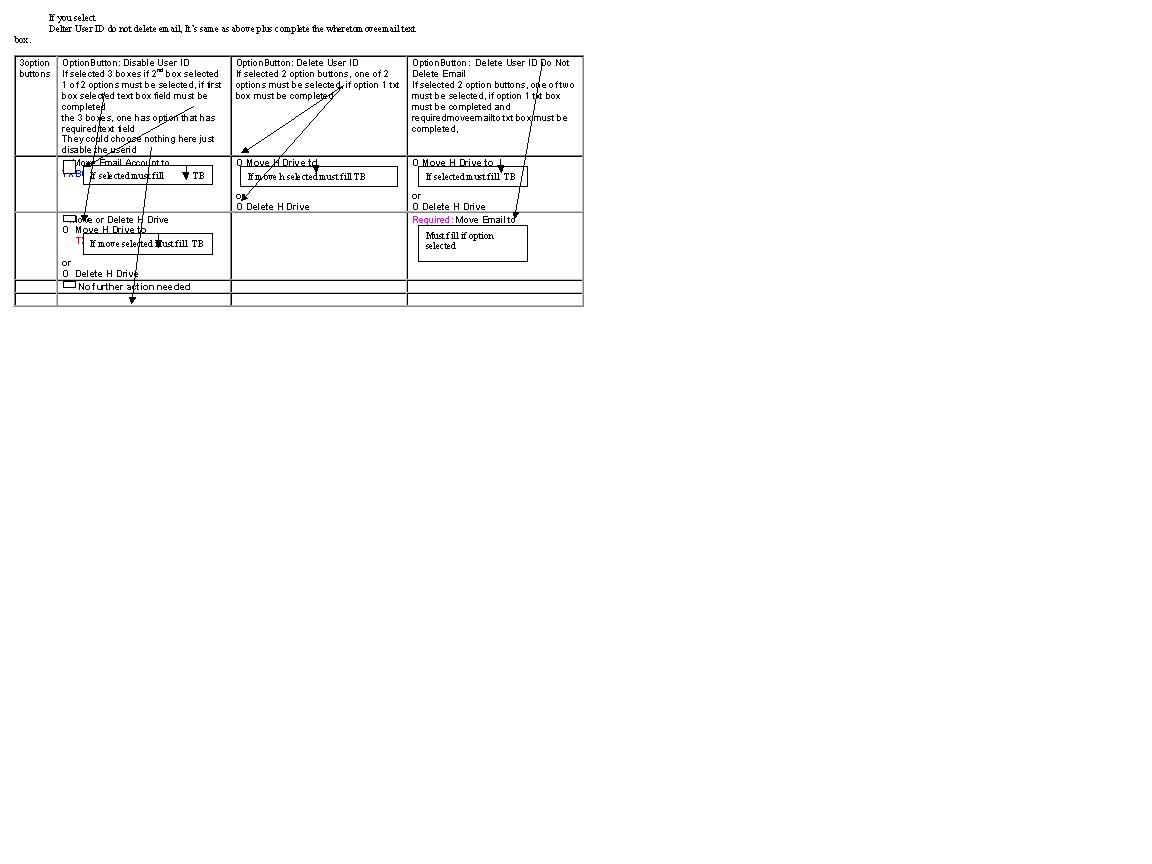
    First option button:
    0 Disable User ID
    If selected 3 boxes show (if 2nd box (move or delete) selected, 1 of 2 options must be selected, if first box (move) selected text box field must be completed)
    these would be the 3 boxes, one has option that has required text field
    □ Move Email Account to TXBOX4Where
    □ Move or Delete H Drive
    0 Move H Drive to TXBOX4Where
    or
    0 Delete H Drive
    □ No further action needed

    Second Option Button:
    0 Delete User ID
    If selected 2 option buttons, one of 2 options must be selected, if option 1 txt box must be completed
    0 Move H Drive to TXBOX4where or
    0 Delete H Drive

    Third Option Button:
    0 Delete User ID Do Not Delete Email
    If selected 2 option buttons, one of two must be selected; if option 1 selected then txt box must be completed and regardless of which of the two options are selected the text box for where to move the email to must be completed.,
    0 Move H Drive to TXBOX4Where
    or
    0 Delete H Drive
    Required: Move Email to TXB4Where

    Now here's the kicker, before I started I asked, is everyone in the on Office 2010. Yep, are you sure, yep everyone's on 2010. So I send what i have done to the committee that's behind this and one of the people can't open it because they're on 2003. So what I've done so far I've been able to save in 2003 and everything works. So whatever i do in the future needs to work for those still lagging behind on 2003.
    I would appreciate any guidance you would be willing to give as to what I need to do to put this section in the delete section (formlet). thanks in advance.
  • 09-20-2012 07:46 AM In reply to

    Re: not sure how to label, anyone up for a challenge multiple options/checkbox/req fields

    Hi!

    You can totally do this.

    I'm attaching a sample because I find it kind of hard to write my way through these things & easier to just build it, you know? So, there is a link to the sample form in the heading of this post - right click that link and save the file locally. From there, because InfoPath fusses about being moved, you need to right click the file you just saved and select Design - then you can open the form in design mode and preview. Hopefully this will give you some ideas for an approach.

    Please excuse me for not giving my fields proper names in this sample - I just wanted to put together something quickly to help you. Additional sections / conditional formatting could also be used to hide the text boxes for "where" unless those options are selected - again, hopefully this is enough to give you a general idea. I only created the first option in this sample.

    Hilary Stoupa

  • 09-20-2012 08:16 AM In reply to

    • wendyh
    • Not Ranked
    • Joined on 09-19-2012
    • Posts 5

    Re: not sure how to label, anyone up for a challenge multiple options/checkbox/req fields

    thanks, this helps a lot, I wish there was a way I could attach what I had worked out so far.  So I can see how this sample you sent could be edited and work for all 3 scenarious,  I don't know how to tie them together so,  I don't know how to copy and paste complete chunks of stuff, sorry on the terminology?  maybe I just start with a  table with 3 colums and start building it down, first option being what you gave me, second option modified what you gave, third modified again?  I'll keep pluggin away, thanks again.


  • 09-20-2012 09:12 AM In reply to

    • wendyh
    • Not Ranked
    • Joined on 09-19-2012
    • Posts 5

    Re: not sure how to label, anyone up for a challenge multiple options/checkbox/req fields

    i've added two more options to field 1 and tried modifying the rules so that sectons used in all 3 show, I'm not geeting it, it's not working for me.  Example Move Email is required if you check the box under disable and would also be required if the third option button were selected.  I can't make it do that.

  • 09-20-2012 09:18 AM In reply to

    Re: not sure how to label, anyone up for a challenge multiple options/checkbox/req fields

    Can you attach what you have done under the Options tab in a reply? It may be this evening before I have time to take a look...

    Hilary Stoupa

  • 09-20-2012 11:37 AM In reply to

    • wendyh
    • Not Ranked
    • Joined on 09-19-2012
    • Posts 5

    Re: not sure how to label, anyone up for a challenge multiple options/checkbox/req fields

    Yes, I was able to do that.  Thanks for any help, I consider it a miracle I've gotten this far.  I have to actually spend the rest of the afternoon being a secretary so I probably won't get to play with it anymore today, it's 2:30 here and big meeting needs the agenda and supporting docs sent out so I now have to beg people for stuff that was due a week ago.

  • 09-20-2012 03:27 PM In reply to

    Re: not sure how to label, anyone up for a challenge multiple options/checkbox/req fields

    I'm so sorry, I keep re-reading the post before this one, and I have no idea what you are trying to say.

    I did notice that I may have confused you by using the false() function - if you set a field's value to false(), you'll want type that into the forumula editor - otherwise, use false (just the word w/out the parenthesis).

    Looking at your form - I think you might be trying to say that Move Email is required if the user selects Disable User ID, or selects Disable User Id, do not delete Email account? But what do you mean by "required"? The user has to check the box?

    Hilary Stoupa

  • 09-20-2012 07:38 PM In reply to

    • wendyh
    • Not Ranked
    • Joined on 09-19-2012
    • Posts 5

    Re: not sure how to label, anyone up for a challenge multiple options/checkbox/req fields

    I was trying to say I have to quite working on it for a while. It's not my regular job.
    Move Email is required on the third option: Disable user Id do not delete email account. If you select that option you have to say what to do with the email. That's in text box that would be required under that condition.
    Move Email and to where is not mandatory under the Disable User Id. That might be a situation where someone is on medical leave, and they're just disabling the user ID. Emails not going anywhere, H driving remaining, we expect the person to return. They might want it moved somewhere if perhaps someone was suspended or it's a generic id attached to a generic mailbox and a lawsuit comes up, they might want it moved somewhere other than where it currently resides.

    restated:

    As to where i'm stuck:

    IF Disable User Id is selected they can do nothing more, hence No further action needed or they can elect to Move the Email Account. If they elect to move the email account they have to say where, so there is also a text box that has to be there and required if Move Email Account is checked. They could also elect to Move or Delete H drive (check Box) which has two options Move to and a text box that would then be required indicating where to move to or simply delete the H drive.
    If they select Delete User ID do not Delete email the one thing they have to do is say where to move the email, so that needs a text box that would be required no matter what. They also have the option to Move or Delete the H Drive (option buttons) and if the option to move the H drive is selected they need to complete a text box saying where to move to, so that text box would be required.
    I've attached a file I took from a word doc and did the best i could to indicate where option buttons, check boxes and required text fields are and i think they correspond with my previous form I uploaded. thanks. wendy
  • 09-21-2012 09:34 AM In reply to

    Re: not sure how to label, anyone up for a challenge multiple options/checkbox/req fields

    Yes, I understood that bit. Here's what I didn't understand:

    i've added two more options to field 1 and tried modifying the rules so that sectons used in all 3 show, I'm not geeting it, it's not working for me. Example Move Email is required if you check the box under disable and would also be required if the third option button were selected. I can't make it do that.

    Thanks for the additional info, I'll read and reply later today.

    Hilary Stoupa

  • 09-21-2012 01:54 PM In reply to

    Re: not sure how to label, anyone up for a challenge multiple options/checkbox/req fields

    Hopefully this will help.

    Hilary Stoupa

Page 1 of 1 (10 items)
Copyright © 2003-2019 Qdabra Software. All rights reserved.
View our Terms of Use.