SubmitToSharePointList doesn't pull ID upon first submission - InfoPath Dev
in

InfoPath Dev

SubmitToSharePointList doesn't pull ID upon first submission

Last post 09-10-2012 02:01 PM by Deeayrian. 8 replies.
Page 1 of 1 (9 items)
Sort Posts: Previous Next
  • 09-10-2012 08:03 AM

    SubmitToSharePointList doesn't pull ID upon first submission

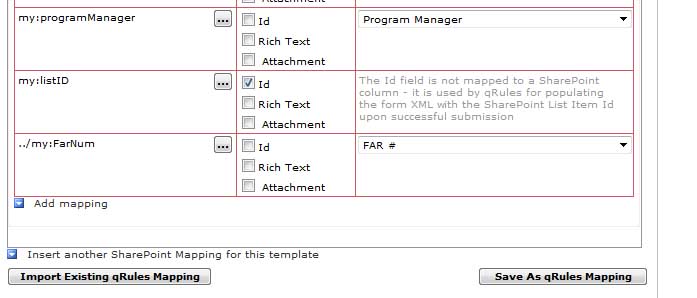
    I have got everything working almost perfectly with the SubmitToSharePointList command in qRules and I love it.   However, I have noticed the following is occuring.  I submit the form and it creates the list items perfectly.  But, it doesn't place the associated list ID number in the List ID field I created in the form.  But if I open the same form and make a change to the data that  gets submitted to the list, then it creates a 2nd list entry and this time it pulls the ID from the list into the List ID field on the form. After the 2nd submission to the list, it does not create duplicate list entries anymore because the list ID is associated to the form as it should be.    

     Is there something I can do to ensure the ID gets pulled into the form the first time it is submitted?  I need to avoid any duplicate entries in the list.

  • 09-10-2012 08:33 AM In reply to

    Re: SubmitToSharePointList doesn't pull ID upon first submission

    That's odd. Is this happening in the browser? Or Filler? If you try in preview (with the list id field displayed so you can see it) does it get populated?

    Hilary Stoupa

  • 09-10-2012 09:38 AM In reply to

    Re: SubmitToSharePointList doesn't pull ID upon first submission

    It is happening in the browser.  I am not sure I could get it to work in Preview since I am unable to actually submit it to a list in Preview mode....unless I am missing something?
  • 09-10-2012 09:52 AM In reply to

    Re: SubmitToSharePointList doesn't pull ID upon first submission

    Your form doesn't work in preview? What happens? Do you get an error message in the error node? I always test my forms in preview prior to publishing, and don't have problems with the command in preview.

    Hilary Stoupa

  • 09-10-2012 10:55 AM In reply to

    Re: SubmitToSharePointList doesn't pull ID upon first submission

    When I am in preview mode, fill out the form and submit it....it just closes the form and I don't see the List ID number populate in the field before it is closed.  When I try to open the form in the library that was generated from a preview, I get the error message that the form is not fully trusted....which isn't true and it works fine with I actually publish it and submit it. 
  • 09-10-2012 11:06 AM In reply to

    Re: SubmitToSharePointList doesn't pull ID upon first submission

    Could you temporarily change your submit options to not close the form on submit?

    Hilary Stoupa

  • 09-10-2012 11:26 AM In reply to

    Re: SubmitToSharePointList doesn't pull ID upon first submission

    Interesting.  I turned off the option to close the form upon submit, tried it again in preview mode and it worked!  The list ID populated in the field.  So what could be causing it not to populate when it is actually submitted?  Could it be the submitting order?    I published the form with the option to close the form upon submission turned off again and it did populate in the form view, but when I went to open the actual form that got submitted to the library, the List ID was not populated in the field. 
  • 09-10-2012 11:33 AM In reply to

    Re: SubmitToSharePointList doesn't pull ID upon first submission

    I bet you are submitting to your SharePoint library before running the qRules command. You want the ID populated before you submit the XML to SharePoint. :-)

    Hilary Stoupa

  • 09-10-2012 02:01 PM In reply to

    Re: SubmitToSharePointList doesn't pull ID upon first submission

    Yes!  You are correct. I thought I had to do that because I needed to pull an automatically incrementing generated number from the form when it submitted to the library, but apparently the number is created before it is actually submitted, so switching the order of the submits worked!  Thanks so much!!
Page 1 of 1 (9 items)
Copyright © 2003-2019 Qdabra Software. All rights reserved.
View our Terms of Use.