REST vs OWSSVR - InfoPath Dev
in

InfoPath Dev

REST vs OWSSVR

Last post 09-11-2012 07:45 AM by Hilary Stoupa. 5 replies.
Page 1 of 1 (6 items)
Sort Posts: Previous Next
  • 09-04-2012 10:27 PM

    REST vs OWSSVR

    Hallo,


    I watched Hilary’s REST video again. I knew REST but had not used it so far in a form, so I freshed up a little on the topic.


    I guess I have a typical question, but cannot give myself a perfect answer.

    As you know I need to  syncronize a taks list via qrules. And we are doing this via OWSSVR. To make it performant, we put a View-Filter to owssvr-Connection and probably a resultprotocol number filter to this. This should work nicely.

    Will this work with REST as well?


    Second.

    I have to query the UserInformationList. Will I do this with OWSSVR or shall I do it with REST?


    I don’t understand really, what feature I lose choosing REST before OWSSVR and vice versa.

    Maybe you guys could clarify?


    Thanks!

    Filed under: ,
  • 09-10-2012 03:57 PM In reply to

    If you are not using Office365, I would use REST - why? Because I think it is simpler. I think the logic is easier to follow in the form.

    However with Office365, the REST web service is disabled.

    Hilary Stoupa

  • 09-10-2012 10:29 PM In reply to

    Hilary Stoupa:
    However with Office365, the REST web service is disabled
     

    Can you give a reference?
    I read a few replies of Office365 support telling that it should work and am still confised on this.

     I understood that calls to external  REST-services (and SOAP web services) are disabled in Office 365 (Sharepoint Online) but not to internal or built-in into Sharepoint (Online) server REST services.

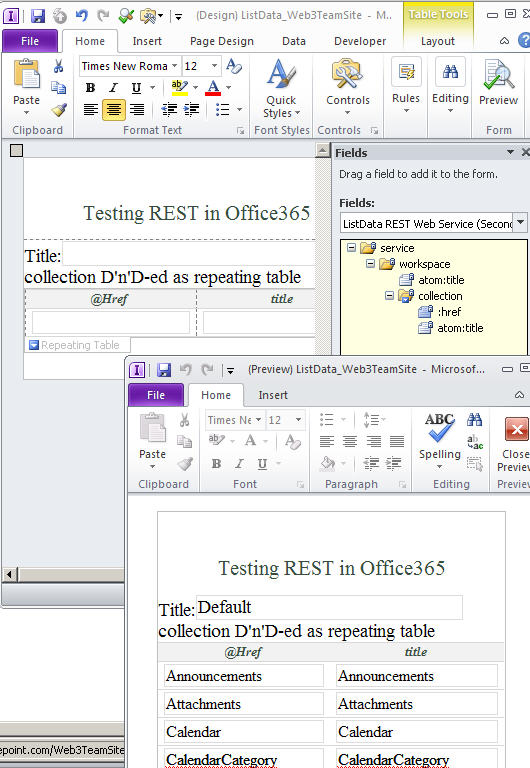
    That is, I succcesfully use a secondary data connection having clicked From  REST WebService (< From Web Service < Data tab on ribbon of Infopath Designer 2010) from my Office365 (sharepoint Online) subsite:

    • https://gennadyvanin.sharepoint.com/Web2/_vti_bin/ListData.svc  

    filling Infopath form data fields in Infopath Filler form, see enclosed screenshot.

    Though, I failed to connect to it from browser form having gotten:

    •  An error occurred querying a data source.
      Click OK to resume filling out the form. You may want to check your form data for errors.

      Error details:
      The underlying connection was closed: An unexpected error occurred on a receive.

      An entry has been added to the Windows event log of the server.
      Log ID:5566

      Correlation ID:c51bf7c2-7498-4603-a103-c342c2ef9f41


    Also when I try to create a data connection from/to external REST web services, like

    •  http://www.weather.gov/forecasts/xml/sample_products/browser_interface/ndfdXMLclient.php?zipCodeList=19115&product=time-series&begin=2012-09-09T00:00:00&end=2012-09-12T00:00:00&maxt=maxt&mint=mint
    which seems to be blocked for me: 
    • From Infopath browser form, I am getting an error:
      A query to retrieve form data cannot be completed because this action would violate cross-domain restrictions. 

      If this form template is published to a SharePoint document library, cross-domain access for user form templates must be enabled under InfoPath Forms Services in SharePoint Central Administration, and the data connection settings must be stored in a UDC file in a data connection library in the same site collection.  
    • from Filler/Prview, I am getting:
      The query cannot be run for the following DataObject: REST Web Service
      InfoPath cannot run the specified query.
      The data source file is accessed through a redirection from a different domain, which is not allowed. If you want to use this data source file, copy it to a location within your security domain.
      Access is denied
    • etc., etc.

    and that cross-domain access cannot be enabled in Office 365 (sharepoint Online)

    Correct me where I am wrong

    Gennady Vanin (Novosibirsk) --- Геннадий Ванин (Новосибирск)
  • 09-11-2012 12:21 AM In reply to

    Thanks Hilary,

    I will do a few queries with REST and will get the hang of it. I agree it is quite simple and nice, to have the query in the URL.

    Michael

  • 09-11-2012 07:43 AM In reply to

    I was unclear. In our experience and what we have seen reported in the forum - SharePoint REST connections are disabled in browser forms.

    Hilary Stoupa

  • 09-11-2012 07:45 AM In reply to

    joanfuture:

    Thanks Hilary,

    I will do a few queries with REST and will get the hang of it. I agree it is quite simple and nice, to have the query in the URL.

    Michael

    I like to just try them in the browser to get the hang of them - sometimes you have to view source on the page to see your results. The OData protocol page has lots of info too.

    Hilary Stoupa

Page 1 of 1 (6 items)
Copyright © 2003-2019 Qdabra Software. All rights reserved.
View our Terms of Use.