How to import SharePoint list columns into a repeating table? - InfoPath Dev
in

InfoPath Dev

How to import SharePoint list columns into a repeating table?

Last post 09-01-2012 10:05 AM by Gennady Vanin (Геннадий Ванин, Новосибирск). 4 replies.
Page 1 of 1 (5 items)
Sort Posts: Previous Next
  • 08-30-2012 09:30 AM

    How to import SharePoint list columns into a repeating table?

    Using InfoPath 2010 how do you import data from a specific column into a repeating table?

    I already have a connection setup to the SharePoint list and I can pull in the data into a List Box. I would like to do the same but with a repeating table but I am not sure how. Only the first cell populates with the first entry from the SharePoint list column.

    In the list box properties the entry is /dfs:myFields/dfs:dataFields/d:SharePointListItem_RW and Value is d:Title

  • 08-30-2012 09:40 PM In reply to

    Re: How to import SharePoint list columns into a repeating table?

    srudenko:

    Using InfoPath 2010 how do you import data from a specific column into a repeating table?

    I already have a connection setup to the SharePoint list and I can pull in the data into a List Box. I would like to do the same but with a repeating table but I am not sure how. Only the first cell populates with the first entry from the SharePoint list column.

    In the list box properties the entry is /dfs:myFields/dfs:dataFields/d:SharePointListItem_RW and Value is d:Title

    Sharepoint List Form data fields is directly associated with list fields, so creating/changing a list schema in sharepoint is reflected in such form (main data connection), upon its refreshing/reopening,  and changing/adding data fields in the main data connection of this form is reflected  in a list, after its publishing.  So, the term "import" is improper to use in this context.

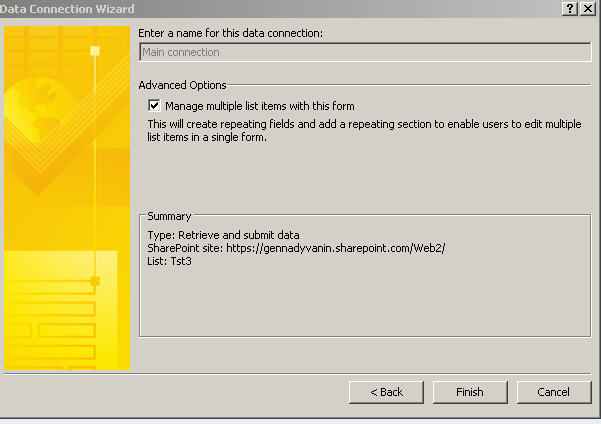
     In order to have repeating sections or tables you should have checked 

    • Manage multiple list items with this form

    while creating Sharepoint List Form template (Main Data Connection).

    If you have not done this at the moment of creating form/Main Data connection, IMO, it cannot be changed, so you should recreate list form (which implies recreating main data connection)

    For existing list, having already published sharepoint list form, you should disassociate list from already published template, for example, in list advanced settings. In browser navigate to list > List tab > List Settings > Form Settings > check both Use the default Sharepoint form and Delete the Infopath Form from the server > OK

     Don't use "Customize Form" button from sharepoint but from Infopath Designer 2010 Design Form < Sharepoint List < New < File, on ribbon to have ability to check

    • Manage multiple list items with this form 

    at Infopath Sharepoint List Form and (Main) Data connection creation


     Infopath Sharepoint List Form Settings


    Gennady Vanin (Novosibirsk) --- Геннадий Ванин (Новосибирск)
  • 08-31-2012 01:49 AM In reply to

    Re: How to import SharePoint list columns into a repeating table?

    Gennady Vanin (Геннадий Ванин, Новосибирск):
    If you have not done this at the moment of creating form/Main Data connection,
     

    It is possible to export source files, to edit manifest.xsf finding and changing a string from 

    • queryOneItemOnly="yes"

    to

    • queryOneItemOnly="no"

     then to save and publish (*) manifest.xsf as XSN template....

    (*) Though it requires to remove all previous ("non-repeatable") controls (in Infopath Designer 2010) and recreate them as "repeatable" because the old ones become to show: "Control cannot store data correctly" and preven publishing 

    So, IMO, it is possible to have all control/fields either only in repeating section/table or non-repeating one which is determined by properties of locked and non-modifiable OOTB Main Data Connection/Source  of Sharepoint List Form.

    Correct me where I am wrong


    Gennady Vanin (Novosibirsk) --- Геннадий Ванин (Новосибирск)
  • 09-01-2012 07:10 AM In reply to

    Re: How to import SharePoint list columns into a repeating table?

    I think there may be some mis-understanding. I am not trying to work with multiple InfoPath lists. I have a form and there is also a completely separate SharePoint list (not Infopath form list). This list has several columns and lets same column A is 'Software Name' I have a data connection already that successfully populates a List Box in the form with all the entries from this column. However, instead of using a list box I want to use a repeating table so that when it loads, cell 1 will show the 1st entry from the SharePoint list, cell 2 will show the 2nd entry and so on... This is the part that I can't get to to work because when the form loads the repeating table only shows 1 cell with the 1st entry from the list.
  • 09-01-2012 10:05 AM In reply to

    Re: How to import SharePoint list columns into a repeating table?

    srudenko:
    I am not trying to work with multiple InfoPath lists

    My answer from previous post cannot be applied to an Infopath form associated to many sharepoint lists and explained how to use a repeating table linked to submit  many items of one sharepoint list through Main Data Connection/Source.

    Update: Though, it is rather for creating (or "exporting", though it is improper term) not showing (or "importing") many items of a sharepoint list in Infopath form repeating table.


    srudenko:
    However, instead of using a list box I want to use a repeating table so that when it loads, cell 1 will show the 1st entry from the SharePoint list, cell 2 will show the 2nd entry and so on... This is the part that I can't get to to work because when the form loads the repeating table only shows 1 cell with the 1st entry from the list.

    You should describe step by step tour situation because I cannot reproduce your problem.

    I see all items of a list in a repeating table from receive (aka secondary) data connection/source to a sharepoint list
    See enclosed screenshot


    Gennady Vanin (Novosibirsk) --- Геннадий Ванин (Новосибирск)
Page 1 of 1 (5 items)
Copyright © 2003-2019 Qdabra Software. All rights reserved.
View our Terms of Use.