Multi Select Listboxes - how to get at the data? - InfoPath Dev
in

InfoPath Dev

Multi Select Listboxes - how to get at the data?

Last post 08-29-2012 11:41 AM by ccondley. 2 replies.
Page 1 of 1 (3 items)
Sort Posts: Previous Next
  • 08-29-2012 05:52 AM

    Multi Select Listboxes - how to get at the data?

    Hi,

    I'm new to the forum and I spent some time browsing but can't find an answer.  I have a multi select listbox populated with states.  The user can select one or more states.  My very basic question is - how do I access that data?  I added the field in the publishing wizard, but when I create a new form in Sharepoint (2007, form created in InfoPath 2010), State remains blank in the view, as if the user hasn't selected anything.

    I also tried displaying the state selection in a textbox on the form and got nothing.  I feel like the data must be stored in an array but I'm not sure how to get to the values selected.  My goal is to be able to load any selected states into a textbox field and ultimately use them as part of the filename.

    Thanks in advance for any help you can provide!

    Chris

    [email protected]

  • 08-29-2012 10:36 AM In reply to

    Re: Multi Select Listboxes - how to get at the data?

    Hi Chris,

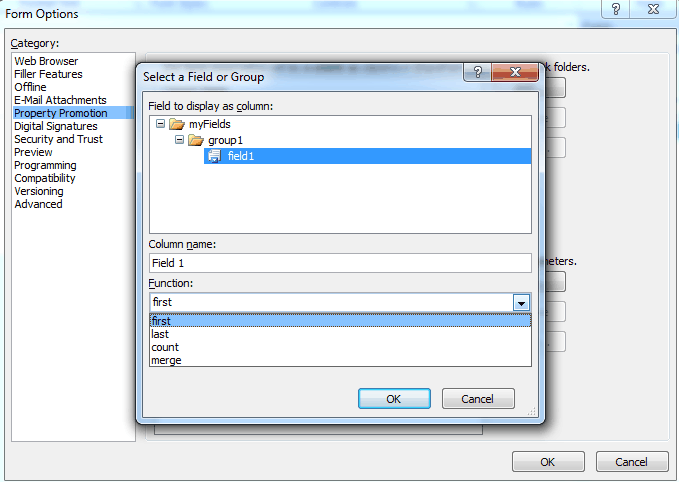
    The multi select list box is a repeating field, so when you promote the property (so that it becomes a column in SharePoint), you are asked how to handle this. See the attached screenshot. You can select: first, count, merge or last.

    Which one have you selected and is it not providing the expected behavior?

    first displays the first item in the list

    count displays the count of items selected

    merge will merge all the data in the list

    last will select the last item

    Hope this helps!

    Ernesto Machado
    Qdabra® Software/ InfoPathDev.com
    The InfoPath Experts – Streamline data gathering to turn process into knowledge.™


  • 08-29-2012 11:41 AM In reply to

    Re: Multi Select Listboxes - how to get at the data?

    Hi Ernest,

    Thank you so much for the prompt response.  This will be very helpful for publishing to sharepoint.  However, I need the multiple values *in* InfoPath.  I found a formula that seems to work for list box [eval(eval(.., 'concat(., "    ")'), "..")] <-I put this in a rule on the state list box and it gave me the multiple values (I'm using it as part of a filename so it has to be populated at submit time).

     Now I'm trying to create a list of email addresses using the Person/Group picker and finding this to be even more challenging.  A) email address is not one of the available fields, and B) when I allow for multiple selections I'm back to the same problem as above - I need to concatenate these values together. 

    Trying to figure out if I'm just not that bright or if some of this InfoPath functionality is a little clunky!

     Thanks again!!

    Chris

Page 1 of 1 (3 items)
Copyright © 2003-2019 Qdabra Software. All rights reserved.
View our Terms of Use.