Deleting a Field Infopath - InfoPath Dev
in

InfoPath Dev

Deleting a Field Infopath

Last post 08-24-2012 08:57 AM by alexj. 3 replies.
Page 1 of 1 (4 items)
Sort Posts: Previous Next
  • 08-24-2012 08:15 AM

    • alexj
    • Not Ranked
    • Joined on 07-05-2012
    • Posts 18

    Deleting a Field Infopath

    How do I completely delete a field in design mode on my form?  I can delete the actual text box or such easily, but the field remains forever

  • 08-24-2012 08:47 AM In reply to

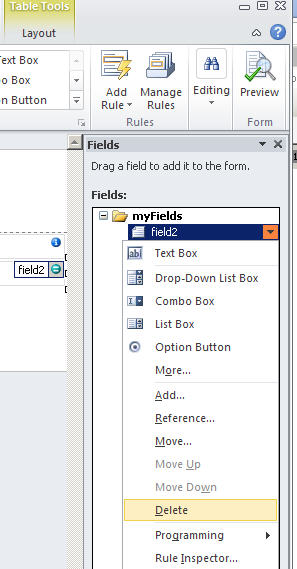
     In fields pane right-click on a data field and choose Delete

    On design surface you are just deleting  a control, which is a visual representation of a data field

    It is possible to have a control with an underlying  data field deleted and vice versa a data field without associated control (for visual rendering of the associated data field) 


     Unbound control (underlying data field was deleted)

    Fig.1. Unbound control (underlying data field field1 was deleted)

    Gennady Vanin (Novosibirsk) --- Геннадий Ванин (Новосибирск)
  • 08-24-2012 08:55 AM In reply to

    • alexj
    • Not Ranked
    • Joined on 07-05-2012
    • Posts 18

    Re: Deleting a Field Infopath

    I am sorry, but I do not seem to see the fields pane?  Where do I find that?

     I have 'Layout, Controls, Data Source, Views, Design Checker, Publish Form Template'

  • 08-24-2012 08:57 AM In reply to

    • alexj
    • Not Ranked
    • Joined on 07-05-2012
    • Posts 18

    Re: Deleting a Field Infopath

    Oh!  Thank you very much for adding the picture!

     I see it now, it is labeled 'data source' for me, not fields!

     I have now successfully deleted the errant field

Page 1 of 1 (4 items)
Copyright © 2003-2019 Qdabra Software. All rights reserved.
View our Terms of Use.