Qrules SetValue - InfoPath Dev
in

InfoPath Dev

Qrules SetValue

Last post 08-17-2012 10:57 AM by BejeweledOne. 7 replies.
Page 1 of 1 (8 items)
Sort Posts: Previous Next
  • 08-03-2012 09:18 AM

    Qrules SetValue

    I am trying to setup a 'History' table in one of my forms. I have the repeating table and have setup the Insert to insert a blank row on resubmit if a certain field is not blank.

    My next rule needs to be to populate that blank row (2 fields) with the data from 2 other fields on the form. I am using qRules (4.1) for the very first time with this so I am very, very new to it.

    I am trying to follow the guidelines in the user guide but am not sure my syntax is right nor if I am doing it right.

    So to do this I should do an action rule, with 'Set a fields value' and select Qrules - command. Then in the function box, enter this: (I think it might be right)

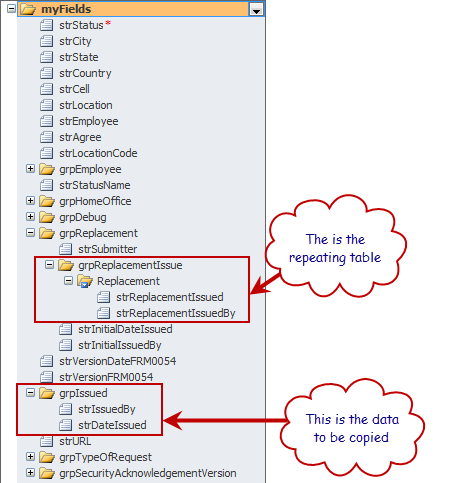
    SetValue /xpath=/my:myFields/my:grpReplacement/my:grpReplacementIssue/my:Replacement/my:strReplacementIssued /value=/my:myFields/my:grpIssued/my:strIssuedBy

    Here is my structure: Reference datastructure.png

    When I try to set this rule though I get this error: "SetValue/xpath" does not point to a valid location path of a field or group.

    Help!

    Filed under: ,
  • 08-03-2012 09:54 AM In reply to

    Your error indicates that in your command you don't have a space between "SetValue" and "/xpath" - although in the command above, you seem to - could you check that first?

    I think you may want to use "last()" here as well, since your inserted row is probably going to be the last one, and you'll need a concat formula, so that you are passing in the actual value:

    concat('SetValue /xpath=/my:myFields/my:grpReplacement/my:grpReplacementIssue/my:Replacement[last()]/my:strReplacementIssued /value=', strIssuedBy)

    You'll use the field picker to select strIssuedBy when you create the concat formula. So, the command takes the XPath to the node who's value you want to set, and then the actual value (not XPath to the value field).

    Hilary Stoupa

  • 08-03-2012 10:20 AM In reply to

    I noticed the space as well and checked that and still received the error, so I don't know what that was about. When I copy what you put here however I can save it without an error.
  • 08-06-2012 11:48 AM In reply to

    One other question. I did get this partially working. The first action to copy infomation into the first field in the repeating table row works, but the second action to copy data into the second field in the same repeating row did not work. Is there something special that I need to do when copying data into the second field on a repeating row?
  • 08-06-2012 12:10 PM In reply to

    Here's another post where this same scenario just came up, see if it helps you - if not, let me know. :-)

    Hilary Stoupa

  • 08-07-2012 04:10 AM In reply to

    So if I understand this correctly, I should create the rule to populate the second field on the first field (condition: when field changes)?
  • 08-07-2012 08:37 AM In reply to

    Oh, I think I may have misunderstood here.

    So - I originally put in a formula that would set the value of the last instance of the row.

    concat('SetValue /xpath=/my:myFields/my:grpReplacement/my:grpReplacementIssue/my:Replacement[last()]/my:strReplacementIssued /value=', strIssuedBy)

    Your form logic inserts a new row, and then this should populate the newly inserted row. I'm sorry, I am kind of confused as to what is not working correctly for you?

    Hilary Stoupa

  • 08-17-2012 10:57 AM In reply to

    That is correct. I have it working now. My row had 2 columns and it wasn't populating the second column but I have that working also. I have however added a 3rd column. Should I populate the 3rd column the same way I populated the 2nd column by triggering it when the first column is populated?
Page 1 of 1 (8 items)
Copyright © 2003-2019 Qdabra Software. All rights reserved.
View our Terms of Use.