Embedding Repeating Table Information in Another Repeating Table - InfoPath Dev
in

InfoPath Dev

Embedding Repeating Table Information in Another Repeating Table

Last post 06-06-2012 04:08 PM by Hilary Stoupa. 1 replies.
Page 1 of 1 (2 items)
Sort Posts: Previous Next
  • 06-06-2012 03:11 PM

    Embedding Repeating Table Information in Another Repeating Table

    Good day,

    I am a new member of the InfoPath community.  I have been tasked at creating a smart form and have enjoyed using InfoPath 2010.  I would like to embed information from one repeating table into another repeating table and have it auto adjust accordingly.

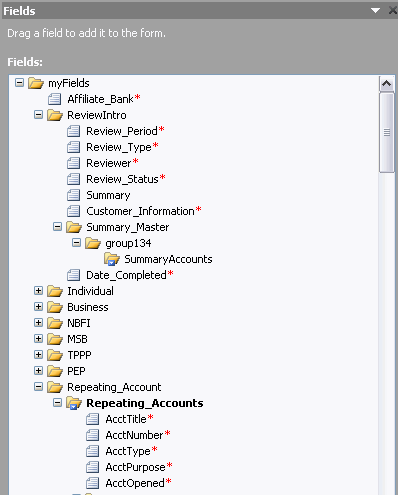
    Hopefully it is not too hard, and forgive me with the data source layout, it may be unappealing, but I am new. (please see attached image). From other posts I gather that this may be relatively easy to do.  Now, for the requirements.

    I would like to take the information from the 'Repeating_Account' section and show it in the 'Summary_Master' section.  I would like the following to populate

    • AcctTitle
    • AcctNumber
    • AcctType
    • AcctPurpose
    • AcctOpened 

    Because each account generated in the table will vary, I would like the information be be inserted in a summary section called the 'Summary_Master'

     So far I am trying this forumla with no avail

    /my:myFields/my:Repeating_Account/my:Repeating_Accounts[count(preceding-sibling::my:Repeating_Accounts) = count(current()/../../preceding-sibling::my:SummaryAccounts)]/my:AcctTitle

     I would appreciate any and all help possible. 

    *Update - as for the field names in the 'SummaryAccounts' repeating table, it can be simply:

    • AcctTitle2
    • AcctNumber2
    • AcctType2
    • AcctPurpose2
    • AcctOpened 2


    T Smoot
    Filed under: ,
  • 06-06-2012 04:08 PM In reply to

    Re: Embedding Repeating Table Information in Another Repeating Table

    Hi, and welcome.

    So you know - it is NOT easy to copy repeating data from one table to another - InfoPath offers no way to insert rows in your table without code (or qRules - which can do that and many other things).

    However - you don't really need a second table for displaying summarized info. Here's a link to a simple sample form. Save it locally, then right click on the form and select Design to open in design mode. The same repeating table is displayed twice on the form, but conditionally formatted to look like a summary table - the key here is the use of preceding-sibling in the formulas.

    Hilary Stoupa

Page 1 of 1 (2 items)
Copyright © 2003-2019 Qdabra Software. All rights reserved.
View our Terms of Use.