Show/Hide Template -- Some sections don't roll up, but instead leave large blocks of white space when they are not expanded. - InfoPath Dev
in

InfoPath Dev

Show/Hide Template -- Some sections don't roll up, but instead leave large blocks of white space when they are not expanded.

Last post 03-29-2012 09:00 AM by Hilary Stoupa. 3 replies.
Page 1 of 1 (4 items)
Sort Posts: Previous Next
  • 03-29-2012 05:00 AM

    • NoMojo
    • Not Ranked
    • Joined on 03-28-2012
    • Posts 2

    Show/Hide Template -- Some sections don't roll up, but instead leave large blocks of white space when they are not expanded.

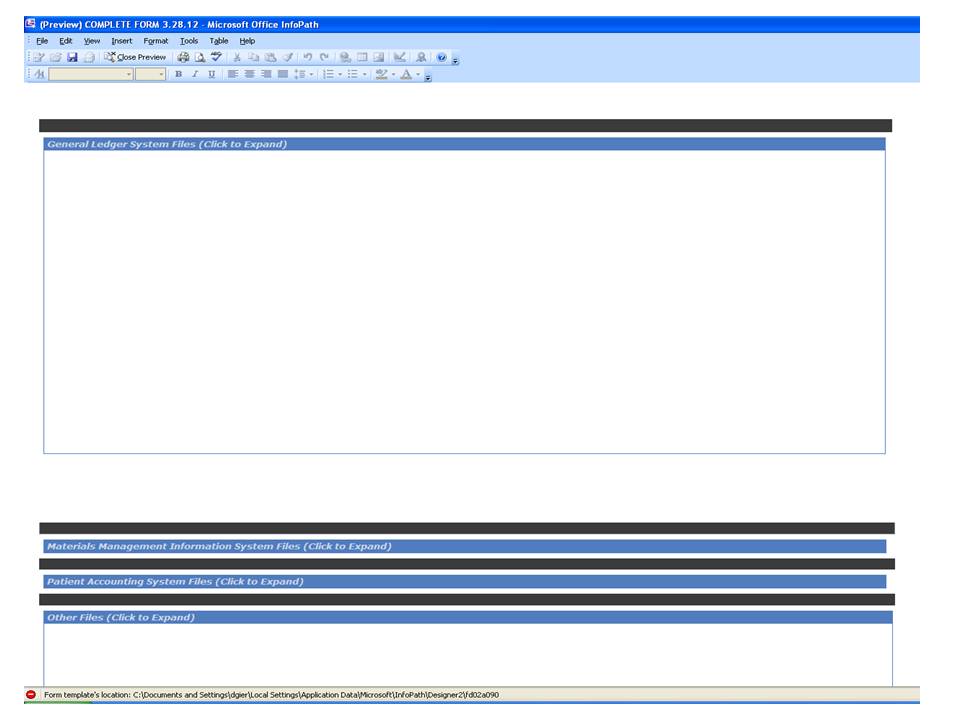
    I just purchased the template yesterday.  I loaded all six of my sections exactly the same way, yet some of them "roll up" the way they're supposed to when previewing or publishing the form, and some of them leave large blocks of white space where the expanded section was when it was open.  (I have attached a screen shot.)

    I created this with a QDabra template, not the "Optional Section" control.

    I'm using InfoPath 2003.

    I have tried using the TOOLS>FORM OPTIONS>ADVANCED>EDIT DEFAULT VALUES and unchecking the "HideShowSection" box (as well as playing around with other items in that field), but obtained the same results.

    I have tried applying the OPTIONAL SECTION control to the already-built sections with unwelcomed results.

    To the best of my ability, I have checked to ensure that all controls are set the same for each section.

    If some of the sections are working properly and others aren't, and if I built them all in the same fashion, then I should not be experiencing this problem.

    If anyone can help me quickly, I would really appreciate it! 


  • 03-29-2012 07:28 AM In reply to

    Re: Show/Hide Template -- Some sections don't roll up, but instead leave large blocks of white space when they are not expanded.

    I think for the sections where you are seeing large blocks of white space, InfoPath has changed the section height from Auto, or if they are in a layout table row, that has been set to a specific height rather than Auto - start checking the properties of the sections, layout table rows, etc for the affected areas.

    Hilary Stoupa

  • 03-29-2012 08:13 AM In reply to

    • NoMojo
    • Not Ranked
    • Joined on 03-28-2012
    • Posts 2

    Re: Show/Hide Template -- Some sections don't roll up, but instead leave large blocks of white space when they are not expanded.


    Thank you, Hilary, I'm not sure which one worked, but it seems like I had to select every table and change the row formatting.  I'm also not sure why, when I first built each section, they were working fine, but then they went off on me.  If I knew what triggered it, I could avoid it.

    Your help is GREATLY appreciated!

  • 03-29-2012 09:00 AM In reply to

    Re: Show/Hide Template -- Some sections don't roll up, but instead leave large blocks of white space when they are not expanded.

    You bet - InfoPath formatting gets funny sometimes. If you nudge a section or row the wrong way, it decides "Oh! You want this to be a specific size! Not Auto!" and tries to help you out. I spend way too much of my time trying to convince it otherwise.

    Hilary Stoupa

Page 1 of 1 (4 items)
Copyright © 2003-2019 Qdabra Software. All rights reserved.
View our Terms of Use.