Select and copy rows from repeating table to create an email - InfoPath Dev
in

InfoPath Dev

Select and copy rows from repeating table to create an email

Last post 03-21-2012 09:54 AM by Hilary Stoupa. 5 replies.
Page 1 of 1 (6 items)
Sort Posts: Previous Next
  • 03-20-2012 03:23 PM

    Select and copy rows from repeating table to create an email

    OK. I swear I have looked through these forums, MSDN and the web endlessly but I cannot find the relevant pieces to properly place these things together. I've even asked the question on the MS forums but it went unanswered for days (since deleted) so I am trying here. I know my way around SP but I not so much Infopath and I am not a dev but I'll go where the solution lies.

    Scenario: User has list in SP that tracks rejected materials. Every so often, the user needs to create a credit memo to send to the supplier showing the rejected items and calculates the cost of the order and totals up the complete credit. Today, its a copy and pasted into an Excel form. The user would like to just select the items to request credit for and hit a magic button to generate the email.

    Solution: I thought this would be easy to do in IP2010 but that is proving not the case and perhaps this isn't even the right solution. My plan was (is?) to use an IP2010 form that would suck in the list data and filter for the items that haven't been credited. I have done this using a secondary data connection, and dragging that connection onto the form as a repeating table. I have the flter set to only show the rows where a credit number doesn't exist.

    I have also managed to create a check box in the repeating table and binding that to a empty text column in the SP list. This was the only way that I could get a checkbox to work independently.

    Where I am stuck is what to do now. Can I select the rows from the repeating table and have an uber button that generates and email? Should make the uber button submit the form to a form library and then have a workflow gereate the email? Can I even go from the form to an email (I can't attach the InfoPath form as I can't assume the external recipients have IP2010).

    My secondary data source is: /dfs:myFields/dfs:dataFields/d:SharePointListItem_RW. 

    My target table in the main data source is: /my:myFields/my:group1/my:copyGroup_rTbl 

    I am not looking for the completed solution (that would be great) but really some direction.  Am I going about this right?  My weeklong search has me going down the path of a code solution which is fine.  If it were code, I think that it would be a button that would collect all the selected rows (where the control column=yes) and then generate an email.  Is there a non-code way to do this?  Also, not to be rude, but I can’t base it on qrules right now.


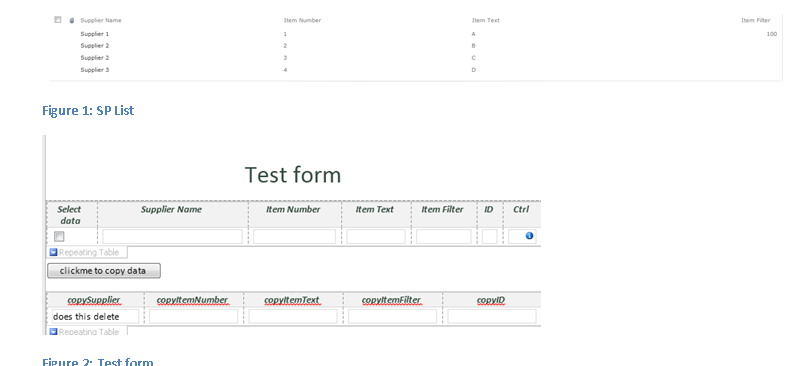
    Please advise….I have attached a file with screenshots of the SP list and the current form I am using for a POC.

  • 03-20-2012 03:45 PM In reply to

    Re: Select and copy rows from repeating table to create an email

    Hi there - you were smart to repurpose a SharePoint field for your checkbox - in your repeating table, you need for the fields to all belong to the repeating node the table is bound to in order for them to work right.

    If you want to copy multiple instances of your repeating secondary data source into your main data source - that's going to require code. But these items are all for the same supplier? So you'd want to send a single email from the form that covered the credits for all the items?

    I mean, you could use a double eval formula to get all the item names into a semi-colon delimited list, for example, and a sum formula to generate the total. That way your email would include the list of items and the sum of the credit - would that be adequate?

    Hilary Stoupa

  • 03-20-2012 04:12 PM In reply to

    Re: Select and copy rows from repeating table to create an email

    Thanks for the quick reply. 

    Yes, I want to copy multiple rows of data from the repeating secondary data into the main data source.  When the repeating table is populated, it may have rows of data pertaining to different suppliers.  The user would then select a subset of data for one supplier, roll that up in another table that does some extended cost calculations and fire that off in an email.  So if you look at the screenshot of the SP list, the repeating table would have 3 rows in it: 1 row for supplier3 and 2 rows for supplier2 (I am filtering the incoming data on whether the Item filter column is blank so Supplier 1 never shows up in the repeating table).  The user could select supplier 3 and send an email or, one or both rows for supplier2 and send an email.

    The actual email and SP list in production would contain a PO number, unit cost, possible discount information amongst other stuff so I am not sure a delimited list would suffice unless I re-queried the SP list to get all items for the matching ID and then dumped it into the main data source.

    I would probably need some condition around whether or not the box is checked such that if the box is checked, the query runs and if it is not checked, if the matching ID is in the main data source, delete that row.  Am I making this too complicated?  It seems so straightforward in my head (a problem to begin with)!

  • 03-21-2012 08:00 AM In reply to

    Re: Select and copy rows from repeating table to create an email

    Well, XPath filters make selecting the nodes with the boxes checked a pretty straight-forward exercise:

    /dfs:myFields/dfs:dataFields/d:SharePointListItem_RW[d:Checkboxfield = 'true']

    For example - with, of course, d:Checkboxfield replaced with your actual field XPath. You've mentioned qRules is not an option for you, so you'll need to write code - you can find samples online pretty easily that should get you started.


    Hilary Stoupa

  • 03-21-2012 09:30 AM In reply to

    Re: Select and copy rows from repeating table to create an email

    Would using qrules make this a whole lot easier?

  • 03-21-2012 09:54 AM In reply to

    Re: Select and copy rows from repeating table to create an email

    Well, you wouldn't have to write custom code to copy your repeating secondary data into your repeating main data source. You could use qRules commands for that - either Insert & SetValue if the schemas don't match, or CopyTable if they do. Here's a link to a video I did on this - it will give you an idea on how the product works. Your form, if it is going to be a browser form, will have to be admin approved or sandboxed either way - qRules is code, so you'd need to admin approve / sandbox for browser - same as if you wrote the code itself. Custom code you write for your form is likely not going to be re-usable, and will cover just this form. qRules can be used in all your templates and has a large range of commands so you don't have to write code to get great InfoPath functionality.

    Hilary Stoupa

Page 1 of 1 (6 items)
Copyright © 2003-2019 Qdabra Software. All rights reserved.
View our Terms of Use.