Cannot open PDF doc link created by SaveToSharePoint - InfoPath Dev
in

InfoPath Dev

Cannot open PDF doc link created by SaveToSharePoint

Last post 03-20-2012 12:12 PM by Hilary Stoupa. 9 replies.
Page 1 of 1 (10 items)
Sort Posts: Previous Next
  • 03-19-2012 03:34 PM

    Cannot open PDF doc link created by SaveToSharePoint

    I get a webpage not found error when clicking on a link to a file attachment link that I have in my saved form.  I used the SaveToSharePoint qRule to save the attachment to a separate document library.  It is storing the file in the library and I can open it if I click on the link in the library directly.  It does not seem to work with PDF or Word documents from the link, but other file formats, such as graphic files and text files seem to work alright.

     Thanks,
    Scott

  • 03-19-2012 03:49 PM In reply to

    Re: Cannot open PDF doc link created by SaveToSharePoint

    Hi - we've not seen this issue before. Can you paste in the value you are getting returned to your qRules link attribute for one of the files that fails?

    Hilary Stoupa

  • 03-20-2012 07:21 AM In reply to

    Re: Cannot open PDF doc link created by SaveToSharePoint

    Hilary,

    I have attached screenshots from the form, results from clicking on first link, results from clicking on second attachment link.  As I mentioned, clicking on the first link opens a new browser tab and displays the image, clicking the second gives an error and opening the document library and clicking on the link for the second file, prompts to open the file in read-only or edit mode and then opens it.  When I right click and copy shortcut when I hover over the filename listed in the document library the url is  http://*********/point/ReqAttachments/2012031916073770342_LIMS%20Change%20Request.pdf

     This is a Infopath 2010 brower form that I have full trust on (template upload to SharePoint 2010 and activated to the site collection).  The version of qRules installed on my client machine that I am doing the form development on is 4.1.4455.21669.  I had originally tried it with qRules 4.0 and had the same problem, so download and installed the most recent version from your website.

    Thanks,
    Scott


  • 03-20-2012 08:00 AM In reply to

    Re: Cannot open PDF doc link created by SaveToSharePoint

    Do you have the same issue on other machines? If you paste the link the browser's address bar and hit Enter, what happens? I'm suspecting a machine config issue, frankly, since this is the first time we've heard of this, and we haven't had it happen internally in the forms we work on....

    Hilary Stoupa

  • 03-20-2012 08:11 AM In reply to

    Re: Cannot open PDF doc link created by SaveToSharePoint

    If I copy the shortcut from the form and paste it into the address bar, I get the same error.  If a copy shortcut from document library, the document opens directly.  I had my co-worker test it on his machine just now and the link from the form is giving the same error.  We are running IE 9
  • 03-20-2012 08:22 AM In reply to

    Re: Cannot open PDF doc link created by SaveToSharePoint

    So - it must have something to do with the space encoding in the URL. If you attach a PDF or Word doc that doesn't have space in the name do you still have the issue?

    Hilary Stoupa

  • 03-20-2012 08:34 AM In reply to

    Re: Cannot open PDF doc link created by SaveToSharePoint

    That seems to be the issue.  I copied the file and renamed it to "MyTest.PDF", then used the form to upload both copies of the document (the one with spaces in the name and the one without).  The link from the form opens properly with no spaces and errors with spaces.  Both files open fine from the document library.

    Any ideas on resolution, as I am sure that users will have spaces in some of their files that they will attach.

    Thanks,
    Scott

  • 03-20-2012 08:50 AM In reply to

    Re: Cannot open PDF doc link created by SaveToSharePoint

    I need to see if I can reproduce this first, I'll check it out today and get back to you. If it turns out we need to be encoding the URL, we should be able to get a fix in place and update the build w/in the week, I'm sure.

    Hilary Stoupa

  • 03-20-2012 08:55 AM In reply to

    Re: Cannot open PDF doc link created by SaveToSharePoint

    Thanks for you help and quick response on troubleshooting this issue.  It is greatly appreciated.
  • 03-20-2012 12:12 PM In reply to

    Re: Cannot open PDF doc link created by SaveToSharePoint

    I'm using IE 9 / ShP and IP 2010. 

    So, first I tried a .png file with spaces in the name:

    http://*****/2012032011530530355_Run IP form with input params from command prompt.png

    Opens in IE w/out a problem from the form or from the address bar.

    Then I tried a Word doc w/ spaces in the name:

    http://*****/2012032011550094711_QueryDB User Manual.doc

    When I paste the URL in the browser address bar and hit enter, my spaces are replaced with %20 in both instances. Clicking the link in my form opens the linked file.

    I tried a PDF:

    http://*****/2012032012033800281_qRules User Guide.pdf

    Clicking the link prompted me to download the file, didn't open directly - but I'm thinking that may be a ShP config issue on my test site.

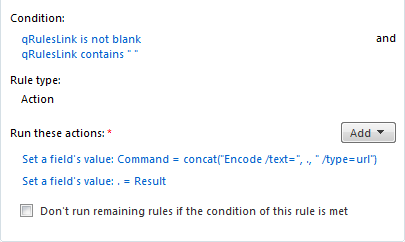
    So - I'm not having this issue w/ spaces causing an issue - the URL not being encoded does not cause me an issue. However, since it is causing an issue for you - what about trying the encode command? You could set a rule on the qRules link field - if it isn't blank and if it contains spaces, you could use the Encode command to reset it to a URL encoded value. See attached screenshot.

    Hilary Stoupa

Page 1 of 1 (10 items)
Copyright © 2003-2019 Qdabra Software. All rights reserved.
View our Terms of Use.