nestead Repeating in infoPath - InfoPath Dev
in

InfoPath Dev

nestead Repeating in infoPath

Last post 03-20-2012 12:50 PM by Tejas123. 4 replies.
Page 1 of 1 (5 items)
Sort Posts: Previous Next
  • 03-19-2012 01:34 PM

    nestead Repeating in infoPath

    Hello,

    I am trying to create nestead repeating table as below, in Parent table dropdown select value, child table should be populated & filter based on dropdown value.

    Item pupulated in Dropdown in parent table & Components needs to populate in child table

    Item 1 (Dropdown)

        child 1

        child 2

        child 3

    Item 2

       child 1

       child 2

       child 3

    I have done following

    --------

    string myNamespace = NamespaceManager.LookupNamespace("my");

    string MKid = GetValue("/my:myFields/my:group1/my:group2/my:field1");


    DataSource dsSub = DataSources["Components"];

    XPathNavigator domNavSub = dsSub.CreateNavigator(); XPathNodeIterator rowsSub = domNavSub.Select("/dfs:myFields/dfs:dataFields/d:SharePointListItem_RW", NamespaceManager);

    //Loop through secondary data source and populate the repeating table

    while (rowsSub.MoveNext())

    {

    string ItemNum =rowsSub.Current.SelectSingleNode("d:Item", NamespaceManager).Value.ToString();


    using (XmlWriter writerSub =MainDataSource.CreateNavigator().SelectSingleNode("/my:myFields/my:group1/my:group2/my:group3",

    NamespaceManager).AppendChild())

    {

    writerSub.WriteStartElement("group4", myNamespace);

    writerSub.WriteElementString("field4", myNamespace, ItemNum);

    writerSub.WriteEndElement();

    writerSub.Close();


    }


    }

    ---------

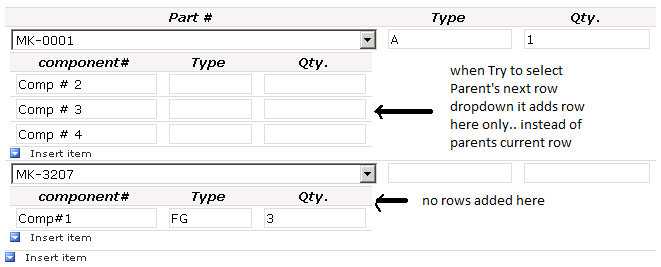
     having issue that for any event new row data  added to 1st row of child table only but not new parent table row. please give me some guidance


  • 03-20-2012 09:06 AM In reply to

    Hi there,

    I don't think you need custom code to accomplish this.  Here are some tutorial videos that might help and I've included an XSN example that illustrates how to create cascading controls without code.

    http://www.youtube.com/watch?v=SH7xUEcQwwg

    http://channel9.msdn.com/Blogs/laurhar/Use-Rules-and-Filters-to-Create-Cascading-Dropdowns-in-InfoPath

    Anson Hidajat
    Qdabra® Software/ InfoPathDev.com
    The InfoPath Experts – Streamline data gathering to turn process into knowledge.™

  • 03-20-2012 10:25 AM In reply to

    Re: nestead Repeating in infoPath

    Thanks Anson,

     Yes, It works but my requirement is, mutiple colums in child table as below also  when re select dropdown it adds new value rows instead of remove old rows & add new.

    my requirement display child table in Edit form only .

    so, not editable parent data alway will be there & based parent  filter child data. but may be i have to populate child table in add form itself as won't get any event to populate Child .

    Parent Item (Dropdown)

           Name         Qty.  Amt.

           Child 1          1    $33

           Child 2          2    $4

            Child 3         3   $23

  • 03-20-2012 10:56 AM In reply to

    Re: nestead Repeating in infoPath

    Sorry, but I'm not quite understanding what your scenario is.  Are you trying to add values to a child table based on selections that are made from a parent table?  That is, you select parent 1 and then in a child table a row is added for child 1?
    Anson Hidajat
    Qdabra® Software/ InfoPathDev.com
    The InfoPath Experts – Streamline data gathering to turn process into knowledge.™

  • 03-20-2012 12:50 PM In reply to

    Re: nestead Repeating in infoPath

    ok.. i  have to display ---

    Two tables in SQL sever Part & Components ( Component has PartID). e.g. Part # 21321 made of components# 123, #345,#4545, #566 etc.

    Parent Table --->  PartNumber  , Part Type, Qty, Amt --  when part selected It populates details in same table & Populate , filter child table

    Child table ---> Components Details(Part made of ) -- > Components# ,Type, Qty, Amt,

    Need to show Components details only readonly mode, Add/Edit mode shows only Parent table.

    I can populate child table in add/edit mode when part selected or

    in read only mode. 

    but using above code .. only add rows to first rows of parent table... not sure how to add rows to dyamic row mean same row child table.


Page 1 of 1 (5 items)
Copyright © 2003-2019 Qdabra Software. All rights reserved.
View our Terms of Use.