Repeating table displaying in SharePoint list (2010) - InfoPath Dev
in

InfoPath Dev

Repeating table displaying in SharePoint list (2010)

Last post 08-21-2017 08:27 AM by Hilary Stoupa. 48 replies.
Page 3 of 4 (49 items) < Previous 1 2 3 4 Next >
Sort Posts: Previous Next
  • 09-08-2013 03:08 PM In reply to

    Re: Repeating table displaying in SharePoint list (2010)

    How to save Repeating Data to SharePoint is a very common issue. We've done lots of webinars on this. Please search a little harder.

    Patrick Halstead
    Project Manager at Qdabra
  • 09-10-2013 03:21 AM In reply to

    Re: Repeating table displaying in SharePoint list (2010)

    Thanks for the response. Just help me clear on this point.

    "saving the secondary source repeating table data to form library  is not possible without writing code (C# or VB programming)" Am i correct?

    Like copying secondary repeating table to main repeating table..

    please correct me if im wrong.

  • 09-10-2013 06:20 PM In reply to

    Re: Repeating table displaying in SharePoint list (2010)

    You can copy the secondary data source's repeating table to your main data source without writing code.

    You do have to use default values and add a trigger column to your main data source repeating table.

    Then, use a rule to set that field column to the fx expression field != false (this toggles it).

    Setting the value to a different value will cause a rule to fire on each row in the repeating data.

    Then you can add a rule to the field that copies the values. Make sure you add a condition to prevent infinite looping.

    All easy to do.

    qRules insert command is slightly better approach because it doesn't involve default values.

    Oh, and qRules lets you submit a secondary data source directly to an XML form library.

    Support this free forum and buy qRules! :)

    Patrick Halstead
    Project Manager at Qdabra
  • 09-11-2013 10:10 AM In reply to

    Re: Repeating table displaying in SharePoint list (2010)

    Thank you for the reply.

    you mean to say that i have to set each default value of fields in Main data source repeating table to value of secondary data source fields.

    And Im confused on how that trigger column and copy works...

    Kindly could you please explain ..

    Thanks once again..


  • 09-17-2013 08:04 AM In reply to

    Re: Repeating table displaying in SharePoint list (2010)

    I have a list form open in InfoPath that I am modifying. I am trying to follow your guidelines here but when I create my new list form and use the url to the list, the option to 'Manage Multiple Items' is not showing on my data connection wizard. Is there something I need to do in the list itself to have that option?
  • 10-31-2013 12:31 PM In reply to

    Re: Repeating table displaying in SharePoint list (2010)

    Hello Patrick, Can you show us how to do this? Is there any tutorial or a webinar that you can post the link? Regards
  • 11-26-2013 04:34 AM In reply to

    Re: Repeating table displaying in SharePoint list (2010)

     Hello Hilary,

    Regarding the usege of repating table/repeating section in the sharepoint list, I would like to know if is it possible to submitting several rows (as it is possible by clicking the Manage Multiple List Items With this Form) but by copying the same ID for the form.


    Per example: I submit tree lines in the repeating table and it creates 3 new entries with different item IDs. As I am submmiting this 3 itens with only one form, can I submmit it with only one ID?

  • 11-26-2013 08:21 AM In reply to

    Re: Repeating table displaying in SharePoint list (2010)

     Well - you could add a field that has whatever you are using for your form id and have it be the same in all instances - I am afraid I don't really think I understand what you are trying to ask....

    Hilary Stoupa

  • 11-26-2013 10:02 AM In reply to

    Re: Repeating table displaying in SharePoint list (2010)

     Hello Hilary, your help is being very valuable. It is exactly what I wanted.

     I would need some help in the sections when I check the manage multiple itens field. How can I add a normal section? All the sections would turn to be repeating sections.

  • 06-25-2014 07:48 AM In reply to

    Re: Repeating table displaying in SharePoint list (2013)

    Hi I see this question alot and I am struggling with the same thing. My repeating row once submitted goes to a sharepoint list and only the first little part shows, example. I have Plan Steps, Responsible Person, ECD date and RCD Date. All that shows is Step 1. Im not sure if 2010 is different 2013 but I could not find the manage multiple items, do I add a connection for that? Is there anyway to show all the items in the repeating table in the sharepoint list? Thank you
  • 06-25-2014 08:08 AM In reply to

    Re: Repeating table displaying in SharePoint list (2013)

    I think you are actually showing a screen shot of your library? One option may be to select Merge instead of First on the promoted property.

    Hilary Stoupa

  • 02-09-2015 02:14 AM In reply to

    InfoPath Form Repeating table Values insert in to SharePoint List

    Hi Hilary, Q: please give me suggestions for InfoPath Form Repeating table Values insert into SharePoint List without coding(Only OOB) ***Please give me solution for this with coding(only OOB) InfoPthaDesigener 2010 Office SharePoint Server 2010 Pls find the below screen shot for Repeating Table
    Hilary Stoupa:

    There is an option to manage multiple list items with the form - see attached screenshot.

  • 04-19-2015 09:49 PM In reply to

    • Manju
    • Top 500 Contributor
    • Joined on 02-26-2015
    • Posts 28

    Re: Repeating table displaying in SharePoint list (2010)

    HI , As this has been done using infopath form library. How can we do the same using infopath list form. Please give a solution. Thanks & Regards, Manju
  • 05-14-2015 07:57 AM In reply to

    Re: Repeating table displaying in SharePoint list (2010)

    Hello,

    I am new in Sharepoint development, and I have project to populate word document template with the columns from the sharepoint list.

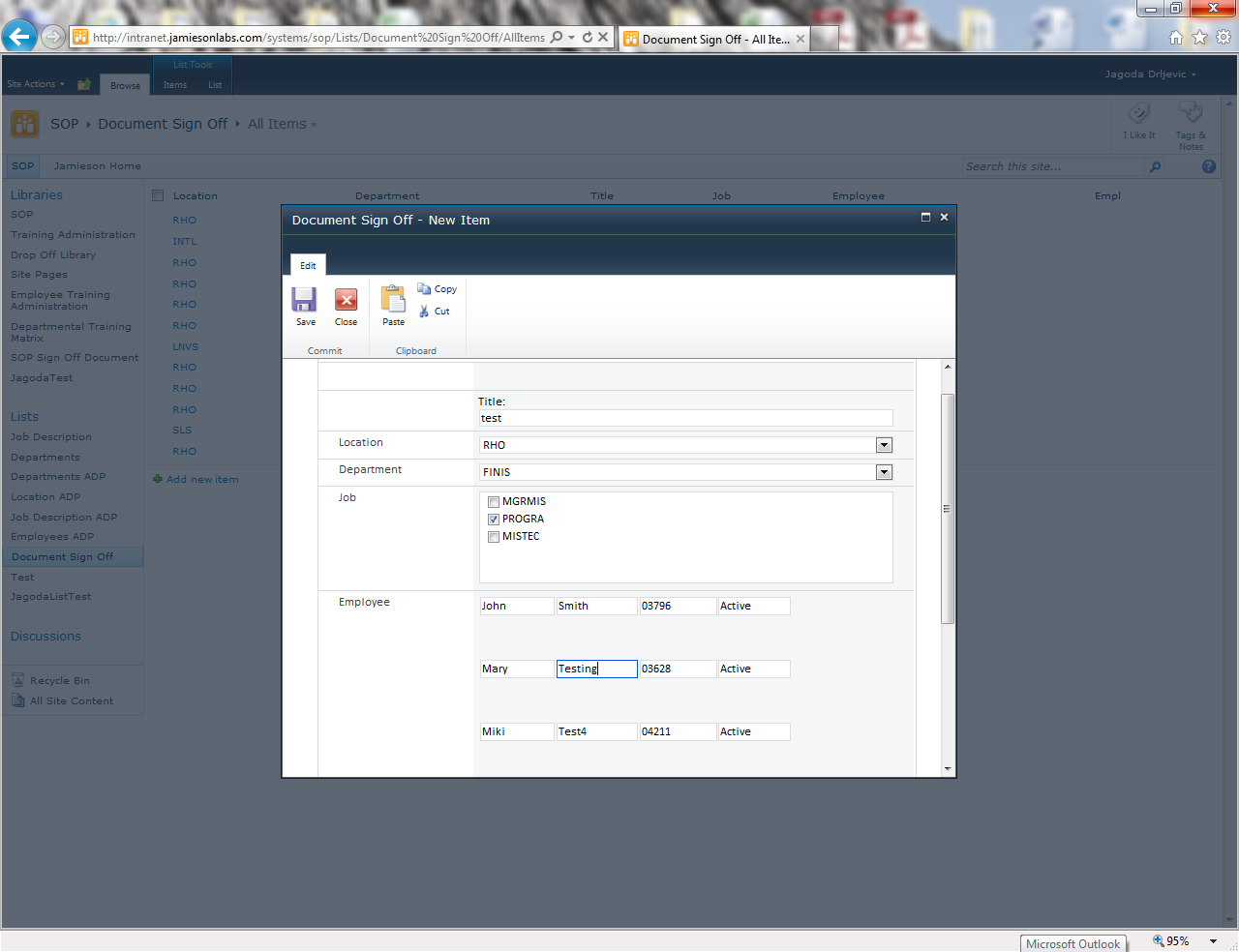
    I build the form in infopath with multiple list:

    I have attached the image of the form to this post.

    The form has two cascating dropdown list box: Location, Department.

    Based on the value in Location and Department I am displaying the multiple selecetion box: 3 values: MGRMIS, PROGRA, MISTEC.

    When the user select one or more choices from the Job multiselection box, the form populate repeating section with the employee lists: First Name, ALst Name, Employee Number and Status.

    When I save the form, it does not save the repeating section in the list.

    I tried so many different ways, but no luck. Do you have any solution for my issue?

    Thank you,

    Jagoda

  • 05-20-2016 01:37 PM In reply to

    Re: Repeating table displaying in SharePoint list (2010)

    Yes it's possible Thabiso.

    Open new InfoPath   ->  go to data Tab  ->  Click on Data Connection   ->  Add   ->  Click on Receive Data -> SharePoint Library or list  ->  copy past link of the site Ex:(http://"ServerName"/"SiteName") -> Choose the list needed   ->  Next  ->  choose filed (aka Columns) needed -> Give the data connection Name  ->   Click Finish.

    Hope this is helpful.


Page 3 of 4 (49 items) < Previous 1 2 3 4 Next >
Copyright © 2003-2019 Qdabra Software. All rights reserved.
View our Terms of Use.