Print - Browser Enabled InfoPath Form - InfoPath Dev Sign in | Join | Help in General InfoPath (Entire Site) InfoPath Dev InfoPath Dev is dedicated to bringing you the information and tools you need to be successful in your Microsoft Office InfoPath development projects. Home Blogs Forums Photos Downloads InfoPath Dev » InfoPath » General » Print - Browser Enabled InfoPath Form Print - Browser Enabled InfoPath Form Last post 01-31-2012 08:05 PM by Sura. 2 replies. Page 1 of 1 (3 items) Sort Posts: Oldest to newest Newest to oldest Previous Next 01-27-2012 10:42 AM Sura Joined on 01-23-2012 Posts 4 Print - Browser Enabled InfoPath Form Reply Contact I want to print browser enabled InfoPath form in button click. Is this possible without writing code ? If possible, what rules need to write on button click ? 01-30-2012 05:35 AM In reply to ErnestoM Joined on 08-27-2007 Posts 3,320 Re: Print - Browser Enabled InfoPath Form 002.gif Mark as Not AnswerMark as Answer... Reply Contact I'm pretty sure that it's not possible to print from a button in a browser form.Could users just click the print button in the Ribbon? Ernesto MachadoQdabra® Software/ InfoPathDev.comThe InfoPath Experts – Streamline data gathering to turn process into knowledge.™ 01-31-2012 08:05 PM In reply to Sura Joined on 01-23-2012 Posts 4 Re: Print - Browser Enabled InfoPath Form Mark as Not AnswerMark as Answer... Reply Contact Thanks ErnestoM. I did your option but it was displayed preview only didn't send InfoPath form to printer. Is there any other way to print ? Page 1 of 1 (3 items) Copyright © 2003-2019 Qdabra Software. All rights reserved.View our Terms of Use.
I want to print browser enabled InfoPath form in button click. Is this possible without writing code ? If possible, what rules need to write on button click ?
I'm pretty sure that it's not possible to print from a button in a browser form.
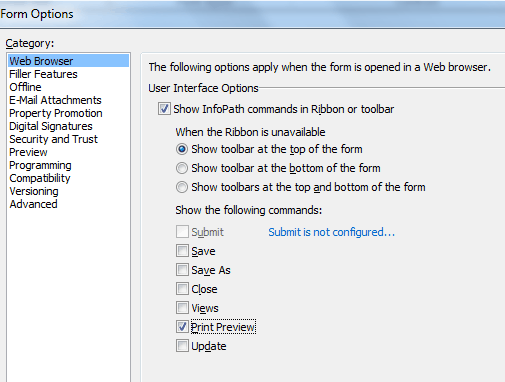
Could users just click the print button in the Ribbon?
Thanks ErnestoM. I did your option but it was displayed preview only didn't send InfoPath form to printer. Is there any other way to print ?