Hiding section controls seems to reset calculated value controls - InfoPath Dev
in

InfoPath Dev

Hiding section controls seems to reset calculated value controls

Last post 01-25-2012 12:55 AM by dw999. 5 replies.
Page 1 of 1 (6 items)
Sort Posts: Previous Next
  • 01-24-2012 10:50 AM

    • dw999
    • Not Ranked
    • Joined on 01-10-2012
    • Posts 6

    Hiding section controls seems to reset calculated value controls

    Hi,

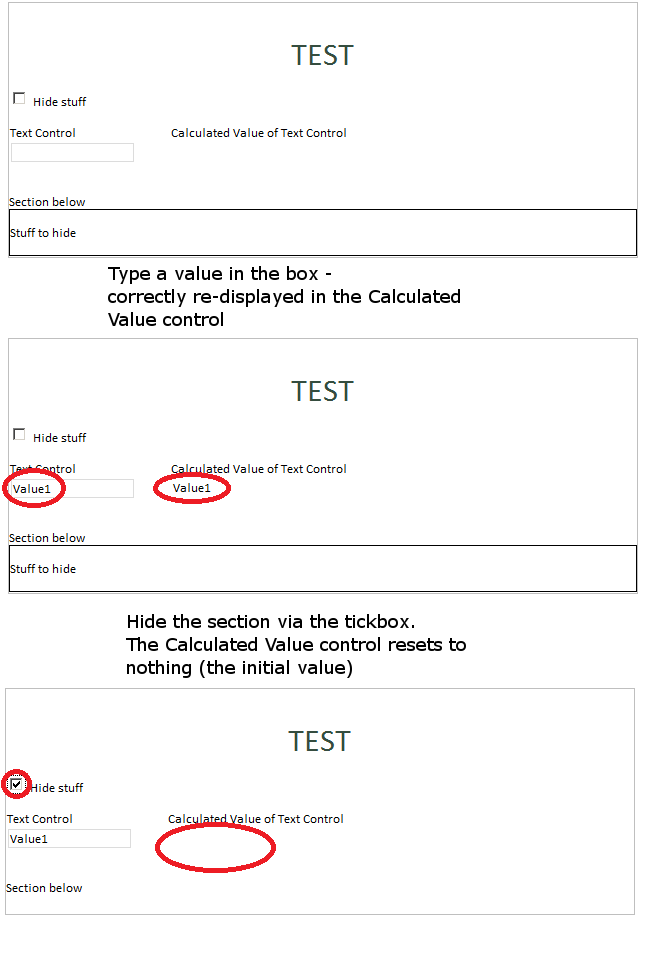
    Has anyone come across this strange behaviour in IP2010? When hiding a section control (via a checkbox and formatting rules) in a browser form (InfoPath 2010) - it seems to also reset any values shown in calculated controls.

    For example, a simple form with:

    • a text control (myField1)
    • a mirrored calculated value control (displaying the value of myField1)
    • checkbox and a section (checking the checkbox hides the section)

    When viewing the form in the browser, myField1 starts off empty. After typing "Test" into the text control and moving focus, the calculated value corrects updates and shows "Test". However, if the checkbox is now ticked, causing the section to hide, the calculated value resets and displays nothing (even though the text control still says "Test")

    Is this a bug with Infopath 2010? Any way around this? 

    This behaviour does not happen using Infopath Filler - the calculated value stays the same as whatever's entered in the text control

    So, extrapolate this to a big form with lots of controls where the user has spent a long time inputting data. Hiding a section would then cause a lot of confusion when any calculated values get reset

    Cheers

    See attached image for details

  • 01-24-2012 11:19 AM In reply to

    Re: Hiding section controls seems to reset calculated value controls

    Can you be sure the calculated value is displayed again? Perhaps it is still hiding - the checkbox control didn't postback.

    You could try putting a border around the calculated value, so you'd know for sure when it displays.

    You could also try setting the postback on the checkbox control to Always (under the control's properties, browser tab). Usually, for "works in filler, not in browser" I start with postback settings....

    Hilary Stoupa

  • 01-24-2012 11:25 AM In reply to

    • dw999
    • Not Ranked
    • Joined on 01-10-2012
    • Posts 6

    Re: Hiding section controls seems to reset calculated value controls

    Hi Hilary,

    I can confirm the calculated value is redisplayed if I change the value in the Text box to something else and tab away. It's definitely not being hidden by any formatting rules. Only the section control is hidden.

    I'll play around with the Postback settings when I'm back in the office.

    It's a very odd bug...

    Cheers


  • 01-24-2012 11:27 AM In reply to

    Re: Hiding section controls seems to reset calculated value controls

    When you have differences in behavior between the client and server, the first culprit is likely the postback settings.  If that's not the solution, then it's likely a bug! :)
    Anson Hidajat
    Qdabra® Software/ InfoPathDev.com
    The InfoPath Experts – Streamline data gathering to turn process into knowledge.™

  • 01-24-2012 11:27 AM In reply to

    Re: Hiding section controls seems to reset calculated value controls

    I'm thinking when you change the field and tab out the form probably sends data to the server (including the current value of the field bound to the checkbox).

    Hilary Stoupa

  • 01-25-2012 12:55 AM In reply to

    • dw999
    • Not Ranked
    • Joined on 01-10-2012
    • Posts 6

    Re: Hiding section controls seems to reset calculated value controls

    Changing the Postback settings did the trick. Thanks for that - very helpful!

Page 1 of 1 (6 items)
Copyright © 2003-2019 Qdabra Software. All rights reserved.
View our Terms of Use.