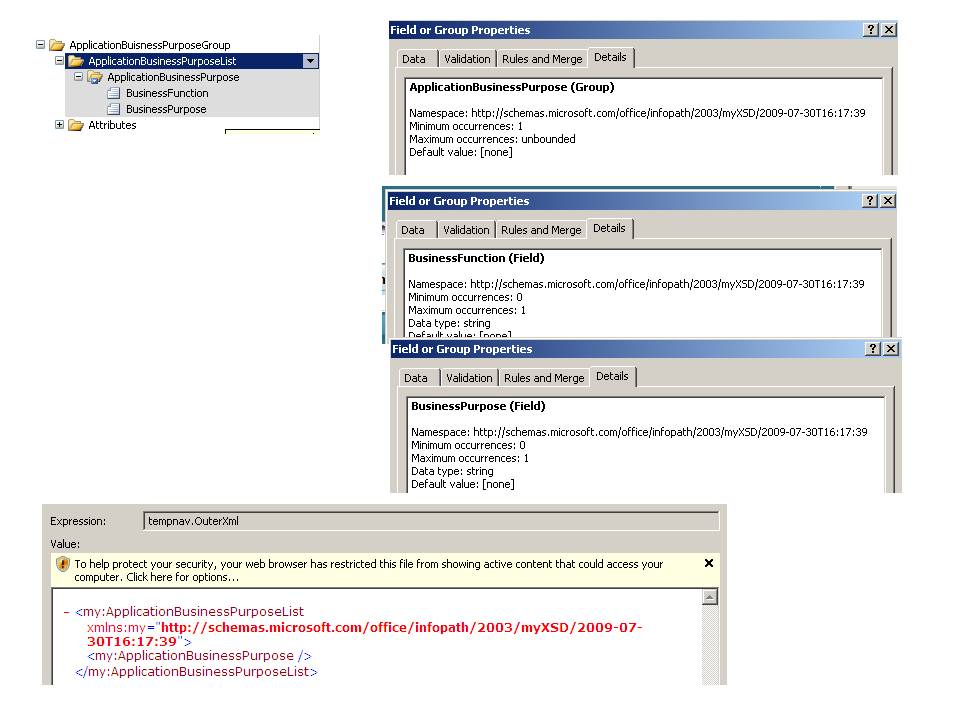
Hi, I am using Infopath2007.
I have a complex form which has a number of repeating groups. One of the repeating groups has 2 fields in it. When I open a new form the repeating group is present, neither of fields is.
Other repeating groups with fields are present as expected.
I have looked at the field details - see picture and they look fine. I know they say min occurences as 0 but all my other fields have that, and still appear when the form is first opened.
When I try and select using
Me
.CreateNavigator.SelectSingleNode("/my:myFields/my:Value/my:ApplicationBuisnessPurposeGroup/my:ApplicationBusinessPurposeList/my:ApplicationBusinessPurpose[./my:BusinessFunction="" and ./my:BusinessPurpose="" ]",namespacemanager)
Nothing is returned. On investigation I find that the ApplicationBuisnessPurpose group is present - but neither the BusinessFunction or BusinessPurpose fields - see last image below. When I use Qrules to insert another ApplicationBusinessPurpose Group both fields are present.
I am sure I have done something to cause this - but cannot fathom what.
I have looked in myschema.xsd and both fields are listed...
<xsd:element name="ApplicationBusinessPurpose">
<xsd:complexType>
<xsd:sequence>
<xsd:element ref="my:BusinessFunction" minOccurs="0"/>
<xsd:element ref="my:BusinessPurpose" minOccurs="0"/>
</xsd:sequence>
</xsd:complexType>
</xsd:element>
I have looked in sample.xml and both fields are listed
<my:ApplicationBusinessPurposeList>
<my:ApplicationBusinessPurpose>
<my:BusinessFunction/>
<my:BusinessPurpose/>
</my:ApplicationBusinessPurpose>
</my:ApplicationBusinessPurposeList>
I have looked in template.xml and both fields are listed
<my:ApplicationBusinessPurposeList>
<my:ApplicationBusinessPurpose>
<my:BusinessFunction></my:BusinessFunction>
<my:BusinessPurpose></my:BusinessPurpose>
</my:ApplicationBusinessPurpose>
</my:ApplicationBusinessPurposeList>
manifest.xsf looks ok
<my:ApplicationBusinessPurposeList>
<my:ApplicationBusinessPurpose>
<my:BusinessFunction></my:BusinessFunction>
<my:BusinessPurpose></my:BusinessPurpose>
</my:ApplicationBusinessPurpose>
</my:ApplicationBusinessPurposeList>
Does anyone have an idea where I should go to try and re-instate these fields on creation of the form?
Thank you.
Catharine