v\:* {behavior:url(#default#VML);}
o\:* {behavior:url(#default#VML);}
w\:* {behavior:url(#default#VML);}
.shape {behavior:url(#default#VML);}
Normal
0
false
false
false
false
EN-US
JA
X-NONE
MicrosoftInternetExplorer4
/* Style Definitions */
table.MsoNormalTable
{mso-style-name:"Table Normal";
mso-tstyle-rowband-size:0;
mso-tstyle-colband-size:0;
mso-style-noshow:yes;
mso-style-priority:99;
mso-style-qformat:yes;
mso-style-parent:"";
mso-padding-alt:0in 5.4pt 0in 5.4pt;
mso-para-margin-top:0in;
mso-para-margin-right:0in;
mso-para-margin-bottom:10.0pt;
mso-para-margin-left:0in;
line-height:115%;
mso-pagination:widow-orphan;
font-size:11.0pt;
font-family:"Calibri","sans-serif";
mso-ascii-font-family:Calibri;
mso-ascii-theme-font:minor-latin;
mso-hansi-font-family:Calibri;
mso-hansi-theme-font:minor-latin;}
Hi,
I am new
to INFOPATH. I am using INFOPATH 2003 and .NET webservice which connect's
database. I binded the Repeating Table from the webservice datasource(Secondary
Datasource). This table contains 3 rows. Now i want to add a new row to the
repeating table but binding the repeating table not allowing me to create a new
row using Xdocument.View.ExecuteAction(..).
After more googling i found its possible through JScript. I've written the code
like below.
var secondDS = XDocument.GetDOM("GetProductNotes");
secondDS.setProperty("SelectionNamespaces",
'xmlns:dfs="http://schemas.microsoft.com/office/infopath/2003/dataFormSolution"'+'
xmlns:d="http://schemas.microsoft.com/office/infopath/2003/ado/dataFields"');
var secondaryRepeatingNodes =
secondDS.selectNodes("/dfs:myFields/dfs:dataFields/ProductNote");
XDocument.UI.Alert(secondaryRepeatingNodes.length);
This
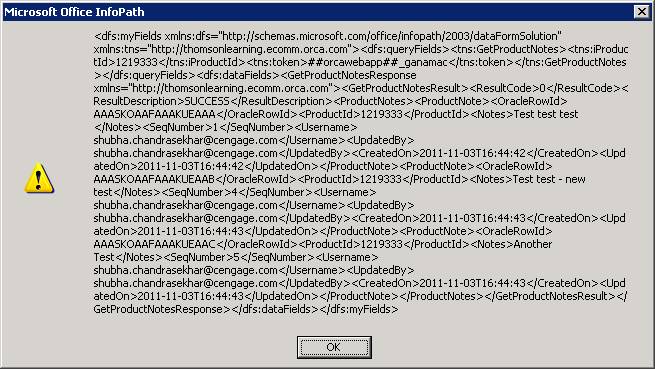
returns "0" here. What is the problem? I’ve given the XML structure
in the attachment. Please help. This is urgent.
![]()