qRules SaveToSharePoint error. - InfoPath Dev
in

InfoPath Dev

qRules SaveToSharePoint error.

Last post 09-23-2011 05:07 AM by ErnestoM. 5 replies.
Page 1 of 1 (6 items)
Sort Posts: Previous Next
  • 09-21-2011 09:18 PM

    • drewified
    • Not Ranked
    • Joined on 01-28-2011
    • Sacramento, CA
    • Posts 13

    qRules SaveToSharePoint error.

    Hello,

    I am currently trying out qRules (v. 3.3) - great product by the way!

    I have a question, I'm following the instructions from this video from your Youtube channel: http://youtu.be/QyqZcZ-A-lM

    When I preview it, this solution works and the attachment is submitted to SharePoint and becomes a link on the form. I have enabled this form option with "full trust." However, when I upload this form as a form template to my SharePoint server, and test the form (in browser) when I add an attachment and try to update the form so that it becomes a link, nothing happens.

    Any recommendations?

  • 09-21-2011 10:17 PM In reply to

    Re: qRules SaveToSharePoint error.

    Hi Drewified,

    Did you have sandbox enabled? The functionality will work in the browser, but browser on 2010 requires sandbox or admin deploy. That may be the issue, but maybe not. If you can open the form, then it's working. Have you tried doing domain-trust and converting the data connection into a UDC?

    Patrick Halstead
    Project Manager at Qdabra
  • 09-21-2011 10:44 PM In reply to

    • drewified
    • Not Ranked
    • Joined on 01-28-2011
    • Sacramento, CA
    • Posts 13

    Re: qRules SaveToSharePoint error.

    Hi Patrick,

    Yes, I did an admin deploy through Central Admin, and then activated the form template on my site collection. I have not tried converting the data connections (I'm assuming this is the secondary data source that is created when qRules is injected into the form?) to a UDC. I'll try that next.

  • 09-22-2011 04:29 AM In reply to

    Re: qRules SaveToSharePoint error.

    Hi!

    No, please don't convert the QdabraRules secondary data source to UDC. Patrick was referring to any other data connections in the form.

    I would first suggest displaying the Error, Success and Result nodes on the canvas, temporarily, so that we can see if anything is happening when you call the command.

    I would then suggest checking the Postback settings on the controls that call qRules. These need to be set to Always.

    Finally, if the above doesn't work, try setting the form back to Domain trust (and make sure the site is added properly to your IE zone settings). The command CAN run in forms that are not full trust by using the dsnamews parameter. This is an undocumented option in qRules, but we should be blogging about it soon. The command will look like this:

    SaveToSharePoint /url=http://servername/Documents/ /xpath=/my:myFields/my:Files/my:File /dsnamews=Upload

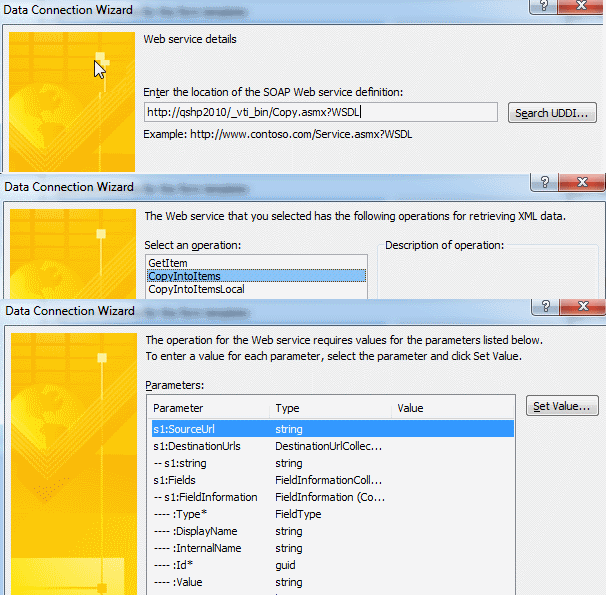
    Upload is going to be a receive type data connection to the Copy web service in SharePoint (http://servername/_vti_bin/Copy.asmx?WSDL) with all blank parameters (in the data connection wizard). I'm attaching a screenshot.

    Hope this helps!


    Ernesto Machado
    Qdabra® Software/ InfoPathDev.com
    The InfoPath Experts – Streamline data gathering to turn process into knowledge.™


  • 09-22-2011 07:11 AM In reply to

    • drewified
    • Not Ranked
    • Joined on 01-28-2011
    • Sacramento, CA
    • Posts 13

    Re: qRules SaveToSharePoint error.

    Ernesto

    Thanks, I do have a Qdabra ADWS data connection (GetMyInfo) on the InfoPath form. I will convert the data connection to UDC. I'll also check the PostBack settings for the controls- I'll add error/success/results node to see what I get. If that doesn't clear it up, I'll try the dsnamews method next.

    UPDATE: Changing the Qdabra ADWS GetMyInfo to UDC data connection, and setting the postback settings for the controls to "Always" did the trick. The qRules command is working great. I'm looking forward to trying out others. Thank you for the assistance, much appreciated.

  • 09-23-2011 05:07 AM In reply to

    Re: qRules SaveToSharePoint error.

     Great news! Thanks for following up to let us know.

    Ernesto Machado
    Qdabra® Software/ InfoPathDev.com
    The InfoPath Experts – Streamline data gathering to turn process into knowledge.™


Page 1 of 1 (6 items)
Copyright © 2003-2019 Qdabra Software. All rights reserved.
View our Terms of Use.