Change the Values of Drop Down List - InfoPath Dev
in

InfoPath Dev

Change the Values of Drop Down List

Last post 08-22-2011 09:06 AM by UdayaHerath. 4 replies.
Page 1 of 1 (5 items)
Sort Posts: Previous Next
  • 08-15-2011 08:29 AM

    Change the Values of Drop Down List

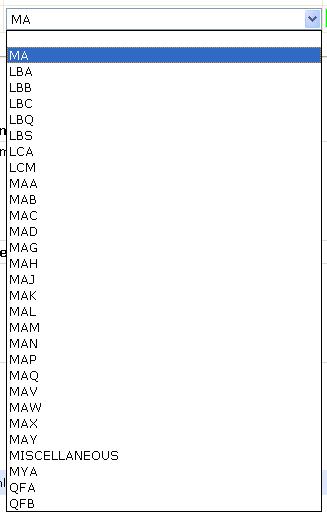
    I have a drop down list one of my form.In my application it was populated through access data base. I save my info path application as an xml using the code.then I changed some values associate to the drop down which currently not available in the drop down. After I load the application again it want through an error also it was added to the drop down as a new value.


    Do you guys have have any idea about this.

    [the value MA was added manually. other values are retrieve through the database]

    Filed under:
  • 08-22-2011 08:19 AM In reply to

    Re: Change the Values of Drop Down List

    Hello UdayaHerath,

     Yes, InfoPath's behavior with dropdown boxes is that if the field has a value that's not available in the box, it will display it until the user selects something else.

    I'm not sure what you mean by this: "After I load the application again it want through an error also".  Could you clarify that?

    Jimmy Rishe / Software Developer / Microsoft MVP
    Qdabra Software
  • 08-22-2011 08:33 AM In reply to

    Re: Change the Values of Drop Down List

     Hi Jimmy,

    Thanks for the reply. I didn't receive any error from that.

  • 08-22-2011 08:55 AM In reply to

    Re: Change the Values of Drop Down List

    Are you saying that you want it to show an error and it's not showing an error? What exactly is the problem?

    Jimmy Rishe / Software Developer / Microsoft MVP
    Qdabra Software
  • 08-22-2011 09:06 AM In reply to

    Re: Change the Values of Drop Down List

    Actually what i want is not to add as a data. But if can not do it is better to show an error message
Page 1 of 1 (5 items)
Copyright © 2003-2019 Qdabra Software. All rights reserved.
View our Terms of Use.