Copy Table error - source and destination must contain the same number of elements and attributes - InfoPath Dev
in

InfoPath Dev

Copy Table error - source and destination must contain the same number of elements and attributes

Last post 05-18-2011 05:40 PM by Hilary Stoupa. 2 replies.
Page 1 of 1 (3 items)
Sort Posts: Previous Next
  • 05-18-2011 08:51 AM

    Copy Table error - source and destination must contain the same number of elements and attributes

    Hi,

    I am using Qrules 3.1

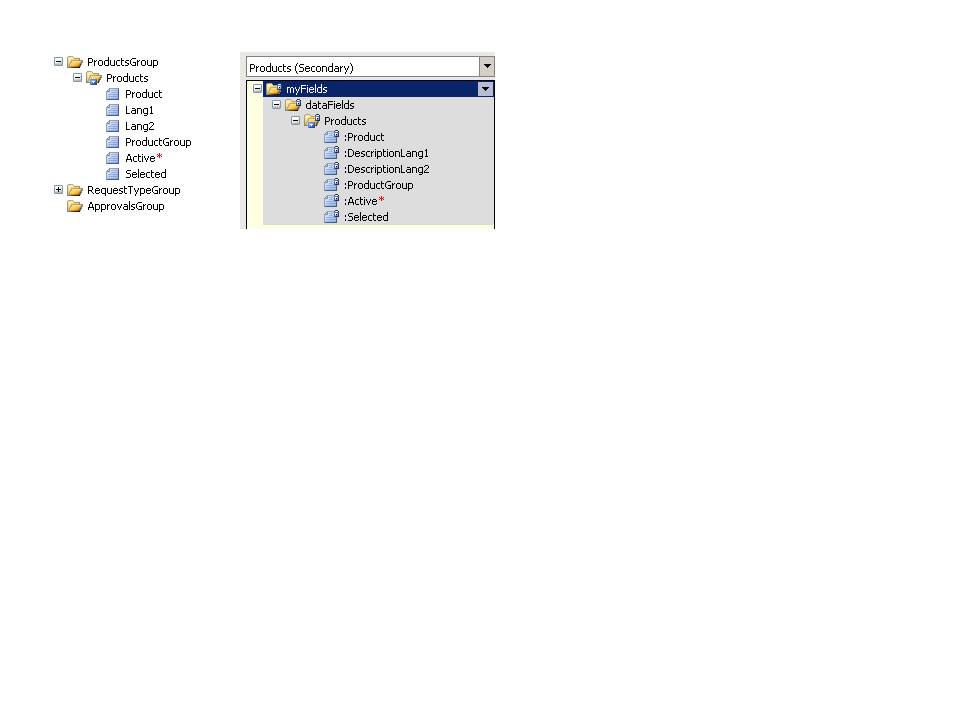
    I am trying to copy from a secondary data source to a main data source.  I have included a picture of my 2 data structures.

    The command I am using to do the copy is

    CopyTable /dsnamesrc=Products /tablesrc=/dfs:myFields/dfs:dataFields /rowsrc=dfs:Products /tabledest=/my:myFields/my:ProductsGroup /rowdest=my:Products /empty=yes

    The error I am getting is The table row of the source and destination must contain the same number of elements and attributes.  I know that the fields I have are not named the same, but from the documentation I understand that that should not be a problem.

    Could anyone suggest what the issue could be ?

    Thank you.

    Catharine

  • 05-18-2011 09:15 AM In reply to

    Re: Copy Table error - source and destination must contain the same number of elements and attributes

    Well, it all looks like it should work from here... can you email me a copy of your form? I'll run it in debug later today, see what's going wrong....

    Hilary Stoupa

  • 05-18-2011 05:40 PM In reply to

    Re: Copy Table error - source and destination must contain the same number of elements and attributes

    If your SharePoint field doesn't have data, the row will be returned to InfoPath without the attribute -- thus the mismatch. At least in the offline data, there were no values for "Selected" -- try populating that field in your list and see if you get a different result.

    Hilary Stoupa

Page 1 of 1 (3 items)
Copyright © 2003-2019 Qdabra Software. All rights reserved.
View our Terms of Use.