Sending workflow on Specific Day of the Week - InfoPath Dev Sign in | Join | Help in SharePoint Integration InfoPath (Entire Site) InfoPath Dev InfoPath Dev is dedicated to bringing you the information and tools you need to be successful in your Microsoft Office InfoPath development projects. Home Blogs Forums Photos Downloads InfoPath Dev » InfoPath » SharePoint Integration » Sending workflow on Specific Day of the Week Sending workflow on Specific Day of the Week Last post 05-08-2011 04:48 PM by pyrocam. 1 replies. Page 1 of 1 (2 items) Sort Posts: Oldest to newest Newest to oldest Previous Next 05-05-2011 08:54 AM kfr676 Joined on 12-08-2010 Posts 12 Sending workflow on Specific Day of the Week Reply Contact I have an InfoPath form built that I'd like to activate a workflow on when it is submitted. I would like the kick off the workflow every Monday in the early AM as a reminder to the user regardless of when the user submits the form initially. Is it possible to create a field in the form that knows it's Monday at say 6 AM and set the workflow to activate based on this field? 05-08-2011 04:48 PM In reply to pyrocam Joined on 01-18-2010 Posts 17 Re: Sending workflow on Specific Day of the Week Mark as Not AnswerMark as Answer... Reply Contact Hi kfr,workflows can pause either for a certain amount of time (eg 5mins) or until a dateyou could probably work out the next monday programatically in the form then say pause until $nextmonday Page 1 of 1 (2 items) Copyright © 2003-2019 Qdabra Software. All rights reserved.View our Terms of Use.
I have an InfoPath form built that I'd like to activate a workflow on when it is submitted. I would like the kick off the workflow every Monday in the early AM as a reminder to the user regardless of when the user submits the form initially. Is it possible to create a field in the form that knows it's Monday at say 6 AM and set the workflow to activate based on this field?
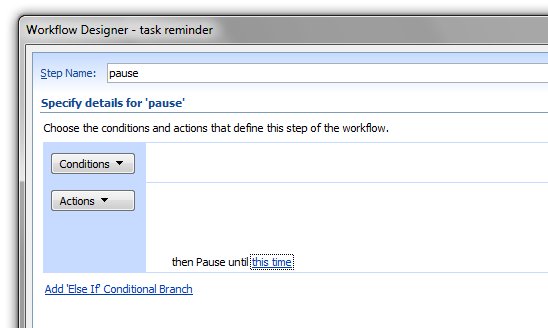
Hi kfr,workflows can pause either for a certain amount of time (eg 5mins) or until a date
you could probably work out the next monday programatically in the form then say pause until $nextmonday