Submitting to Multiple SP List - InfoPath Dev
in

InfoPath Dev

Submitting to Multiple SP List

Last post 04-12-2011 08:01 AM by Hilary Stoupa. 10 replies.
Page 1 of 1 (11 items)
Sort Posts: Previous Next
  • 04-08-2011 10:49 AM

    Submitting to Multiple SP List

    Hi, I'm new to the qRules product. The tutorial worked great for a single infopath 2007 form with submission to a single MOSS Sharepoint list. But I need a little assistance with this scenario. I have a template with a set of fields linked to 1 Sharepoint list. Under these sets of field, I have 3 repeating tables that needs to submit to 3 different sharepoint lists within the same site. (Just a preference to keep the information separate). I am able to map and submit the "non-repeating fields to the Sharepoint list. However, I can't seem to figure out how to continue the mapping for the repeating table. 1. Do I have do create separate mappings for each repeating table? 2. If Yes, do I add all the mappings into the form's "Submit" button under "Rules"? Can anyone advise if this is attainable? Thank You in advance
  • 04-08-2011 11:01 AM In reply to

    Re: Submitting to Multiple SP List

    Hi --

    If I understand correctly, you are submitting to 4 different lists?

    If so, you are going to need 4 mappings and 4 Submit data connections that use the UpdateListItems method of the lists webservice -- each Submit connection will use a different mapping for the parameters.

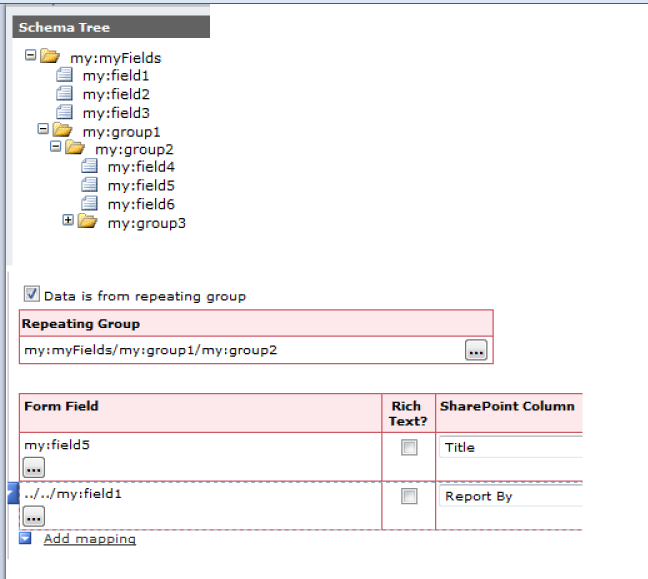
    If, instead, you are saying you want to submit some non-repeating data with your repeating data (that is, your three repeating tables submit to different lists, but also submit some non-repeating data to the same lists) you can manually add the higher level nodes when mapping. You'll map for repeating, then manually enter a relative XPath to the non-repeating field. Including screen shots of my schema tree and my manual addition of a field.

    Hilary Stoupa

  • 04-08-2011 11:15 AM In reply to

    Re: Submitting to Multiple SP List

    Thank you for the quick response...I've been pulling my hair out out ....at least what's left of it!!! the first scenario is the case. I'll try this first. As for the optional "id" field in the command button. Do I have to create an "Id" field in the SP list and map that to an "Id" field on the infopath form?
  • 04-08-2011 11:46 AM In reply to

    Re: Submitting to Multiple SP List

    No -- all SharePoint List Items have an ID -- that's built in. Don't map it. Just use the /id parameter in the command if you want your updates in your form to be reflected in your list. For your non repeating mapping submit, you'll use the full XPath to the node you want to use for the /id param (like /id=my:RootNodeInForm/my:PathToIdField). For the repeating, you'll use a relative path (like /id=my:nameOfMyIdFieldInMyForm)

    Hilary Stoupa

  • 04-08-2011 02:40 PM In reply to

    Re: Submitting to Multiple SP List (confusion re: /id=?)

    Hi again, I was able to partially submit to 2 list, the information from the 3rd repeating table did not submit to the SP list at all. Also, the non-repeating section did not submit any information into the list as well. Question: should the non-repeating section's command value be "SubmitToSharePointList /submit=FMSubmit /mapping=mappingFM /id=_ID" since SP list's built in ID field is "_ID"?
  • 04-08-2011 03:44 PM In reply to

    Re: Submitting to Multiple SP List (confusion re: /id=?)

    The /id parameter takes an XPath to a field in your form. Do you have a field in your form you want to use for that parameter? Do you have the Error node from the Qdabra Rules data source on your form so you can check for errors? Have you tried each submit command individually to verify each works?

    Hilary Stoupa

  • 04-11-2011 11:34 AM In reply to

    Re: Submitting to Multiple SP List (confusion re: /id=?)

    Thanks for getting back to me so soon. Are you referring to a unique ID field in my form that identifies the specific item: I've attached a picture of my xsn.
  • 04-11-2011 12:39 PM In reply to

    Re: Submitting to Multiple SP List (confusion re: /id=?)

    A screenshot of your main data source would be more helpful. But yes, I'm referring to a node in your data source (you don't have to display it on the form itself) that can be used to hold the ID from SharePoint. You only need this if you want updates in the XML to update existing form items (as opposed to creating new, which could give you duplicates). If you haven't looked at my blog post on using this command, take a look. Search for the phrase "Add a Field for the List Item ID" -- it may help you understand better what I'm talking about.

    Hilary Stoupa

  • 04-11-2011 02:48 PM In reply to

    Re: Submitting to Multiple SP List (confusion re: /id=?)

    Thank you for sticking with me on this problem... followed the instructions provided...getting an error message "Errors occurred submitting to list: The operation failed because an unexpected error occurred. (Result Code: 0x80020005)" I have changed the "sex" field to a drop down of male or female. the qRules error message is as stated above I've read the following post regarding this error but not understanding the replacement of user's id. http://www.infopathdev.com/forums/t/15290.aspx My infopath form has an ID field under /my:myFields/my:ID (non-repeating part). I've also added an id field in the each of the repeating part as AccidentID, FMID and ActivityID for easier reference. Can you explain a little more in regards to the error message? Thanks!
  • 04-11-2011 07:28 PM In reply to

    Re: Submitting to Multiple SP List (confusion re: /id=?)

    Hi Hilary, Please disregard the last post as I've figured out what you meant with the ID field. Thank you for everything. Looks like I'll be purchasing qRules!!! A Great Tool with Great Support! Thanks Again!!!!!
  • 04-12-2011 08:01 AM In reply to

    Re: Submitting to Multiple SP List (confusion re: /id=?)

    Hey, congrats on getting everything working! I know that command has a lot of moving parts, but trust me when I say it gets easier. Now that you understand how it works, you'll have no problem setting it up the next time you need it.

    There are tons of wonderful commands you can use -- I encourage you to take a litttle time to reveiw them in the user guide, so that you are familiar with what all qRules has to offer. I think it is a product that does a spectacular job of filling InfoPath gaps, and I hope you get a lot of use out of it.

    Hilary Stoupa

Page 1 of 1 (11 items)
Copyright © 2003-2019 Qdabra Software. All rights reserved.
View our Terms of Use.