Infopath drop down box causes problems with same value fields - InfoPath Dev
in

InfoPath Dev

Infopath drop down box causes problems with same value fields

Last post 02-25-2012 06:07 AM by kjb6974. 9 replies.
Page 1 of 1 (10 items)
Sort Posts: Previous Next
  • 02-28-2011 05:59 PM

    • jv_001
    • Not Ranked
    • Joined on 03-01-2011
    • Posts 1

    Infopath drop down box causes problems with same value fields

    I am using infopath to create a registration form for some SharePoint sites.  The form reads from a list in SharePoint and populates a drop down menu for site names.  The idea is that users can select the site that they want to register to from the drop down box.  When the form is submitted, the email of the site owner will be stored and used later in a workflow to contact the owner.  The display portion of the drop down box is set to show the name of the site and the value is set to display the email of the owner.  Everything is working great except for one minor problem.  One owner can have multiple sites.  When you select a site name from the dropdown menu that its value is repeated, the drop down box will automatically change itself to a different value.  For example:

    Display: Site1  Value: Email1

    Display: Site2  Value: Email2

    Display: Site 3 Value: Email3

    Display: Site 4 Value: Email1

    If I were to select Site1 from the drop down, as soon as I click somewhere else in the form, the drop down box would change to Site 4.  If I select Site 2 or Site 3 I have no problem.  It seems like infopath gets confused when the same value is repeated in the choices.  For anyone wondering how to replicate this problem, you can do so with the following steps:

    1. open a blank form

    2. add a drop down box

    3. add the data above to the drop down box

    4. preview the form.

    5. try selecting Site 1

    Any help would be appreciated.  Just a note, I don't have access to any programming tools so I need to be able to solve this with rules conditional formatting.  This is also a browser enabled form.

     Thanks,

    JV


  • 03-07-2011 02:28 AM In reply to

    Re: Infopath drop down box causes problems with same value fields

    This is by design. Values must be unique. Displays need not be unique.

    Patrick Halstead
    Project Manager at Qdabra
  • 02-17-2012 12:29 PM In reply to

    Re: Infopath drop down box causes problems with same value fields

    I have a similar problem.  I am using a Sharepoint list as a data connection and depending on how I have the list ordered changes the outcome of my values.

    For example, complexity ratings corresponding to high, med, low are stored as 3 separate columns off the associated description.

    A separate control allows the user to select which complexity value to calculate (high, med, or low).

    I created a repeating section with a dropdown control and bind the data connection.

    Based on a rule, if a user selects an item from the drop down (5th item in the list), the correct corresponding value is displayed (e.g. 1.0).

    When the user inserts the next repeating item, and chooses a value from the dropdown positioned after the 5th item the value of the calculation retains the same as the previous (e.g. 1.0 instead of 1.25).

    If the user selects any item positioned before the 5th item in the same drop down control, the calculation returns the correct expected number.

    I tried changing the control from an expression box to a text box with no effect.

    I also tried adding a default value to give the dropdown the first list item selected, no effect.

    Some examples are:

    desc high med low

    "type 1" 9.0 5.0 1.0

    "type 2" 6.5 3.5 1.0

    "type 3" 5.0 2.0 1.25

    Please advise, thanks


  • 02-23-2012 05:13 PM In reply to

    Re: Infopath drop down box causes problems with same value fields

    Sorry - I am having trouble understanding this. Can you post some screenshots? Under the Options tab you can attach a file.

    Hilary Stoupa

  • 02-23-2012 06:17 PM In reply to

    Re: Infopath drop down box causes problems with same value fields

    Please see my original post for the first screen shot...
  • 02-24-2012 08:33 AM In reply to

    Re: Infopath drop down box causes problems with same value fields

    So based on the type and the complexity, you get the days - this is done with a rule, is that correct? So, for the value of the field you are setting with the rule, what does your rule look like? Can you check the "Edit XPath" before you paste the formula in?

    Hilary Stoupa

  • 02-24-2012 08:59 AM In reply to

    Re: Infopath drop down box causes problems with same value fields

    Hello. 

    Since I have 3 complexity values (High, Med, Low) I have 3 different rules using a filter to make sure the Complexity control value matches the in the case below "low" complexity value:

    ../my:UnitSize * xdXDocument:GetDOM("Technical Unit Types & Complexity")/dfs:myFields/dfs:dataFields/dfs:Technical_Unit_Types/@Complexity_-_Low[../@Unit_Type = xdXDocument:get-DOM()/my:myFields/my:ProjectRequirementsTechGroup/my:PEProjectRequirementsTech/my:TechUnitType]

    The other 2 rules are identical with a filter set on "high" and "med" accordingly...hope that helps.  Thanks, Kevin

  • 02-24-2012 03:09 PM In reply to

    Re: Infopath drop down box causes problems with same value fields

    What field is the rule set on? And what is the repeating group in your main data source? You need to replace the repeating group with "current":

    ../my:UnitSize * xdXDocument:GetDOM("Technical Unit Types & Complexity")/dfs:myFields/dfs:dataFields/dfs:Technical_Unit_Types/@Complexity_-_Low[../@Unit_Type = current()/my:TechUnitType]

    For example - I'm guessing here, since I'm not sure what field your rule is on or what the repeating group is for your main data source.

    Hilary Stoupa

  • 02-25-2012 05:57 AM In reply to

    Re: Infopath drop down box causes problems with same value fields

    Hi.  "my:ProjectRequirementsTechGroup" is the repeating section name and "my:TechUnitType" is a dropdown control field which is in the data source group called "my:PEProjectRequirementsTech".  Since the user can change the unit size, unit type, or complexity I have modified all 3 controls to fire the same 3 rules (high, med, low) to calculate the estimated number of days work effort.

    I did try adding current() based on reading these posts prior to your suggestion (appears I am on the right track), for both attempts below:

    @Unit_Type = current()/my:PEProjectRequirementsTech/my:TechUnitType   AND   @Unit_Type = current()/my:TechUnitType 

    Either way, I got the same error:  "my:PEProjectRequirementsTech/my:TechUnitType" does not point to a valid location path of a field or group.

    ../my:UnitSize * xdXDocument:GetDOM("Technical Unit Types & Complexity")/dfs:myFields/dfs:dataFields/dfs:Technical_Unit_Types/@Complexity_-_Low[../@Unit_Type = current()/my:PEProjectRequirementsTech/my:TechUnitType]

     I did find that using "/../" after "current()" worked so that I could verify the formula:

    ../my:UnitSize * xdXDocument:GetDOM("Technical Unit Types & Complexity")/dfs:myFields/dfs:dataFields/dfs:Technical_Unit_Types/@Complexity_-_Low[../@Unit_Type = current()/../my:TechUnitType]

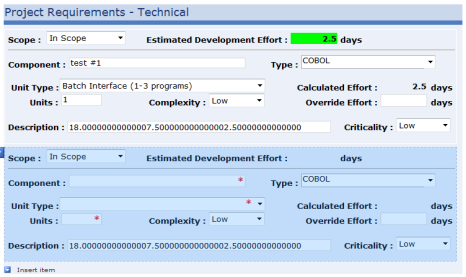
    However, I can tell you that the problem seems to occur before any of the rules fire in that inserting the next group item still refers to the secondary data source attributes of the first group item.  Please see the screen shot attached (I have used the description field to display the high, med, low complexity values for troubleshooting).  Please let me know if you have any additional thoughts on what needs to be done to make this work.  Thanks again for all of your help and suggestions.  I sincerely appreciate this as I have been working on this for 2 weeks now.

    Thanks

  • 02-25-2012 06:07 AM In reply to

    Re: Infopath drop down box causes problems with same value fields

    Good news.  Turns out that the decsription field I was using to debug needed the same /../ code as I applied to the rules.  Everything seems to be working now.  Thanks again for your help.
Page 1 of 1 (10 items)
Copyright © 2003-2019 Qdabra Software. All rights reserved.
View our Terms of Use.